
Hreflang Tags: What are they and when to implement on your site?
Summary (TL;DR)
In this post, let's talk about the importance of hreflang tags for multilingual websites or targeted at different regions, explaining how they help Google to display the correct version of content for each audience.
We will also explore the implementation challenges, highlighting practical examples and benefits, such as avoiding duplicate content and improving public targeting, making user experience more personalised.
In addition, we will address how to efficiently implement these tags in HTML, XML sitemap or HTTP headers, avoiding common errors and maximizing SEO performance.
You will also see useful tools to facilitate the process and examples of large brands that successfully use hreflang. With the right practices, your website can reach a global audience with relevance and effectiveness.

Quick answer: hreflang is the markup that tells Google which version of a page to show for each language or country, such as pt-en and en. Use it when the site has the same page translated or adapted to different regions. Each version must point to all others and to itself, and it is worth including an x-default for those who do not fit in any.
Hreflang tags they are fundamental for those who have a site with content in different languages or focused on several countries. They help ensure that Google shows the right version of your content to the right people, depending on your language and location.
This is especially important if you have several versions of the same content, such as in Portuguese, Spanish or English. But, despite being a simple tool in terms of concept, implementation can generate some doubts.
John Mueller, Google, even said that the hreflang tags are “one of the most complex aspects of SEO”. . But don't be scared, it's not that complicated. If you're wondering how all this works in practice, let's explain in detail how to use the hreflang tags to optimise your multilingual site.
Know what these tags are, because they are important and how to implement them efficiently!
What are hreflang tags?
The hreflang tags are an HTML attribute which you can add on your site to signal Google and other search engines which language and region you are using on a specific page.
This means that if you have different versions of a page, one in English, another in Spanish and perhaps one in French, hreflang tags will help search engines understand which version to display for each user.
This dynamic is especially important when it comes to International SEO, because the tag directs the right page to the right audience. That is, if you have a Portuguese version of your website, it will be shown to Brazilian users, while an English version will be shown to Americans, for example.
For example, let's look at Xiaomi's website. In Brazil, the URL is www.mi.com/br/, where the content is in Portuguese.

In UK countries, the British English version is found in www.mi.com/uk/.

The same is true for several other languages, such as Japanese, when we access the URL www.mi.com/jp/.

This is possible thanks to the hreflang tags, which indicate to Google that both pages are equivalent but aimed at different audiences.
When you have multiple versions of the same content in different languages, these tags are vital to avoid duplicate content problems. . They signal to the search engines that the different versions are actually alternatives, not duplications of the same content. Thus, they know which version to display in the search results, which also contributes to improving SEO.
So if you have an English page and one in Spanish, for example, the hreflang tag guides search engines on which version should be shown, preventing an English version from being displayed to users of Spanish-speaking countries. This tool helps improve content targeting, providing a more personalised and relevant experience for each user.
How do the hreflang tags work?
When you translate your content into different languages, the last thing you want is for users to see the wrong version of your page. Here comes the role of hreflang tags: they indicate to Google and other search mechanisms which version of the content to show, based on the user's language or location.
It is worth noting that Google and Yandex use hreflang tags to understand the different versions of a page and improve the relevance of search results, but other search engines still use these tags along with other methods.
Bing, for example, considers the hreflang tag as a weak signal and uses other methods such as HTML attribute content-language and the visitor's location, to determine the language of a page.
In Baidu's case, the situation is still different, as he does not use hreflang tags. This makes it clear that while tags are essential for Google and Yandex, they are not mandatory for other search engines.
In any case, whenever possible, it is recommended to implement hreflang to improve the navigation and the relevance of its content, regardless of the search mechanism.
The main advantage of using them is improve the user experience. . This reduces the rejection rate and increases the length of stay on the page, which ultimately can benefit your SEO.
The more relevant the content is to the user, the less likely it will click back to the results page. How Gary Illyes, from Google, mentions, the pages within a hreflang cluster share classification signs. This means that the most relevant page version for the user will be displayed in the search results, but there is still the relevance factor.
Code example
The hreflang tags follow a simple and easy-to-implement syntax on multilingual pages. To implement these tags on your site, you need to add a specific code to the page header.
This is an example of how the code works:

This code signals to Google that the version of the page indicated is in English, directed at users in the United States. Let's go into every part of the code to better understand:
link rel=”alternate”: this means that the specified link is a alternative version from the current page. In other words, the content indicated by the hreflang tag is a different version of the same page, usually in another language.
hreflang=”en-us”: the hreflang attribute specifies the language and region for the page. . In this example, “en” is the code for English, and “us” is the code for the United States. In other words, this tag informs that the page is directed to English speaking users in the US.
href=”https://example.com”: this is the Alternative page URL which contains the content in English. Google will use this link to show the correct version of the page to users seeking this language.
For websites with multiple versions in different languages, you can add multiple hreflang tags, each pointing to a specific version of your page. For example:

In this case, we have three different versions of the page: one in English for the United States, one in Spanish for Spain and one in Portuguese for Brazil.
Each of these pages has its own URL and is indicated to Google through the hreflang tags to ensure that users see the correct version, according to language and location.
By using these tags correctly, you guarantee that your multilingual site be well indexed by search engines, improving your SEO optimisation and performance.
Benefits of using hreflang tags
Implementing hreflang tags on your site brings a number of significant benefits to the International SEO and for the user experience. Check out the mains below:
Best target audience targeting based on language and locality
With the implementation of hreflang tags, you can ensure that users see the correct version of the page according to your language and location preferences.
This means that if your website has English and Portuguese versions, for example, an English user will be directed to the English page, while a Brazilian will see the Portuguese version.
This direction improves user experience, making content more accessible and relevant to the target audience, which can increase engagement and conversion.
By applying international SEO efficiently, you can adapt your content to the specific needs of different regions, promoting a personalised experience for each visitor.
Reduction of duplicate content on international websites
Another important benefit is the reduction of the risk of duplicate content, something that can harm the SEO of your site.
When you have pages with the same content in multiple languages, such as an English version for the US and one in English for the UK, Google may consider these pages to be duplicated. This is because the information is very similar, but with regional variations.
The hreflang tags help Google understand that these pages are alternate versions of the same page and not duplicated. Thus, you avoid penalties for duplicate content and maintain performance of site optimisation, especially on multilingual websites.
Increased relevance and ranking in local searches
When using the hreflang tags correctly, you too increases the relevance of your site to users in specific locations. This can improve your ranking in local searches, as Google better understands the relationship between your pages and the language and locale preferences of users.
For example, if you have a Spanish version directed to Argentina, Google may display this version more frequently for Argentine users looking for related content.
By targeting your content to specific regions, you ensure that your page is more relevant for those who are searching in your language and region, which may result in better positioning of search results.
When to implement hreflang tags on your site?
Hreflang tags are essential when you have a site with versions in different languages or directed to audiences from different locations.
For example, if you have pages in English, Spanish, French or other languages, and these pages have the same intention, such as the same product or service, but with regional variations, hreflang tags are indispensable.
They help ensure that search engines show the right content for the right users, based on language or location.
Let's go to some examples of situations where it is ideal to use hreflang tags:
International sites with regional versions
If you have a site with versions for different countries, such as a Portuguese version of Brazil (www.example.com/br) and a Portuguese version of Portugal (www.example.com/en), hreflang tags are ideal to ensure that each visitor is directed to the correct version of the page.
Content translated into multiple languages
If your website offers content translated into several languages, like English, French, German and Spanish, you need the hreflang tags to inform Google which version to show for users of each language.
Differentiation of regional variants of a language
For pages that have regional variations, like British and American English, hreflang tags help prevent Google from considering these pages as duplicate content, signaling which version is relevant to each audience.
In short, if your site has content in different languages or regional versions, the implementation of hreflang tags is essential to improve your Multilingual SEO, direct the right audience and increase relevance in search results.
Best practices for implementing hreflang tags
The implementation of the hreflang tags requires attention to detail to ensure that they work properly.
When structuring the code, it's important follow some recommended practices to avoid errors and ensure that search engines understand correctly the linguistic or regional versions of their content.
Check out some essential guidelines to implement these tags effectively on your site:
Implementing hreflang tags using HTML
One of the simplest ways to implement hreflang tags is directly in the HTML code of your pages.
To do this, just add the appropriate tags within the section <head> your HTML, specifying the language or location and URL of the corresponding version. This method is ideal if you are starting to use hreflang and has few versions of pages.
Example of implementation:

This code tells Google which page version to display based on the user's language or location. Don't forget to add tags on all relevant pages to ensure that Google knows which version to display for different audiences.
Implementing HTTP hreflang headers
If your site includes pages that do not use HTML, such as PDFs, or if you prefer not to edit the HTML code of each page, another option is to use HTTP headers.
With the headers, you can specify the language of the alternative versions of a document. This method is often used for non-HTML content, but can also be applied to traditional web pages.
Example of HTTP header for a PDF file:
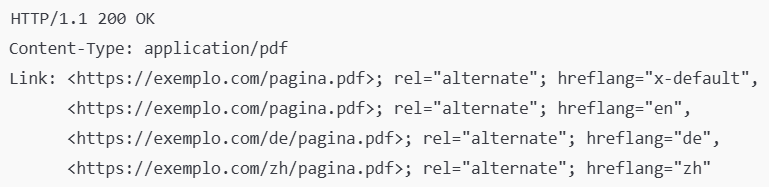
By using this method, you can tell search engines which version of PDF file to display based on the language and location of the user.
Implementing hreflang on your XML sitemap
Another efficient way to implement the hreflang tags is within your sitemap XML. By including tags within the sitemap, you centralize all marking into a single file, which can facilitate maintenance and decrease overload in headers and HTML code.
This approach also does not negatively impact page loading speed, something that can occur with the insertion of many tags directly into HTML.
Example of tagging on XML sitemap:
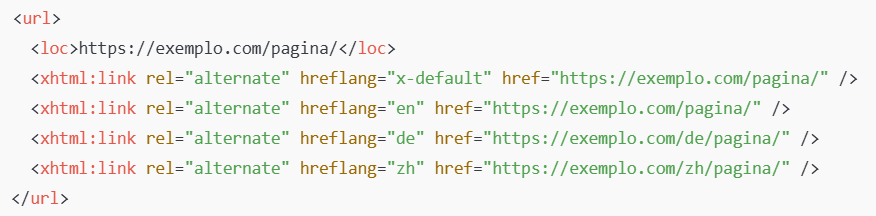
With the use of XML sitemap, you can manage hreflang marking centrally, facilitating updates and ensuring that information is always consistent.
Common errors in the implementation of hreflang tags
When implementing hreflang tags, it is important to avoid some common errors, being them:
Contradictory tags
Make sure there's no conflicting hreflang tags for the same content. For example, a page should not have a tag indicating “en” (English) and another tag indicating “es” (Spanish) if there are no language-specific versions.
Missing tags
If you have page versions in different languages, it is essential to include all the necessary hreflang tags. A no tag may result in a bad experience for users, since they can be redirected for an incorrect version.
In addition, perform validation tests of your hreflang tags using SEO tools as the Google Search Console It's fundamental.
Google offers a specific tool to identify problems related to hreflang, such as poorly configured or missing tags. Validating your tags helps to avoid ranking problems and ensures that your content is displayed to the right audience.
Examples of applied hreflang tags
Large brands and organizations around the world use hreflang tags to optimise their international pages. Check out some examples in practice:
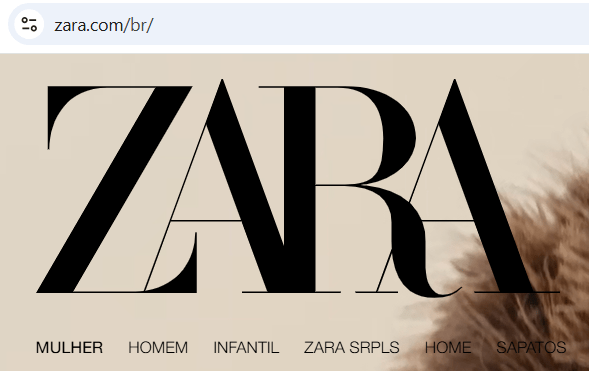
The Zara, a fashion retail giant, has a global presence, with versions of its website in different languages, adapted to the regional preferences of its customers. The company uses hreflang tags to ensure that users see the website version in their native language.
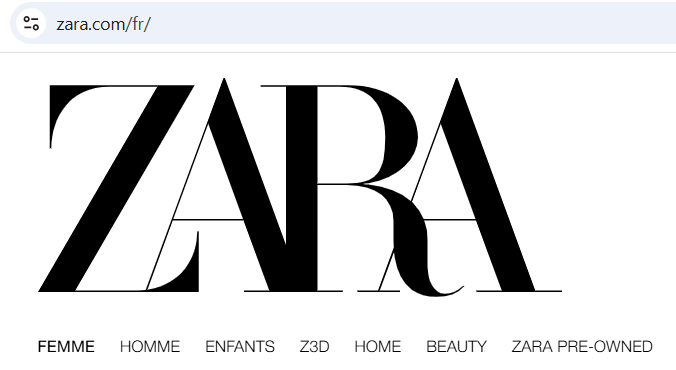
For example, customers from France access the website in French, while those from Germany see the German version, improving the purchase experience and avoiding confusion with versions of the site not relevant.
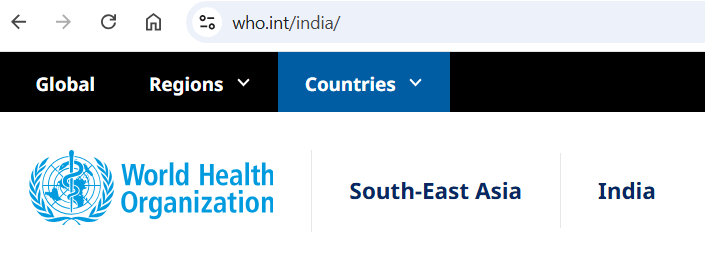
The WHO (World Health Organization) also benefits from the use of hreflang on its multilingual site.
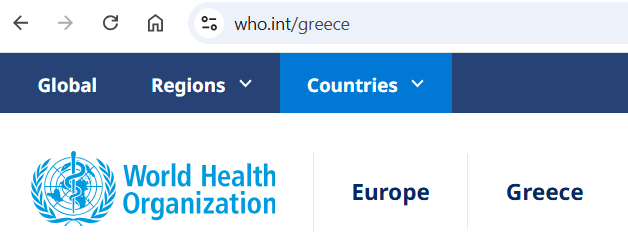
For example, one person in India will see health information in Hindi or English, while in France the content will be in French, ensuring that everyone receives the appropriate content.

The Netflix, with its wide catalogue of content in multiple languages, uses the hreflang tags to ensure that your users are directed to the website version and content that best meets your language preferences.

A user in Brazil will see the interface and subtitles in Portuguese, while a user in the USA will see the content in English, offering a personalised experience.
Tools for facilitating implementation
If you use a CMS like WordPress, there are several tools and plugins that can facilitate the implementation of the hreflang tags on your site without needing much technical knowledge.
One of the simplest options is the plugin Hreflang Tags Lite, which allows you to generate and insert the hreflang tags directly into the pages or posts of your site. This tool is useful for those seeking a practical and quick solution.
In addition, there are hreflang tag generators such as the Hreflang Tags Generator Tool, which creates the code necessary for you to enter directly into the HTML pages of your website.
This option is perfect for those who have no programming experience, as it generates a simple line of code that can be copied and pasted into the source code of the pages, especially those that require international attention.
Hreflang tags are essential for optimizing multilingual and international websites, improving user experience and contributing to better SEO performance. Using them helps to ensure that the content is displayed for the right audience, in the correct language and in the appropriate region.
Optimize your website for a global audience and improve SEO with the correct implementation of hreflang tags. Learn to test and adjust your tags to maximize results.
FREQUENTLY ASKED QUESTIONS
What does the href tag in HTML mean?
The tag href is an attribute used in HTML elements such as <a> (link), to specify the destination address (URL) of a link. For example, <a href="https://example.com">Visite nosso site</a> creates a link that directs users to the given URL.
What's tag hreflang?
The hreflang tag is an HTML attribute used to indicate the language and regional location of a specific page. It is essential for multilingual or international websites, as it informs search engines which version of the content to display to users based on their preference for language or location.
How to implement hreflang tags on my site?
You can implement hreflang tags directly in the HTML code of your pages, in XML sitemap or via HTTP headers. In HTML, syntax is added in the section <head> on the page, as:
This indicates to Google that the specified URL is an alternative version of the English language page, directed at users in the US.
What benefits do hreflang tags bring to SEO?
Hreflang tags help improve international SEO by avoiding duplicate content issues and directing users to the right version of the page based on language and location. This increases the relevance of content, improves user experience and potentially raises ranking in local searches.

Caio Nogueira is a SEO, GEO, link building and Digital PR expert and co-founder of WebSyd, website creation agency and SEO consulting founded in 2016. It acts with organic search strategies, digital authority construction and brand optimisation for search engines and artificial intelligence platforms. Throughout his trajectory, he participated in more than 1000 projects involving SEO, website development, content marketing and authority acquisition through backlinks and Digital PR. At WebSyd, it participates in the planning of strategies to increase organic visibility, lead generation and presence of companies on Google and AI-based search engines. As an author, it publishes content on SEO, GEO, website creation, link building and digital authority, sharing analyses, strategies and practical experiences related to organic growth of companies. Its contents and contributions have also been published in companies and vehicles of technology and marketing such as Wix, HostGator, Duda, Neil Patel, Locaweb and E-Commerce Brasil.
View all posts


 Estimate the cost

