
301 SEO redirects: everything you need to know
Summary (TL;DR)
In this post, we explore the concept of 301 redirects, their importance to SEO, and how to use them effectively to improve your website's organic traffic.
We discussed how to configure 301 redirects in the .htaccess file, redirect old domains to new ones, and how to redirect from HTTP to HTTPS.
We also address how to correct common redirection problems, such as forwarding chains, loops, and broken redirections, in addition to highlighting the importance of keeping redirects up-to-date and relevant.

Quick answer: redirecting 301 warns the browser and Google that a URL has permanently changed address. Use 301 when switching URL, domain or migrate to HTTPS: According to Google documentation, it is a strong signal that the new URL should appear in the search instead of the old one, and a well-configured 301 does not make the site lose position. Care is always to point to an equivalent page, avoid strings and loops and update the internal links to the final address.
301 redirections are quite simple. They are used to redirect one web page to another. But understanding how they relate to SEO is more complicated.
What's a 301 redirect?
Redirecting 301 indicates that a page has been permanently moved to another address, such as reorganizing the URLs of one site. . The number 301 is the HTTP status code sent in response.
In simple terms, a 301 redirect informs the browser: “This page has been permanently moved. This is the new location and we do not intend to move it back. ” The browser replies, “Of course! I’ll send the user there right now! ”
How to redirect 301
There are many ways to redirect 301, but the most common method is to edit .htaccess file from your site.
You will find this in the root folder of your website:
If you don't see the file, that means one of two things:
- You don't have a .htaccess file. Create one using the Notepad (Windows) or TextEdit (Mac). Just create a new document and save it as “ .htaccess”. Make sure to remove the default .txt file extension.
- Your website is not running on an Apache web server. This is somewhat technical, but there are different types of web servers. Apache, Windows / IIS and Nginx are the most common. Only Apache servers use .htaccess. To check if your website runs on Apache, see with your host.
How to redirect an old page to a new page
Using WordPress is quite simple, just remove the need to edit .htaccess file with the Redirection free plugin. . This makes adding 301 redirects very easy.
How to redirect an old domain to a new domain
Redirecting pages to a different domain address has several purposes and depending on whether you want to do this permanently or temporarily, you should use different methods and scripts.
Redirect all addresses from the old domain to the new one, using htaccess. If the address structure of the old domain matches the new, you can do this easily and in a matter of moments, but changing the address structure may take a long time.
With the new domain in the air, place the rule below on the .htaccess of the old domain, which leads each address to the same path in the new domain:

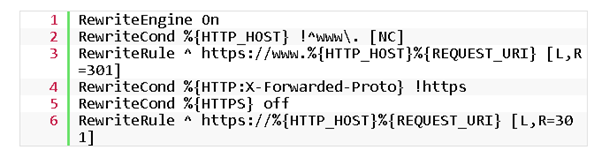
Redirect the entire domain to www (and vice versa)
The positioning and order of the code in your htaccess file are also important. You can experience undesirable effects if several instructions are placed in the order “wrong”.
If you want your site redirected to www (or vice versa), then you need a redirection on .htaccess.
Here is the version for www:

Here is the version contrary to www:

How to redirect entire HTTP domain to HTTPS
IMPORTANT! You should have an SSL certification installed on your website for this to work. Otherwise, you will receive the “Not Secure” warning message.

Redirect the entire domain to www and HTTP to HTTPS
Do 301 redirects affect SEO ?
The impact of 301 redirections on positioning is great, because one of the factors of Google ranking are the links that the page receives. When a URL changes without redirecting, these links point to a page that does not exist.
Currently, 301 is one of the most effective and safe redirection methods for research mechanisms.
By 2016, the use of 301 redirects could result in loss of position and traffic on Google. Today, a correctly configured redirection should not have a negative impact on the positioning of a given page.
Even many SEO experts use 301 redirects to increase organic traffic.
How to Fix 301 Redirections to SEO Problems
See how to find and fix existing problems related to 301 redirects.
1. Make sure the HTTP version of your site redirects to HTTPS
Every site must use HTTPS.
This not only adds an extra layer of security to your visitors, but Google uses HTTPS as a rating signal. But having an SSL certificate is only half the battle...
You also need to if make sure that people really visit the HTTPS version from your site, which means using a 301 redirect between the version HTTP and HTTPS.
To check if this redirect is working:
- Go to your home page and watch the bar URL.
- You should see https://[www].euwebsite.com/, plus a lock icon.
- Enter the address with http:// (without “s”) and press Enter. You must be redirected to the HTTPS version automatically.
NOTE . If you see a page with an HTTP warning for HTTPS and it's just HTTP aversion of the page from which tracking started, that's not a problem.
Fix these problems by applying the appropriate 301 redirects from HTTP to HTTPS version of affected pages.
2. Remove pages with 301 status codes from Sitemap
Google analyzes sitemaps for understand which pages to track and index.
Since pages with 301 status codes no longer exist technically, it makes no sense to ask Google to track them. If these pages remain on your sitemap, Google may continue to review them every time they retrace your website. That's unnecessary.
This is one way to find these pages:
- Find your URL sitemap (usually is yourdomain.com/sitemap.xml);
- Use this tool to download all URLs;
- Paste this URL list in this free HTTP status checker (observation: limited to 100 URLs at a time);
- Filter by pages with 301.
Remove these URLs from your sitemap and replace the final redirect URL (if not yet there).
3. Fix redirecting chains
Redirection chains occur when there are a series of two or more redirects between the initial URL and the destination URL.
Here's the Google says about this:
Google recommends direct redirecting to the final destination. Second HTTP bug documentation, Googlebot follows up to 10 redirect jumps; after that, the URL is treated as a redirect error. Even within that limit, each jump slows down the load.
Redirection chains have no other purpose than to harm the user experience and slow things down, so you should avoid them whenever possible.
There are two ways to correct these errors:
- Replace the redirection chain with a single 301 redirection. Instead of Page 1> Page 2> Page 3> Page 4 , the redirection becomes Page 1> Page 4 .
- Replace internal links for pages redirected by direct links to the final URL. . This prevents Google and other bots from tracking the redirecting chains. Most importantly, it prevents users from having to deal with the slowness of multiple redirects by clicking on a link.
4. Fix redirect loops
Redirecting loops occur when a URL redirects back to one of the other chain URLs. This creates an infinite loop of redirects that can confuse and intercept search engines and users.
Example: Page 1> Page 2> Page 3> Page 2 > Page 3> Page 2 > Page 3 [...]
These are killers of the user experience because they usually result in a response like this from the browser:
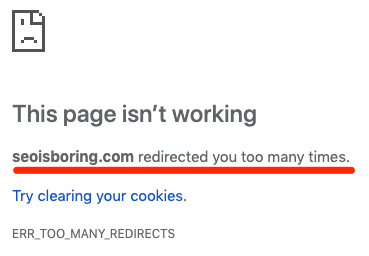
You can find redirect loop errors using the same HTTP status code checker we mentioned earlier.
For more than 100 pages, check the internal pages ed audit of the Ahrefs website for redirecting loop errors.
After listing the pages with loop, correct each of the two ways:
- If the URL should not redirect, change your HTTP response code to 200.
- Whether the URL should redirect, correct the final destination URL and remove the loop. Alternatively, remove or replace all links to the redirect URL .
5. Correct broken redirects
Broken redirects are pages that direct to an inactive page. They are bad because neither visitors nor search engine robots can access the final URLs. Because of this, most visitors will leave their website and most search engines will abandon tracking.
You can check these errors in batches of 100 using an HTTP status code verifier.
To correct these errors:
- Restore the inactive page (if accidentally deleted);
- Remove links to the redirected URL.
6. Redirect Pages 404
The pages that return a 404 status are dead. But there are times when a user sees this page makes sense. For example, if someone types the wrong URL into your browser, for example, the error page tells you that something is wrong. You can see an example of this below.

That said, pages with 404 status codes are a problem when:
- They're traceable.. . Trackable usually equals clickable. And if they are clickable, some users will end up clicking on internal links on your site just to see an inactive page. This is not good for the user experience.
- They have backlinks. . As 404 pages are not accessible, all backlinks which point to them are effectively wasted.
To solve this first problem:
- Redirect 404 pages to Someplace relevant. It's the key. Google treats rerouting to unrelated pages (such as the home page) as soft 404, so there is no real advantage in redirecting unless you are doing this to a similar and relevant page.
If you do not have a similar or relevant page and still have a 404 page with many high-quality backlinks, honestly, it may be worth republishing content that existed at that place.
7. Replace 302 redirects and 301s meta update redirects
Never use 302 redirects or meta update redirects for permanent redirections.
The 302 redirects are for temporary movements and Google recommended do not use meta update redirects if possible. Therefore, if you have one of these on your site, try to remove them or replace them with 301 redirects.
Fortunately, these two problems can be corrected in the same way:
- If the redirection is permanent, Use a 301.
- If redirection is not permanent , remove the redirection.
You should also try to remove or replace internal links to redirected pages, especially if they can confuse users who click on them.
8. Search for redirected (301) pages that get organic traffic
Pages with HTTP 301 status codes should not receive organic traffic because they should not be in Google's index. If these pages are getting traffic, that means Google hasn't seen the redirection yet.
You can check organic traffic on Google Analytics or Google Search Console.
Now, if you've recently added 301 redirection, that's probably not a big problem. Google should see you during the next screening, after which you must unindex the page.
9. Search for 301s external “bad”
Most websites have links to relevant third party sites and resources. All right... until the page to which the external link is redirected elsewhere. It is important to check if there are 301 external “default” from time to time. Go to your CMS and remove them.
Do you need to review the redirects and technical SEO of your website?
FREQUENTLY ASKED QUESTIONS
What's a 301 redirect?
A 301 redirect is a permanent way to redirect an old URL to a new one, informing browsers and search engines that the content has been moved to a new location permanently.
How to configure a 301 redirect?
On Apache servers, 301 is configured in the .htaccess; file on Nginx in the server configuration file. In WordPress, plugins like Redirection or Rank Math itself create redirections without editing files.
Do 301 redirects affect SEO?
Yes, 301 redirects can positively impact SEO by preserving link authority and ensuring that traffic is correctly targeted to the new pages. However, poorly configured redirections can harm the user experience and performance of the site.
How to fix common 301 redirection problems?
Common problems include redirecting chains, forward loops and broken redirections. To fix them, replace the strings with direct redirects, resolve the loops and make sure that the redirects are pointing to active pages.

Caio Nogueira is a SEO, GEO, link building and Digital PR expert and co-founder of WebSyd, website creation agency and SEO consulting founded in 2016. It acts with organic search strategies, digital authority construction and brand optimisation for search engines and artificial intelligence platforms. Throughout his trajectory, he participated in more than 1000 projects involving SEO, website development, content marketing and authority acquisition through backlinks and Digital PR. At WebSyd, it participates in the planning of strategies to increase organic visibility, lead generation and presence of companies on Google and AI-based search engines. As an author, it publishes content on SEO, GEO, website creation, link building and digital authority, sharing analyses, strategies and practical experiences related to organic growth of companies. Its contents and contributions have also been published in companies and vehicles of technology and marketing such as Wix, HostGator, Duda, Neil Patel, Locaweb and E-Commerce Brasil.
View all posts


 Estimate the cost

