
Internal links to SEO: a practical guide
Summary (TL;DR)
Internal links are key to a good SEO strategy, as they help Google discover new pages, improve PageRank and make it easier for users to browse the site.
Creating a logical and organized structure of internal links, grouping related content and connecting important pages, is essential to improve ranking in search engines.
It is important to perform regular audits to identify and correct problems such as broken links or orphaned pages, ensuring that all links are working and contributing to the domain authority.

Quick answer: internal links are links between pages of the same site. They help Google to discover and understand pages and distribute authority. Good practices: linking content of the same theme into clusters, using descriptive anchors, keeping important pages a few clicks from home and fixing broken, redirected links and orphaned pages.
When we think of SEO strategy, one thing is certain: let's talk about internal links. After all, creating a network of connections from your own domain is essential for any website. You may not even notice, but if you get to a site through a Google search, this site certainly has an internal link strategy.
But we know that even if it is important, many people have doubts when creating an internal link strategy. So let us address this issue in this practical guide.
So you will learn about this essential factor for your site's SEO, and consequently will improve your rankings.
Besides, you will also learn to:
- Adjust internal links with problems;
- Adjust internal links redirects;
- Remove internal links from pages without relevance;
- Improve direct links to important pages;
- Solve problems of “orphaned pages”.
Why internal links are so important to SEO
Briefly, the importance is because Google uses internal links to discover new content.
What the Google talks about this subject:
Google needs to constantly search for new pages and when it finds them, add them to its list of known pages. Some pages are known because Google has done the tracking before, others are discovered when a link directs the algorithm to a new page.
In addition, internal links are very important to improve the PageRank of a website. Even if this is not a visible metric for common users, Google considers PageRank of pages and sites. . And with a good internal link strategy, it is possible to improve the PageRank indexes of a site.
Understand all about PageRank in our complete article: Google PageRank is not dead: know why it still matters.
How to create an ideal internal link structure
To start building this structure, it is interesting to consider your site as a pyramid. At the top are the most important contents, while at the bottom of the pyramid are the least important content.
Usually the main page, which is at the top of the pyramid, will be the homepage of the site. Below it is common to find other important pages such as:
- About
- Services
- Products
- Clients
- Blog
- Amongst others.
After this level, we have other pages such as discrimination of individual services and products, blog posts, etc.
But when we talk about internal linkage, a more comprehensive strategy must be created. You can't just quote the home page of the site on all blogposts.
Create Content Clusters
In fact, what you should do is separate content from a blog, for example, into different categories. And from that, connect different content on similar subjects. To decide how to do this, it's always important to consider what your client would do.
With a well-made Buyer persona drawing, this task becomes simpler and it is possible to arrive at a logic that makes sense for your blog. And one important point here is that probably by doing this exercise, you will realize the need to write content on various other subjects.
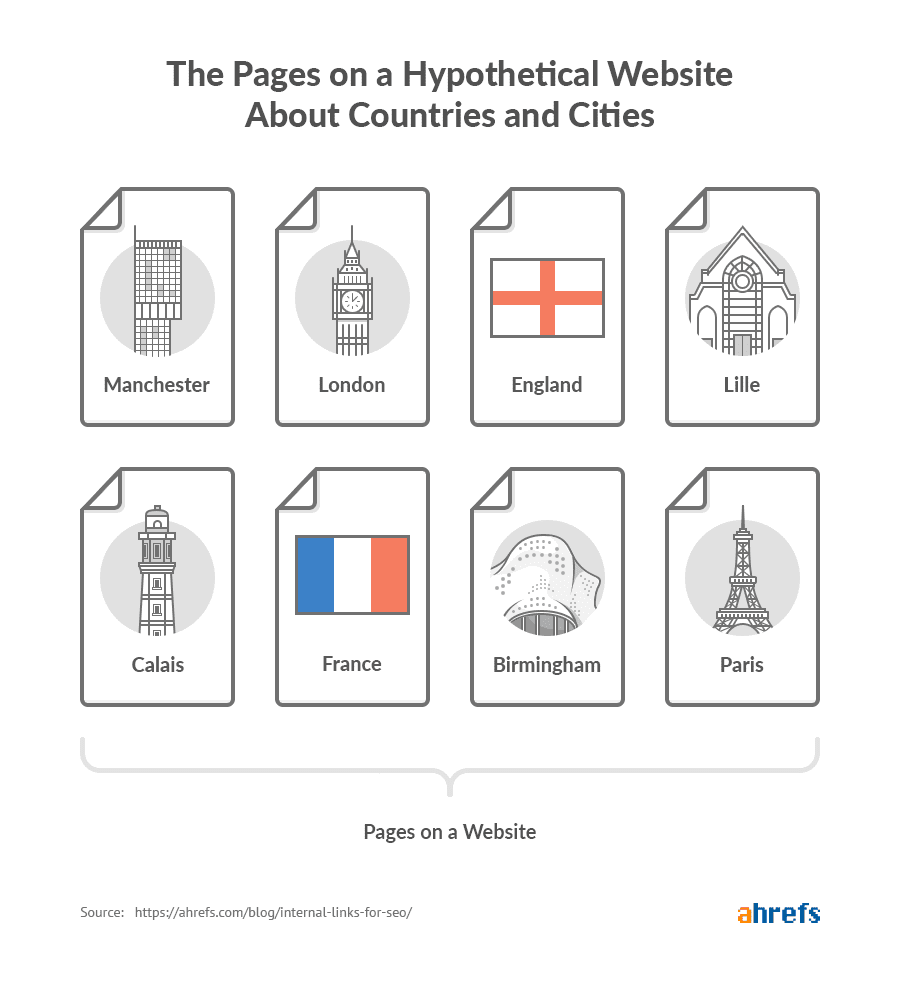
Look at one example of pages on a website who talks about cities and countries around the world:
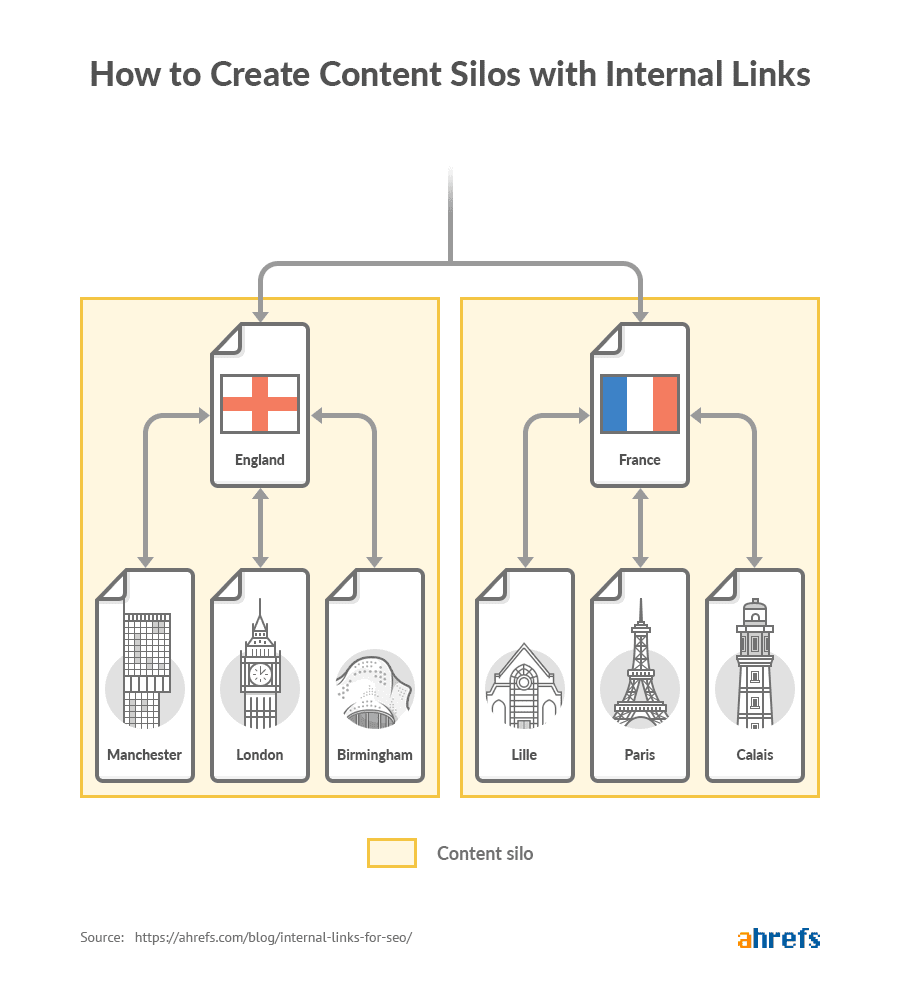
Instead of leaving the content so loose, with countries and cities mixed together, it is best to group them into content clusters. See how the content becomes clearer and more organized in this way:
Source: Ahrefs.
The benefits of organizing your pages in this way, with internal links between them, are:
- Users can access more pages of their website without losing interest in content.
- The search engines like the Google you will understand more easily the structure of your website.
- The most important pages will transfer your authority to the secondary pages, influencing the overall relevance of the domain.
Use the strategy for products, services and even testimonials
Now that you have managed to organize your blog from content clusters, it is possible to use the same methodology for other pages of your website. If you work with products of various categories, this organization will help, and a lot, the experience the user.
And as a consequence, reading Google's algorithms about your website will also be easier. Thus increasing the relevance of your domain.
How to check if your internal links are in trouble
Everything we've mentioned here makes a lot of sense, especially for those who are starting a site from scratch. If you already have a website and want to improve your internal link strategy, you need to take care of it.
First of all, you should understand how to check that the internal links that are already in use on the site are still active. And you can do this analysis using extensions of Google Chrome, or with paid programs that will generate more complete reports.
Today we will present two Chrome extensions for you to audit all internal links on your pages.
-
Check My Links
If you need a tool to quickly check out all the links of a page, Check My Links is your best option.
To use you must click on the icon that will be in the right corner of the address bar in Google Chrome. Automatically the extension checks the internal links of the page you are on. If internal links are working, they will be highlighted in green. The internal links with problems will be marked in red with an error code.
-
Domain Hunter Plus
This other Chrome extension works the same way as Check My Links. To use it, just click on the icon and wait for the page links to be analyzed.
Broken links: how to solve the problem?
When you perform an internal link analysis on a Google Chrome platform or extension, you may encounter some problems. So it's important to understand how to solve them, or at least the ones that happen most.
- If the page was deleted by accident, you can restore it with the same URL.
- Create a link to another relevant URL.
What if the internal links are pages with redirect?
If the internal links are working, but they have internal links that you are using redirect, you need to check these links. After all, with the redirect your internal link may be sending the user (and Google) to pages without direct relation to the page on which the link was placed.
What to do with internal links that lead to irrelevant pages?
Another point that should be noted when conducting the audit of internal links of your site, are pages without relevance. These could be old campaigns for products that are no longer sold. Or else launch items that after a few months should no longer be called that way.
To avoid this problem, it is always important to map the internal link being made. Also, review the pages as we are describing in this guide. So you avoid problems in the future and can easily identify pages that lose relevance.
Improve direct links to important pages
The situation here is as follows. Consider that you have 5 pages of your site that together bring the largest volume of traffic for your domain.
But when you analyze these 5 pages, they are very far (in amount of clicks) from the main page of the site. This can happen if a very specific item that is within a subcategory of the site ends up standing out and generating a lot of traffic.
So if you identify this problem the ideal is to be able to link inside the home page of the site with these most relevant pages of the domain.
How to solve “orphaned pages” problems
When we identify a page that does not contain internal links, we call this page “orphan”. And if you consider any page of your site important, this can never be an orphaned page.
There are two main reasons for this:
- Google will not find this page organically (unless you send your sitemap through Google Search Console or have backlinks from other sites that lead users to the page in question).
- There will be no PageRank exchange between pages, as there are no links to do this.
This way, if you realize that an important page or already with good organic traffic is orphaned, you need to add some internal links to make the results even better.
How to use internal links strategically
Now you will understand how it is possible to use Google to identify the opportunities for internal linkage in your domain. With this, the authority of your page grows organically. Learn two simple ways to make your internal link strategy happen.
-
Do a search “site:”
If you have made a recent post on your blog, but feel that you still need to add internal links in the text, you can use this strategy.
Do a survey in this way: “site: seudominio.com” and write next to the keyword or phrase related to the content of the text you recently published.
With this search, Google will show you as a result the pages containing the words you added in the search. So if you type “site:WebSyd.digital optimisation of websites” the result will be:
In this example, it is possible to see that there are 208 pages that talk about site optimisation within the WebSyd domain. This makes it easier to find the most relevant links on your site, as per the keyword you need.
The more specific your search, the higher the chances you will find few links. But this might be a good idea to add links with content that is actually related to the text that was produced.
-
Find out what your pages are with more backlinks and authority
If you have a tool that identifies the number of backlinks and authority of your domain pages, this is a great option to improve your internal link strategy.
This is because it is these pages with higher authority that can make a difference on any site with internal links.
Thus, by identifying the most powerful pages considering ranking and authority, you can select the main ones and add your links to other content such as product pages or blog posts.
Final considerations
Maybe you've already noticed, but it doesn't cost to reinforce: working with internal links is not an exact science. Like several other SEO pillars, there are many variables involved in ranking the searchers, and it is impossible to understand 100% how everything works.
What you need to do is create a logical structure for your internal links, and run the planning as expected.
Some important tips about working with internal links:
- Do not always use a main text to create your internal structure and links. On the contrary, it is important to have some main pages that can serve as anchor text for your blog.
- Do not create internal links of pages that do not relate to the content of the blog post. If you do this and Google identifies that something is weird, you will certainly have your ranking affected.
- Don't exaggerate on internal links. You don't need to create links to every word in a text, but work strategically to connect important content. Sometimes one or two well-thought-out links will be worth more than 30 loose, unrelated links to the main content of the page.
So study the pages you already have in your domain, understand what content still needs to be created, and start using internal links as a differentiated SEO strategy.
Do you need to organize internal links and optimise your website pages? Our SEO team can help.
FREQUENTLY ASKED QUESTIONS
What are internal links and why are they important for SEO?
Internal links are hyperlinks that connect different pages within the same domain. They are important because they help Google track and index new pages, improve PageRank, and also facilitate user browsing by increasing the length of stay on the site and reducing the bounce rate.
How can I create an effective structure of internal links on my website?
To create an effective structure, think of your site as a pyramid, with the home page at the top and less important pages at the base. Organize your content in clusters by connecting related pages to each other. This not only improves navigation, but also helps search engines understand the hierarchy and relevance of pages.
What should I do if I find broken internal links on my website?
If you find broken internal links, you can fix them in various ways: restore the deleted page, create a redirect to a relevant URL, or remove the link and replace it with one that works. Keeping internal links working properly is essential to avoid SEO problems.
How can I identify opportunities for internal linking on my website?
An effective way to identify internal linking opportunities is to use the search “site:” on Google, followed by a relevant keyword. This will show all pages in your domain that mention this keyword, allowing you to add internal links in a strategic and relevant way.

Caio Nogueira is a SEO, GEO, link building and Digital PR expert and co-founder of WebSyd, website creation agency and SEO consulting founded in 2016. It acts with organic search strategies, digital authority construction and brand optimisation for search engines and artificial intelligence platforms. Throughout his trajectory, he participated in more than 1000 projects involving SEO, website development, content marketing and authority acquisition through backlinks and Digital PR. At WebSyd, it participates in the planning of strategies to increase organic visibility, lead generation and presence of companies on Google and AI-based search engines. As an author, it publishes content on SEO, GEO, website creation, link building and digital authority, sharing analyses, strategies and practical experiences related to organic growth of companies. Its contents and contributions have also been published in companies and vehicles of technology and marketing such as Wix, HostGator, Duda, Neil Patel, Locaweb and E-Commerce Brasil.
View all posts


 Estimate the cost

