
How long does it take for the site to be indexed on Google?
Summary (TL;DR)
Google indexing is a critical process to ensure that your website is visible in search results, attracting organic traffic and improving your online presence.
This process involves several steps, from tracking to analysis and finally adding to Google's index, and is influenced by various factors including content quality, SEO on-page optimisation, internal and external link structure, and the effective use of Google tools for webmasters.
We address the importance of creating relevant and high-quality content, implementing effective on-page SEO strategies, building trusted website links, and using Google tools to speed up indexing your site.
Quick answer: a Google documentation, tracking a new or updated page may take from a few days to a few weeks. New sites, without links pointing to them, tend to stay at the end of this track. Send the sitemap and ask for indexing by URL Inspection in Search Console helps Google find the pages, but does not guarantee inclusion in the index.
Simply put, indexing is the method by which Google discovers, analyzes and stores web pages in its database, making them accessible to users through search.
When a page is indexed, it is added to Google's index, an immense catalogue of billions of web pages, which means that it can now appear in the search results.
Without indexing, the page does not appear for those who search on Google, however useful it is.
If yours site does not appear on GoogleThis could become a big headache for you and your company.
So it is worth understanding how the process works and what speeds up or delays the entry of pages in the index.
The Google Indexation Process
Google's indexing process is a complex and sophisticated operation designed to organize the vast amount of information available on the web so that it can be quickly retrieved by users.
This process can be divided into several main stages: tracking, analysis and indexing.
Tracking
The first step in the indexing process is tracking. Google uses software programs known as “Googlebots” or “spiders” to track the Internet for new pages or updates on existing pages.
These bots browse the web following links from one page to another. This method allows Google to discover new or updated content to add to your index.
Discovery of new sites and pages
Google discovers new sites and pages in many ways.
In addition to continuous web tracking using existing links, site owners can directly submit new pages or sitesmaps through Google Search Console, a free tool that allows webmasters to manage the presence of their website in Google search results.
Google can also discover new content through backlinks from other sites.
Analysis
Once a page is found, Googlebot analyzes the content of the page by recording details such as the type of content (text, images, videos etc.), the relevance of specific keywords, the freshness of content, and many other factors.
This analysis helps to understand that it is each page, which is crucial for the indexing step.
Index
After analysis, if the page is considered of quality and relevant, it is added to Google's index.
The index is like a huge digital library that contains a copy of all the pages Google considered fit to be shown in the search results.
During indexing, Google processes and stores information about web pages, including keywords, content relevance and site location, so that they can be recovered when a user does a relevant search.
It is important to note that not all pages tracked will be indexed. Google uses complex algorithms to determine the relevance and quality of content.
Pages with duplicated content, little content or that violate the Google Search Foundations (old Guidelines for webmasters) may not be indexed.
In short, Google's indexing process is a meticulous combination of tracking, analyzing and storing information.
This process ensures that Google users can find the most relevant and high-quality information available on the web, while site owners who follow SEO best practices have the opportunity to increase their online visibility.
Factors that influence indexing time

Content and quality: explanation of how quality and original content accelerate indexing.
SEO on-page: the influence of SEO practices on indexing, including title tags, meta descriptions and URL structure.
External links: how established site links can help Google discover your website faster.
Sitemaps and robots.txt: the importance of a well-structured sitemap and the correct use of robot.txt file.
In practice, these factors tend to accelerate indexing: internal links pointing to the new page, sitemap sent in Search Console, links of already indexed sites and a server that responds quickly. Delay: orphaned pages, block on robots.txt, forgotten noindex tag, duplicate content and 5xx errors.
How to check if your site has been indexed
Checking if your site has been indexed by Google is a key step towards understanding your online presence and optimizing your visibility in search results.
There are two main ways to check your site's indexation: using Google tools for webmasters, such as Google Search Console, and doing direct searches on Google. Here's how you can do both:
Using Google Search Console
Google Search Console is a free tool offered by Google that helps website owners monitor and maintain the presence of their site in Google search results. To check your site indexing using this tool, follow the steps below:
- Go to Google Search Console: First, you need to have an account and check the property of your website at Google Search Console. After setting up your account, you can access the control panel of your website.
- Open the Page Indexing report: in the Index menu, o Page Indexing report (old Coverage report) shows how many pages are indexed and why each page is not indexed.
- Inspect a specific URL: ed URL inspection tool informs if that page is in the index and allows you to request indexing after a correction.
Using Google Search
Another simple way to check if a specific page of your site has been indexed is to use Google's search directly:
- URL Search: Go to Google and type “site:seudominio.com.br” in the search bar, replacing “seudominio.com.br” with your site domain. This will show all the pages on your site that have been indexed by Google.
- Direct search: searching for the full URL in Google gives a clue, but the result of the search site: it is a sample and does not show everything that is indexed. To be sure, use the Search Console URL Inspection.
Tips to speed up indexing
Speeding up your site indexation by Google is crucial to improving your online visibility and attracting more organic traffic. Here are some effective tips to help speed up this process:
1. Creating high quality and relevant content
- Keep the site active: new pages linked from indexed pages are discovered faster. Publishing often helps Google return to the site, but quality weighs more than volume.
- Focus on quality: High-quality content that satisfies user search intent is more likely to be indexed quickly. Make sure your content is informative, well written and useful.
- Use keywords strategically: Do a keyword search and incorporate them naturally to your content. This helps Google understand what your page is about and index it to relevant queries.
2. Implementation of effective on-page SEO strategies
- Optimization of titles and descriptions: Make sure that each page has a unique title and attractive meta description, including relevant keywords.
- Friendly URL structure: Clear and structured URLs help Google understand the hierarchy and content of your website.
- Use of header tags: Structure your content using header tags (H1, H2, etc.) to highlight important titles and subtitles, improving readability and indexing.
3. Construction of trusted website links
- Get quality backlinks: Links from other trusted sites to your site (backlinks) are a strong sign of trust for Google. Focus on getting backlinks from relevant and high authority websites in your niche.
- Create shareable content: Content that is often shared on social networks or other websites can generate natural backlinks and attract Google's attention.
4. Use Google tools to send your sitemap
- Use Google Search Console: Through Google Search Console, you can send your sitemap directly to Google. This helps Google find and track its pages more efficiently.
- Request indexing of important pages: after posting or correcting a page, use URL Inspection and click “Request indexing”. There is a daily order limit, and sending the same URL several times does not speed up the process.
By implementing these tips, you can not only speed up your site indexing by Google but also improve your ranking in search results, increasing your visibility and attracting more organic traffic.
Remember that patience and consistency are key, because the results of these strategies may take some time to manifest.
Common problems in indexing

Problems with site indexing on Google can significantly impact online visibility and the performance of a website in search results.
Recognizing and solving these problems quickly is crucial to ensuring that your site is properly indexed and user-friendly.
Here are some of the most common problems related to indexing and how you can solve them:
Duplicate content
- Problem: Duplicate content occurs when substantial blocks of content appear in more than one place on the internet. This may confuse search engines by choosing which version of the content is most relevant for a particular query, and may result in indexing the “wrong” version or penalizing the site.
- Solution: To solve duplicate content issues, use the canon tag to tell Google which version of the content is the original and should be indexed. In addition, avoid publishing content that is very similar within your own website.
Technical problems on the site
- Problem: Technical problems such as broken URLs, page slow loading time, non-responsive site (not adapted to mobile devices) and server errors can prevent Googlebot from tracking and indexing the site correctly.
- Solution: Perform regular technical audits of your website to identify and correct these problems. Tools like Google Search Console can help detect tracking errors and other technical problems that may affect indexing.
Blocking by robots.txt or meta tags
- Problem: The robot.txt file is used to tell search engines which pages of the site should not be tracked. Likewise, the meta tag “noindex” can be used to avoid indexing specific pages. Incorrect use of these features may accidentally block important tracking and indexing pages.
- Solution: review the robots.txt and meta tags from the pages so as not to block important content. The old robot tester.txt has been disabled; today Search Console shows robot report.txt, with the files found and possible errors.
Lack of quality content
- Problem: Pages with low quality content, little content or content that is not useful to users may have difficulty in being indexed. Google prioritizes content that offers real value to users.
- Solution: Focus on creating original, relevant and high-quality content that meets the needs of your users. This will not only facilitate indexing of your website but will also improve your position in the search results.
Lack of internal and external links
- Problem: A weak link structure, both internally between the pages of your own website and externally from other sites to yours, may make it difficult for Google to find out and index its pages.
- Solution: Develop a solid link building strategy that includes creating internal links relevant and obtaining quality backlinks from other sites.
Solving these common problems can significantly accelerate your site indexing and improve your visibility in search results.
Stay proactive in maintaining your website and implementing SEO best practices to ensure efficient indexing and higher ranking in search engines.
Learn how to index your website right now: know SCP Turbo
For those who need an agile and efficient solution for their pages to appear in Google searches, we have a direct and easy-to-apply recommendation.
We talk about SCP Turbo, a tool designed for fast and uncomplicated indexing of web pages, requiring few steps for its execution.
With your tool registration and access, simply add your website to the platform. This process is very simple. After adding your website, SCP Turbo starts operating, ensuring that soon its pages are all indexed.
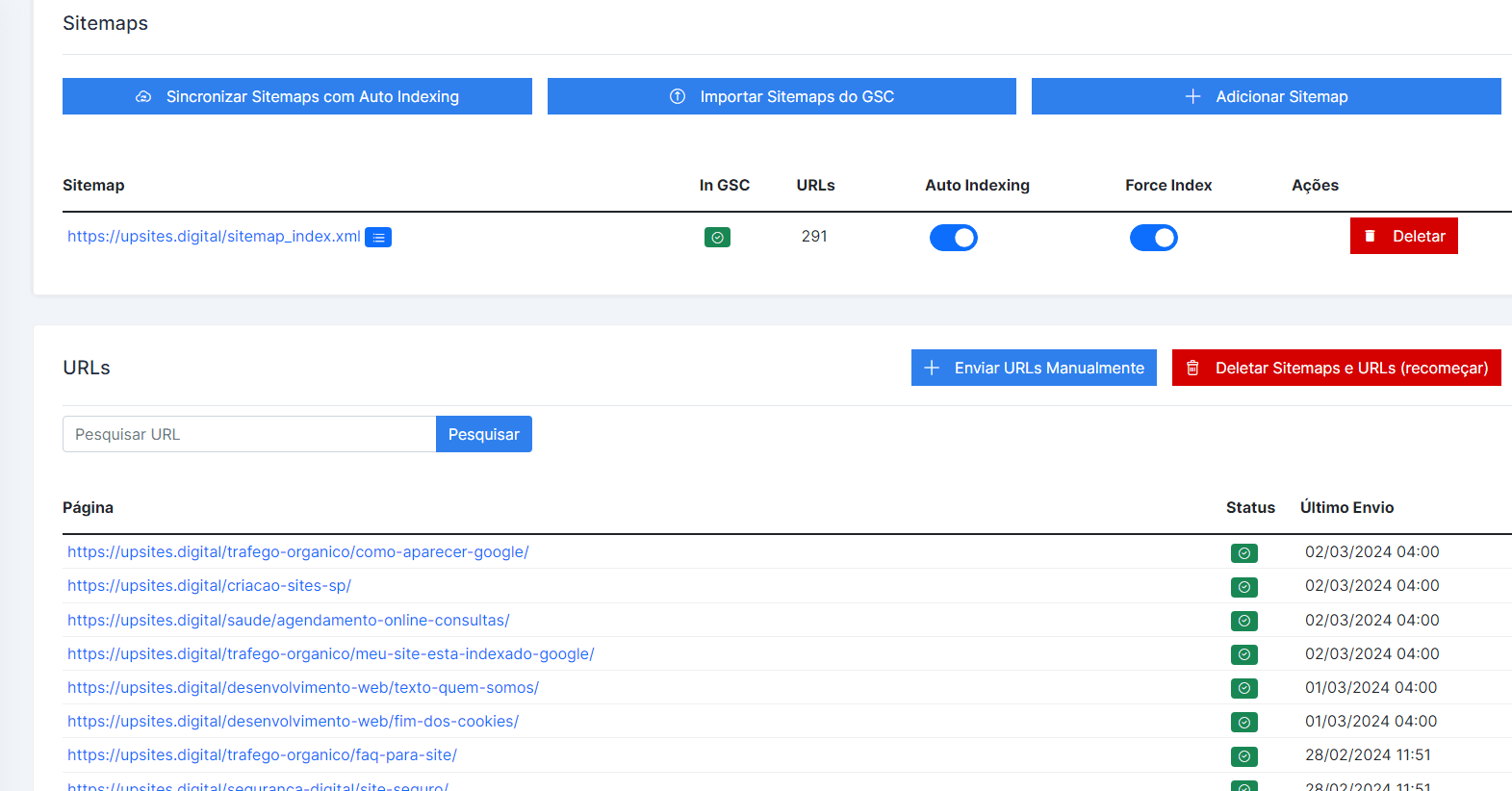
Did you care? Click the following button and start using SCP Turbo without waiting!
Conclusion
Indexation is important for all sites. How to appear on Google is a vital element to ensure that your website is visible online and capable of attracting qualified organic traffic. Understanding the indexing process, from tracking to analytics and inclusion in Google's index, is essential to optimise your SEO strategy and improve visibility of your website. We have addressed several key points to help speed up indexing your website, including:
The importance of creating high-quality and relevant content that meets the needs of users and follows Google's guidelines.
The need to implement effective on-page SEO strategies, such as title optimisation, descriptions, URLs, and the strategic use of keywords.
Build trusted website links to increase the authority of your site and encourage Google to track and index your pages faster.
Using Google tools for webmasters, such as Google Search Console, to send your site and sitemaps, making it easy for Google to find out and index its content.
We discussed common problems that may delay indexing, such as duplicate content, technical problems on the site, inappropriate use of robots.txt and meta tags, lack of quality content, and a weak link structure. We offer practical solutions for each of these challenges, aiming to optimise the indexing process.
Now that you are equipped with knowledge and strategies to accelerate indexing of your website, we encourage you to implement these tips. Remember that SEO is a continuous process.
Regularly monitoring your site's indexing status, adjusting your strategy as needed, and staying up-to-date with SEO best practices are crucial steps to ensure the long-term success of your website in search engines.
With dedication and correct approaches, you can significantly improve the visibility of your site by attracting more traffic and achieving your online goals.
FREQUENTLY ASKED QUESTIONS
How long does it take for Google to index my new site?
According to Google documentation, tracking a new or updated page may take from a few days to a few weeks. New and unlinked sites usually take longer. Send the sitemap and request indexing by URL Inspection in Search Console helps Google find the pages, but does not guarantee indexing.
Is there any way to speed up the indexing process of my website?
Yeah. Send an XML sitemap to Google Search Console, connect new pages from already indexed pages, request indexing of the most important URLs in the URL Inspection and fix blocks such as forgotten noindex or restrictive robots.txt. Useful and original content also helps the page to be included in the index.
How can I check if my website has been indexed by Google?
The search “site:seudominio.com.br” gives a sample of indexed pages. To be sure, use Google Search Console: The Page Index report shows the total indexed and the reasons for deletion, and URL Inspection confirms the status of a specific page.

Caio Nogueira is a SEO, GEO, link building and Digital PR expert and co-founder of WebSyd, website creation agency and SEO consulting founded in 2016. It acts with organic search strategies, digital authority construction and brand optimisation for search engines and artificial intelligence platforms. Throughout his trajectory, he participated in more than 1000 projects involving SEO, website development, content marketing and authority acquisition through backlinks and Digital PR. At WebSyd, it participates in the planning of strategies to increase organic visibility, lead generation and presence of companies on Google and AI-based search engines. As an author, it publishes content on SEO, GEO, website creation, link building and digital authority, sharing analyses, strategies and practical experiences related to organic growth of companies. Its contents and contributions have also been published in companies and vehicles of technology and marketing such as Wix, HostGator, Duda, Neil Patel, Locaweb and E-Commerce Brasil.
View all posts


 Estimate the cost

