
Robots.txt and SEO: everything you need to know
Summary (TL;DR)
The file Robots.txt is a fundamental element in the structure of a site, responsible for instructing search engines on which pages or files can be tracked and indexed.
Although it is simple to configure, an error in the file Robots.txt may result in major problems for SEO, such as preventing Google and other search engines from finding and showing the content of your site.
This guide addresses since the importance and purpose of Robots.txt, how to create it, best practices, until checking common errors and frequent questions, ensuring that your site is optimised for search engines.

Quick answer: the robots.txt is a file at the root of the site that tells search robots which areas can or cannot be tracked. He controls tracking, no. indexation: a blocked page can still appear on Google if you receive links. To get a page out of the results, use the meta tag on index and leave the page traceable.
Robots.txt is one of the simplest files within a site. But it can also be one of the most problematic.
This is because a simple change of character can make Google no longer find its content to show users. That way, this will hurt the SEO that you built.
Thinking about the importance of this subject, in this text you will learn about:
- What is a Robots.txt file
- How to recognize a Robots.txt file
- Do you really need a Robots.txt file?
- How to find the Robots.txt file from your website
- How to create a Robots.txt file
- What are the good practices of using the Robots.txt file
- Examples of Robots.txt files
- How to find errors in a Robots.txt file
- FAQs
1. What is a Robots.txt file
Robots.txt is a file hosted at the root of a website. This text file has instructions directed to Google robots and other searchers.
In this file you must inform three main points:
- Which directories should not be tracked by search engines;
- Files that should not be indexed;
- The map of the site with URLs that should be tracked by Google.
Considering all this information, an unreviewed Robots.txt file is a major risk. What happens is that the site may not end up appearing to users.
This is because when the site is being created, programmers add the following configuration to Robots.txt:
User-agent: *
Disallow: /
In this case, the file is telling all robots (user-agent: *) not to track site pages (with the command disallow: /). Therefore, when the site is released this instruction needs to be changed. Otherwise the site will not be found.
Google has a page dedicated to Robots.txt, access here.
2. How to recognize a Robots.txt file
A Robots.txt file is written as follows:
Sitemap: [URL location of sitemap]
User-agent: [bot identifier]
[directive 1]
[directive 2]
[directive...]
User-agent: [another bot identifier]
[directive 1]
[directive 2]
[directive...]
In short, what should be done is to add rules for robots by determining which user-agent is and what are the directives.
User-agent
The user-agent is the field in which you must define for which robot the rule in the sequence should be applied. By default, this will always be the first line of any rule. If you want to include all robots in a single rule, you must use the * symbol.
The most important users-agents for SEO are:
- Google: Googlebot
- Google Images: Googlebot-Image
- Bing: Bingbot
- Yahoo: Slurp
- Baidu: Baiduspider
- Bing - Google - Google - Engineering consulting bogotá
Important: With each new user-agent added, you need to add the directives again. After all, the instructions related to the first user-agent do not apply for others later added.
Directives
Following that, the directives should be added, which are the rules you want to give user-agents.
Google-recognized Directives
Understand below what directives Google recognizes.
Disallow (disable)
By using this directive, you create an instruction so that search engines do not access the files and pages on that particular path.
If you do not want users to access your blog and all your posts, you should add the following directive to the file:
User-agent: *
Diallow: /blog
Allow (enable)
On the other hand, the ‘allow’ directive is used so that search engines can track a directory or page even if it has been disabled before.
In the example we have a case in which the site owner does not want users to view the blog and its posts. The intention that is only a specific post can be accessed. In this case the robots.txt will look like this:
User-agent: *
Diallow: /blog
Allow: /blog/allowed-post
With this, search engines such as Google and Bink will be able to access the “/blog/allowed-post” address, but will not be able to access others:
Example:
- /blog/another-post
- /blog/yet-another-post
- /blog/download-me.pdf
Sitemap (sitemap)
This directive is used for search engines to locate the sitemap created on robots.txt. A sitemap includes pages that you want searchers to track and index.
Below is an example of a file with the sitemap directive. Note that this does not need to be repeated whenever you quote a new user-agent:
Sitemap: https://www.domain.com/sitemap.xml
User-agent: Googlebot
Disallow: /blog/
Allow: /blog/post-title/
User-agent: Bingbot
Disallow: /services/
Directives not recognised by Google
Now understand two directives not recognized by Google.
Noindex
It was believed that the tag noindex was informally recognized by Google. However, on 1 September 2019 the company confirmed that it does not recognise that Directive.
The noindex tag was used to prevent Google from indexing all posts in a blog:
User-agent: Googlebot
Noindex: /blog/
Nofold
The tag nofollow it was never an official Google directive for robots.txt. And on September 1, 2019, the company also stated that an option for the nofollow in robots.txt was to add the attribute rel=“nofollow” in each URL quoted on a page.
But originally many people believed it was possible to block links on a blog through the following directive:
User-agent: Googlebot
Nofollow: /blog/
3. Do you really need a Robots.txt file?
If your site is small, there's a great chance you don't need the Robots.txt file. But for those who do, the robots.txt is important to control which pages of your site search engines can access.
With his use it's possible:
- Avoid ranking of duplicate content;
- Keep certain sections of the site private;
- Avoid server overload;
- Avoid that images, videos and files are made available in Google results.
But understand that it does not completely eliminate the results on the internet about certain content. What can happen is your site is linked to others sites, and these may appear in a Google search indirectly.
4. How to find the Robots.txt file from your website
If you already have a robot.txt file on your site, it will be displayed by typing “yoursite.com.br/robots.txt” into the internet search bar.
If something like this comes up, it's because you have a robot.txt file:
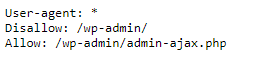
Take a test with the address https://www.google.com.br/robots.txt and look at the results.
Robots.txt
5. How to create a Robots.txt file
If you still don't have your robot.txt file, it's not hard to create one. What you need is:
- Create a blank notepad file (.txt) and start typing directives.
If you want searchers not to find your /admin/ directory, you must type:
User-agent: *
Dysallow: /admin/
- Create all the directives you need.
- Save the file as “robots.txt.”
Where to put the finished file?
Your robot.txt file should be added to the root of your site, more specifically at the root of the subdomain for which the file applies.
For example, to control page tracking behavior on “yoursite.com.br”, the file should be accessible through the address “yoursite.com.br/robots.txt”
6. What are the good practices of using the Robots.txt file
Understand now what are the good practices of using robots.txt to avoid SEO problems and errors:
-
Use a new line for each directive
Incorrect:
User-agent: * Disallow: /directory/ Disallow: /another-directory/
Correct:
User-agent: *
Disallow: /directory/
Disallow: /another-directory/
-
Use the * symbol to simplify general instructions
When you want to include all user-agents and multiple Disallow commands in a directive, it is possible to use * for this. See below:
Less efficient option
User-agent: *
Disallow: /products/t-shirts?
Disallow: /products/hoodies?
Disallow: /products/jackets?
…
More efficient option
User-agent: *
Disallow: /products/*?
This way, if the intention is to block all product pages, you can create only one general command. And so eliminates the need to enter all subcategories within this great item of the site.
-
Use “$” to specify the end of a URL
If you want to block the search for all profiles that end in .pdf on your website, you can use the directive below:
User-agent: *
Disallow: /*.pdf$
This way all URLs that end in PDF will be blocked. But in the case of pages that contain PDF in the URL, without finishing the URL at this point (/file.pdf?id=68937586), they continue to appear in the search.
-
Each user-agent should be used only once.
For you to avoid mistakes, this good practice is indicated. After all, Google will be able to understand if you quote a user-agent several times. The problem is that you have a great chance of repeating or forgetting some information in this way.
-
Keep specific directives to avoid simple errors
If you create a very open directive, you may have your SEO damaged. For example, let's consider that a website is launching a German version, but it doesn't have all the content ready yet.
To prevent search engines from showing an unfinished page, you can add the following directive:
User-agent: *
Dysallow: /de
But realize that this directive will also end up blocking any research that starts with “/of”:
- /designer-dresses/
- /delivery-information.html
- /depeche-mode/t-shirts/
- /definitely-not-for-public-viewing.pdf
So you should add a final “ / ” to the directive:
User-agent: *
Dysallow: /de/
-
Communicate through comments on robots.txt
You can communicate with the website developers, or even leave comments for future changes. To include a comment on robots.txt you need to add the # symbol before starting the sentence.
-
Use a robot.txt for each subdomain
If you have a site “yoursite.com.br” and a blog.yoursite.com.br blog, you need to create two robot files.txt. Each file should be added to the root of each domain.
7. Examples of Robots.txt files
If you do not know very well the possibilities that exist in a robot.txt file, we share below some examples used.
-
Full access for all users-agents
User-agent: *
Dysallow:
-
Access completely blocked for all users-agents
User-agent: *
Disallow: /
-
Block a folder of all users-agents
User-agent: *
Dysallow: /folder/
-
Block a file of all users-agents
User-agent: *
Disallow: /this-is-a-file.pdf
-
Block a PDF file from all users-agents
User-agent: *
Disallow: /*.pdf$
8. How to find errors in a Robots.txt file
As you noticed during this text, there are several details that should be considered when writing a robot.txt file. So understand how to find errors in these files.
For this audit, it is interesting to make a periodic check for problems related on Robots.txt through the Coverage Report of the Google Search Console.
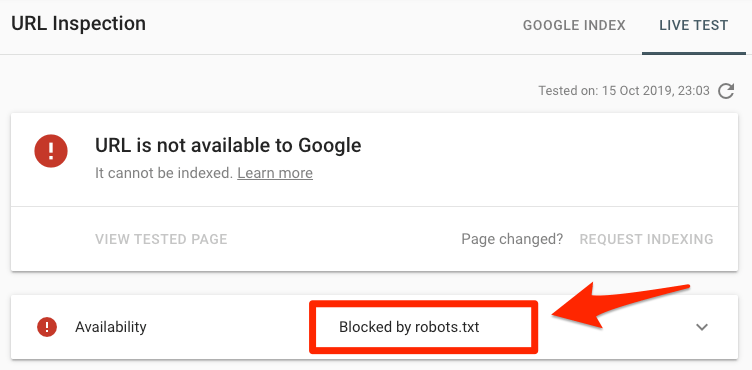
- Enter the URL in the Google Search Console URL Inspection Tool. If this page is blocked on robots.txt you should find a screen like this:
- If any URL of your sitemap is blocked, you will see this screen:
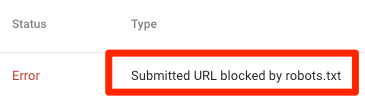
If you create a correct sitemap and deleted canonicalization, index and redirects, this error should not appear.
To evaluate exactly the directive that ended up blocking some content improperly, use Google support in tool test robots.txt. . See below a tool screen:
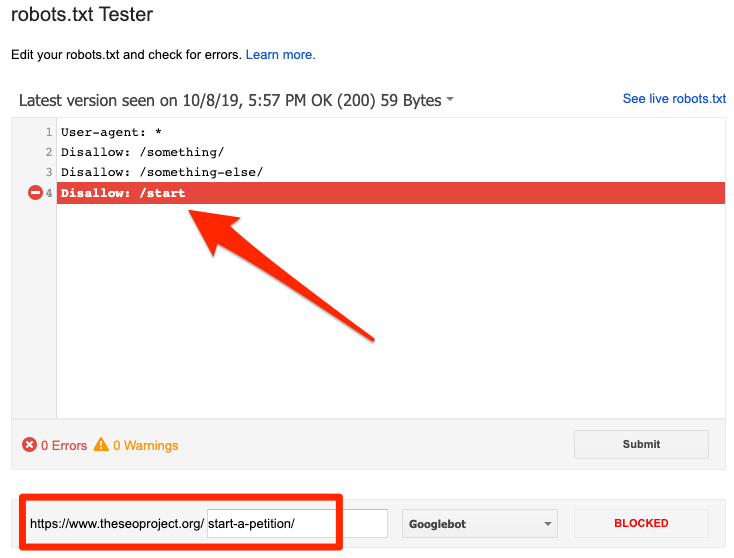
- If you find the error below, it means that some content not indexed by Google has been blocked by robots.txt
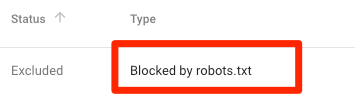
So if you have used robots.txt with the intention of deleting a Google page, there are other options that can be made.
- Robots meta tag;
- HTTP X-Robots-Tag header.
Only with these strategies can a page be unindexed from Google.
- When some content blocked by robots.txt is still indexed to Google.
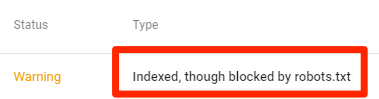
This is another problem related to using the file to delete pages. As we have seen above, there are other options for this.
9. FAQs
To finalize this material on Robots.txt and SEO, let's quote some of the most frequent questions on the subject:
-
What is the total file size?
500 kilobytes (approximately)
-
Where to find robots.txt in WordPress?
In the same place as other websites and blogs platforms: doing a search for theirite.com.br/robots.txt.
-
How to edit robots.txt in WordPress?
You can do this manually, or else using WordPress SEO plugins like Yoast.
Final Considerations
We've reached the end of the content with all the information you need to know about robots.txt. As you have noticed, at various times we cite that small errors in the file may end up causing big problems for your site's SEO.
Therefore, it is essential that you observe the best practices mentioned above, avoid unnecessary errors and keep your robots.txt well organized.

FREQUENTLY ASKED QUESTIONS
What is the Robots.txt file and what is its main function?
The Robots.txt is a simple text file located at the root of a site, which provides instructions to search engine robots on which pages or files should be tracked and indexed. It is essential to control the visibility of your content in search engines.
How can I create and configure a Robots.txt file?
To create a Robots.txt, just create a text file (.txt), add the necessary directives (such as Disallow to block pages and Allow to allow tracking), and save it as robots.txt at the root of your site. It is important to ensure that directives are accurate in order to avoid SEO problems.
What are the best practices when using Robots.txt?
Some good practices include: using a new line for each directive, using the symbol * to generalize instructions, use the symbol $ to specify the end of a URL, and keep the file organized with explanatory comments. This helps to avoid errors and ensure that the file works as expected.
How can I check for errors in my Robots.txt file?
You can use Google Search Console to check if yours Robots.txt is improperly blocking some important URL. Google’s “Test Robots.txt” tool also allows simulating file behavior and identifying unnecessary errors or locks, helping to fix problems quickly.

Caio Nogueira is a SEO, GEO, link building and Digital PR expert and co-founder of WebSyd, website creation agency and SEO consulting founded in 2016. It acts with organic search strategies, digital authority construction and brand optimisation for search engines and artificial intelligence platforms. Throughout his trajectory, he participated in more than 1000 projects involving SEO, website development, content marketing and authority acquisition through backlinks and Digital PR. At WebSyd, it participates in the planning of strategies to increase organic visibility, lead generation and presence of companies on Google and AI-based search engines. As an author, it publishes content on SEO, GEO, website creation, link building and digital authority, sharing analyses, strategies and practical experiences related to organic growth of companies. Its contents and contributions have also been published in companies and vehicles of technology and marketing such as Wix, HostGator, Duda, Neil Patel, Locaweb and E-Commerce Brasil.
View all posts


 Estimate the cost

