
How to create a multilingual site for WordPress [full guide]
Summary (TL;DR)
In this blogpost, you will find information on how to create a multilingual WordPress site to improve SEO and user experience.
We discussed the importance of translating your website to reach new visitors and facilitate the navigation of a multilingual audience.
We address the main features needed for an effective translation plugin and present TranslatePress, a tool that allows you to translate your site in a complete and easy way.
We provide a detailed step by step on how to set up and use TranslatePress, as well as highlighting its benefits and upgrade options for advanced features.

Quick answer: to create a multilingual site in WordPress, install a translation plugin like TranslatePress, choose languages, translate by the visual editor (manual or with automatic translation) and activate separate URLs by language with hreflang tags, so that Google shows the right version to each audience.
Create a website Multilingual on WordPress is a great way to improve the SEO and user experience on your website. . You can reach new visitors in Google's search and allow your multilingual audience to browse the site with a preferred language.
However, creating a multilingual site in WordPress can also seem a little tiring. After all, you will have to translate all its content. There are several random text sequences of the themes and plugins you're using. How is it possible to make all this work? Will I have to make one? English course, one French course or any other language?
All these doubts are common at this time, but we need to say that having a multilingual site in WordPress is not as complicated as it seems.
Of course, learning other languages is always a great option for your development and new business opportunities, but with the right translation plugin for WordPress, translating the site to different languages does not need to be an arduous task. To prove this, we will show you exactly how to start translating your website into new languages.
At the end of this post, you will be able to translate 100% of your content by just clicking on a version of your site without the need for any special knowledge:
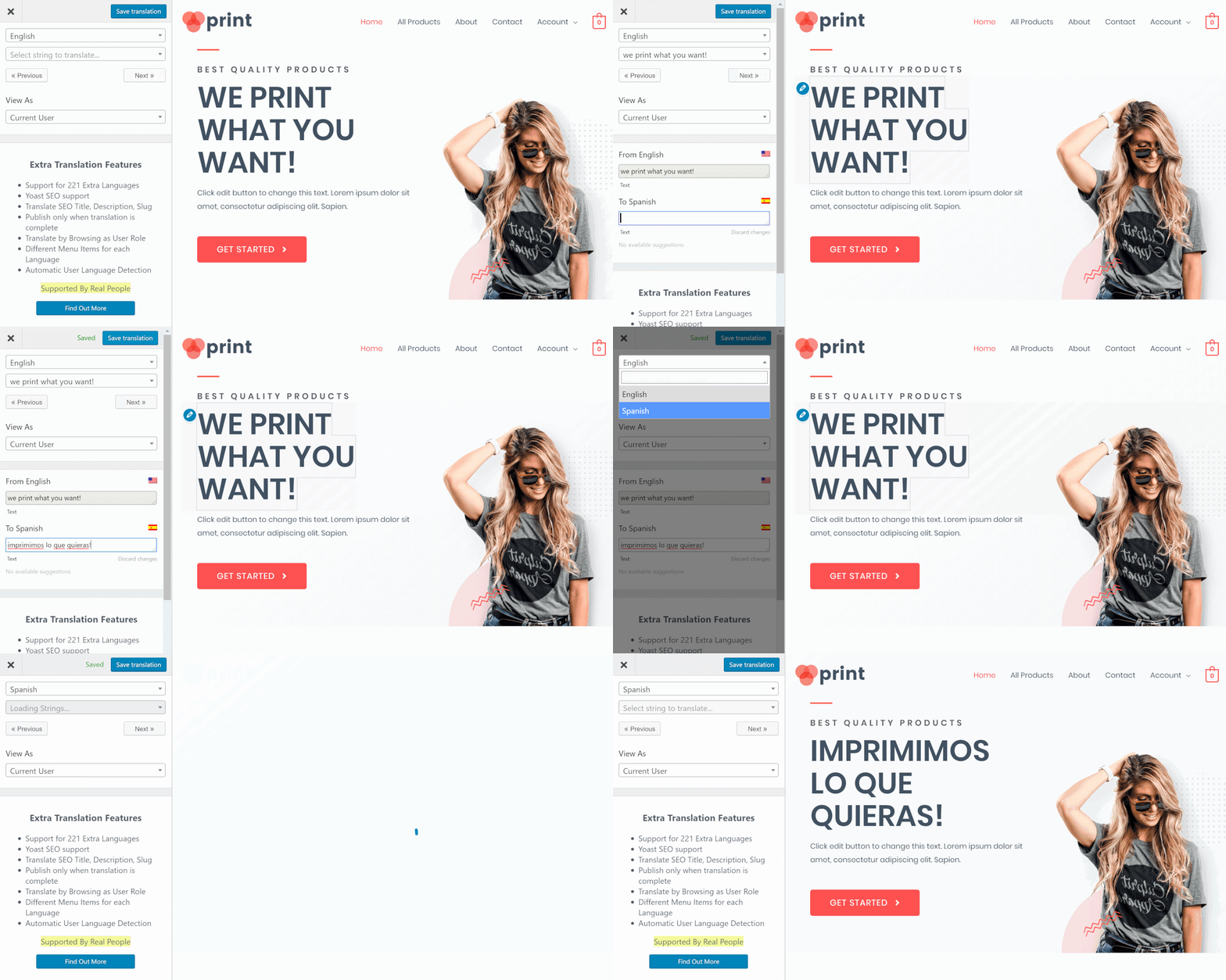
Come on!
Important considerations to translate your WordPress site
A multilingual site undoubtedly stands out in the market and can deliver good results with regard to getting access from people who speak in another language, if that is their strategy. However, if you want to get all the benefits of a multilingual WordPress site, you will need to look for some specific features in your chosen translation tool.
Features are important for:
1. Multilingual SEO
By translating your WordPress site, you may have a good Google placement for research in other languages. And the best of all is that you won't need create content new for this to happen, just redefine the ideas that already exist in a new language.
However, if you wish optimise your website's multilingual SEO in order for it to really have a good ranking on the search results, you will need to use a plugin that implements the main features such as:
- URL Structure indexable, usually a subfolder or subdomain.
- Multilingual support to sitemap.
- Hreflang support.
- Translatable SEO metadata.
Making the implementation of these techniques is very important for your site's content to be classified in all languages, so take a lot of attention in choosing and using the plug-in.
2. Front-end usability
Offering visitors the possibility to browse your site in the language they wish to offer a great experience for the user. After all, the vast majority of people prefer to browse the sites in their native language.
However, how will people choose the language they prefer? It's no use you dedicating yourself to having a multilingual website if you don't facilitate the location of language change.
To resolve this issue, look for a tool to help you add at least one front-end language alternator. Some tools also allow you automatically redirect visitors to their language with base on IP address or browser settings.

3. Full translation of the site
Your WordPress site is composed of many parts and details and it can be difficult to find a tool that makes your translation complete.
You need to worry about translating content in the WordPress editor, the text that is part of your theme, widgets and the contents of any plugin you are using.
With so much information, it may happen that some texts get lost in shuffle and not translated, especially when dealing with dynamic content (gettext). . Obviously, offering a multilingual site with untranslated content is not good.
In addition to providing a bad experience for the user, you can still pass on an unprofessional site image. So if you want to create a multilingual WordPress site, make sure your choice tool allows you to do the full translation.
The TranslatePress plugin
The TranslatePress is a WordPress translation plugin (one of the most used), which comes in the free and premium versions and meets all the above mentioned features.
It allows you to translate your site manually, automatically (developed by Google Translate and DeepL), or combining both options. This means you can do automatic translation and then do manual editing.
The way TranslatePress handles translations ensures that it can translate 100% of your site, including all the content of your theme and plugins.
It also creates a multilingual SEO base, with indexable versions of your website for each language, multilingual sitemaps and more. In addition, it allows you to translate your content with a visual translation interface that looks a lot like WordPress Customizer, which makes it super easy to manage all your translations.
After you finish translating your website, you can choose how to display the language alternator between the following options: floating button, menu item or widget.
Here's how it works!
But wait! If you've come this far and have already decided to hire a professional company to create your website, ask for a quote right now with WebSyd by clicking on the button below!
How to create a multilingual site in WordPress
Now that you know the theory behind running a multilingual WordPress site, let's explore the actual tutorial and show how you can start using o TranslatePress using the free version available on WordPress.org.
If you have no technical knowledge, don't worry. The basic configuration is simple to be made and will take aepnas a few minutes.
To start, install and activate the TranslatePress plugin on your site.
1. Choose the languages you want to use
Once you have enabled the plugin, go to Settings → TranslatePress to make the basic configuration.
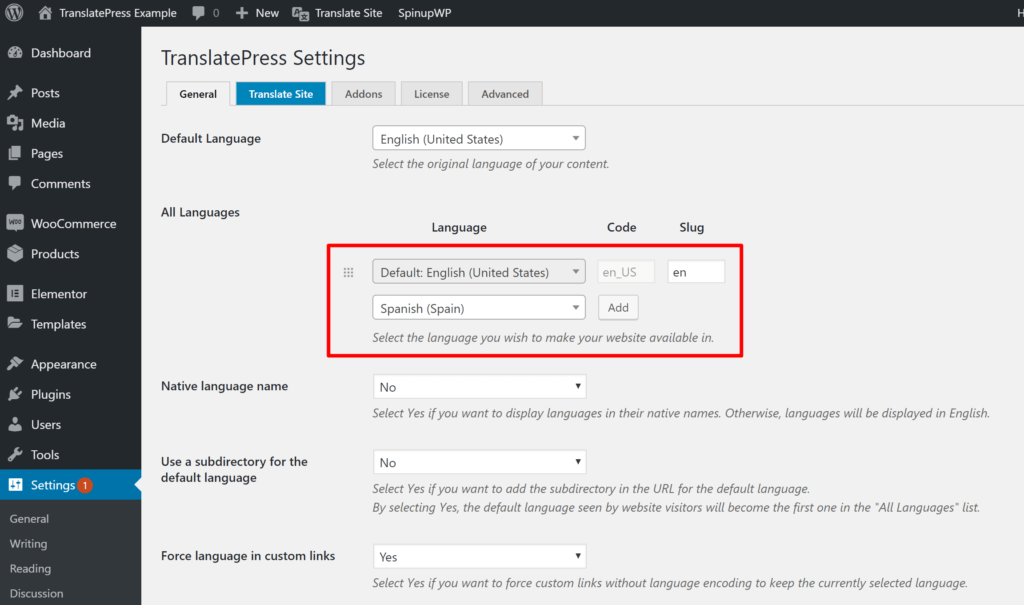
At this stage you can choose the current language of your website and to which languages you want it translated.
For example, if the current language of your site is English and you want to translate it into Spanish, you will make the configuration as follows:
2. . Choose how to translate the content
Option tautomatic raduction allows you to translate automaticede your site or WooCommerce store using Google Translate or DeepL.
If you want to set up Google Translator, it will be necessary generate a Google Translator API key to connect to the service, as well as in the image below:
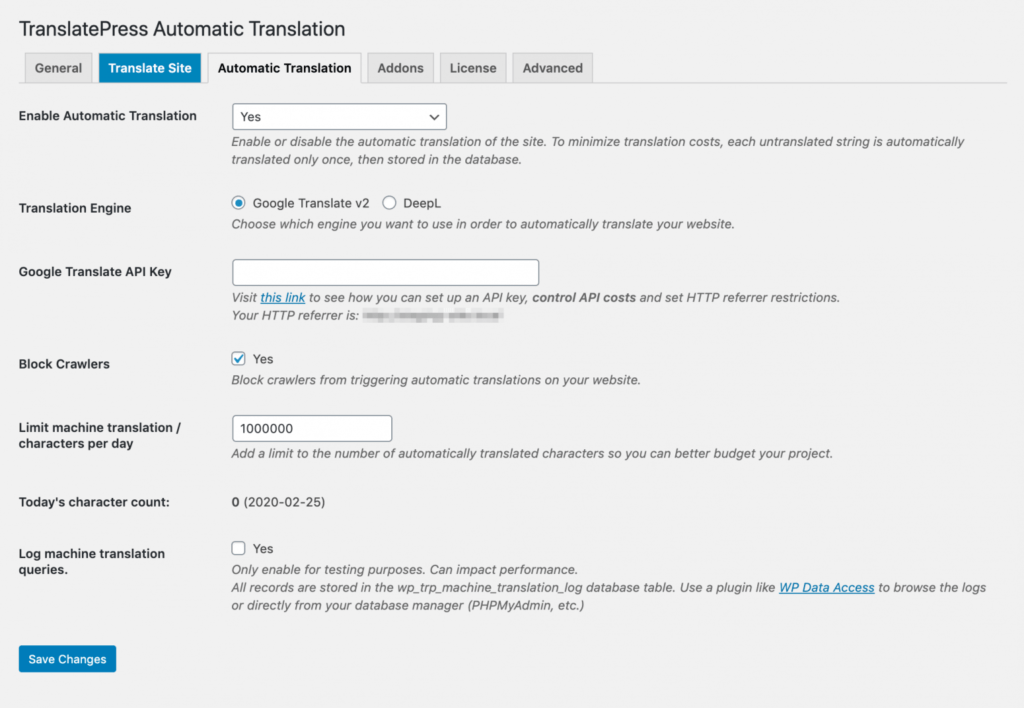
With this, TranslatePress will use the translation auto for translate all content of the site. . It is worth making it clear that you can always go back and adjust translations manually if necessary.
3. Configuration of the language alternator for your visitors
TranslatePress, by default, adds a floating language changer so that website visitors can choose the language(s) they wish to use.
In order for you to make the configuration of this feature, you should access the option of Language Alternator, which I displayed the language alternator through an access code or menu item:
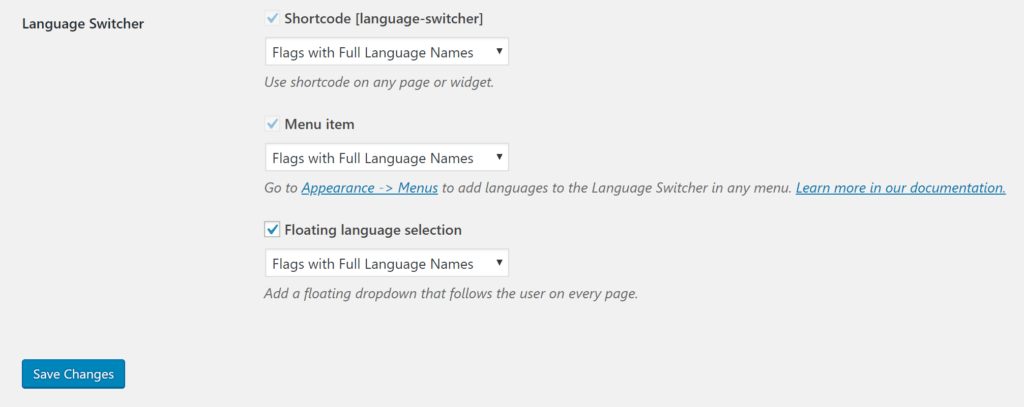
After making the changes you want, just click Save Changes .
4. Start translating the content
Now, you have installed the plugin on your site and are ready to start translating your content!
The great advantage of TranslatePress is that you can translate everything on your site only using a visual interface. That is, the translation of the content will be done in a simple way, in just a few steps.
To do this, you will need to access the page you want to translate and click on the button “Translate Page“ or “Translate Page” in English. This option is available in the WordPress administrator toolbar:

You can also see the floating language alternator that TranslatePress automatically adds.
After accessing the translation editor, you will find a very similar interface to WordPress, being very easy to adapt to it.
To edit or add any translation, you can:
- Pass the mouse over the editor in your site view and click on the pencil icon.
- Use the drop-down menu on the left to search or browse all the contents of the page.
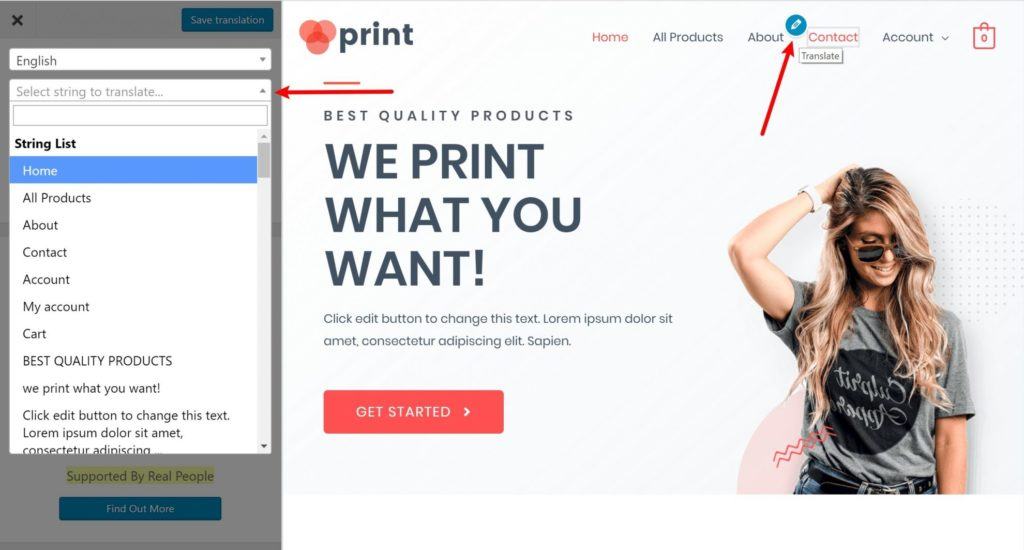
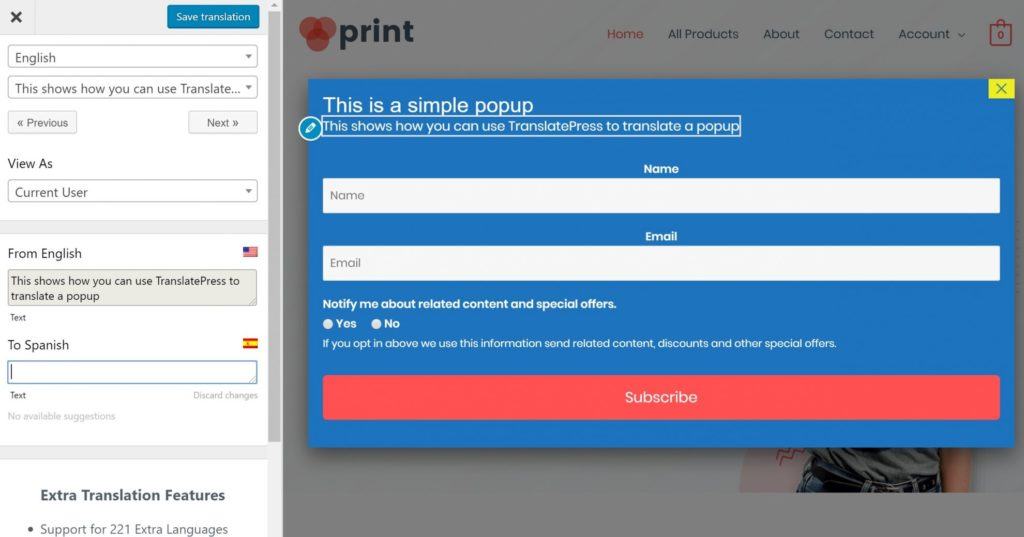
After selecting what you want to translate, you can do your edits right there in the sidebar:
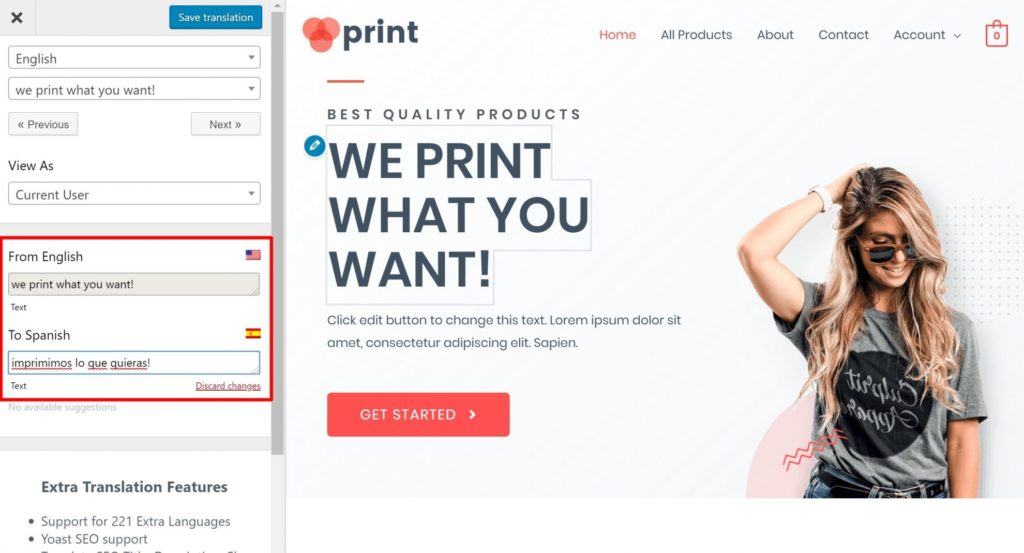
With this interface you can translate anything.
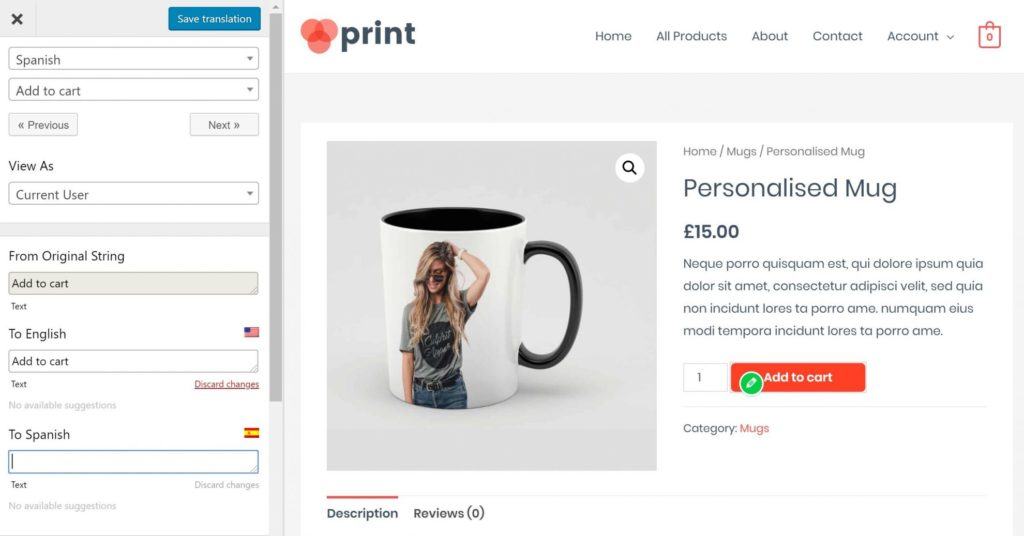
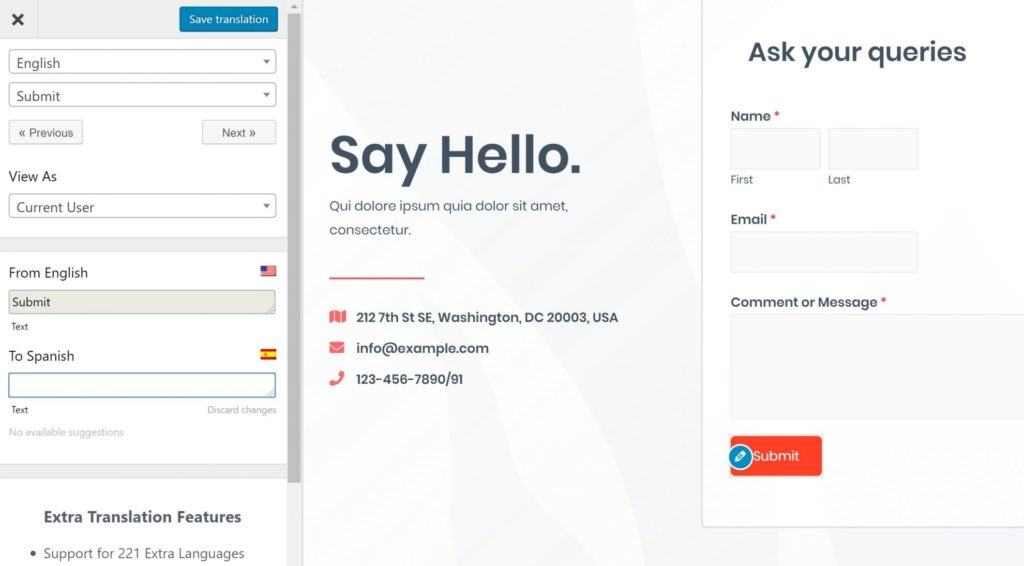
The example of step by step we are using is a page created with the Elementary builder. However, you can use the plugin to translate:
- Products in WooCommerce:
- A form:
- A pop-up:
- And you can even display different images based on user language, which also allows translating the image content:
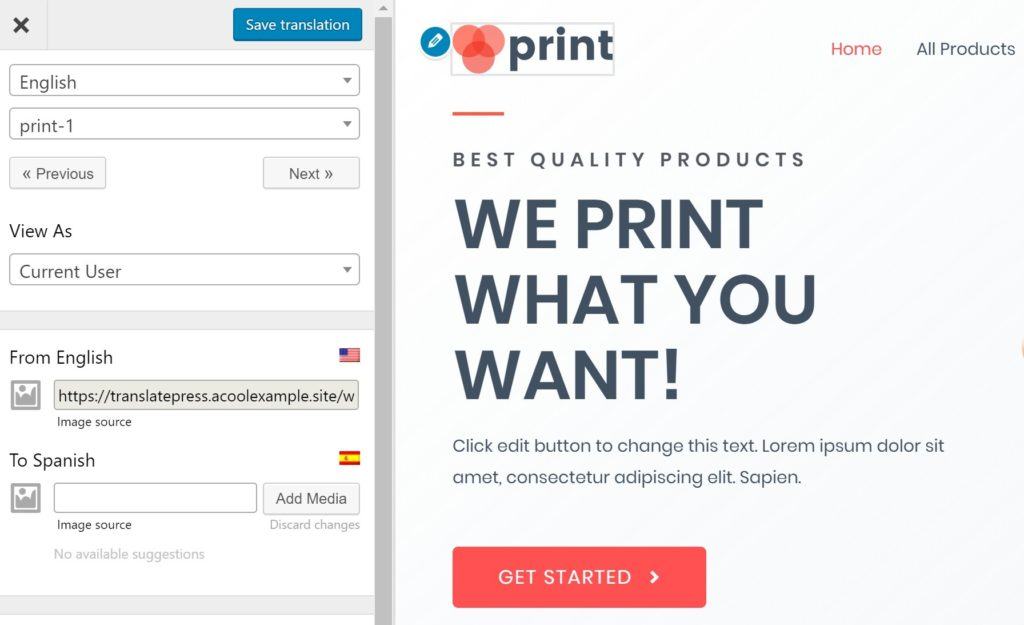
If the image is on your site, you can use TranslatePress to translate it, no matter where it comes from.
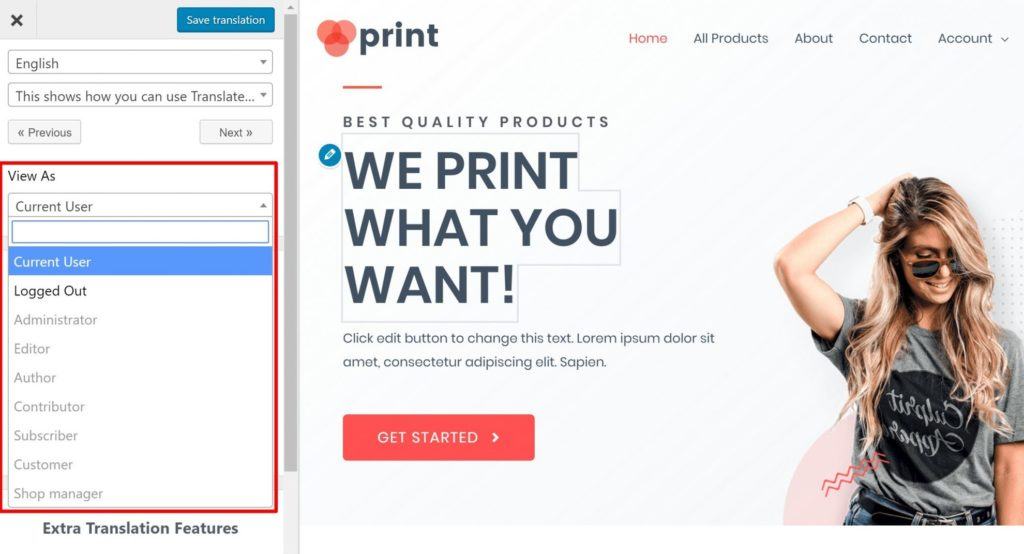
You can even browse through different types of users, which is super useful if you are running a association site or any other situation with registered users.
For example, if you have special content that only logged-in users can view, use the option View as to change the way you are browsing:
5. Update to Pro for more features (optional)
At this stage, you already have a multilingual WordPress site fully functional, without spending a penny.
However, TranslatePress offers a premium version with great benefits that we cannot overlook.
The first is full access to the SEO Pack . . While the free version creates an optimised SEO version of your site, SEO Pack allows you to further advance with the ability to translate URL slugs, titles, social media graphics tags, create multilingual site maps among several other features.
You can also add several languages to translate the content of your website, as well as other additions to:
- Automatic user language detection – automatically redirects the language to visitors based on IP address.
- Translator accounts – allow special translators to translate the content of your site without having to use WordPress back-end.
- Function Browse as user: Browse the site with different user functions, in addition to log/logoff option in free version.
- Language-based navigation: Show different menu items based on the language, rather than just translating existing menu items.
Get started today your multilingual WordPress site
By choosing the correct translation plugin, creating your WordPress multilingual site does not need to be frustrating.
With TranslatePress you can translate 100% of your website content in a very simple way. Using your visual interface, you can search by string or just click on the part of your website you want to translate. Practical, isn't it?
It works with regular WordPress content, in addition to all themes and plugins including page creators, pop-up plugins, form plugins, e-commerce plugins, custom field plugins and more.
With your multilingual website you will be able to reach many more customers and still have a great strategy to break objections on sales. . Start translating your website today!
Did you like our tips? Comment down!

Source: Translatepress.com
FREQUENTLY ASKED QUESTIONS
What are the advantages of a multilingual site?
“A multilingual site offers several advantages, such as increasing global reach, allowing you to connect with a wider audience in different geographic regions. Improves user experience for speakers of other languages and can increase the trust and credibility of your brand or business. It can improve SEO in different languages, increasing site visibility in local and international search engines.
How to make a multilingual site?
To create a multilingual website, you can start with a content management system (CMS) that supports multilingual like WordPress with specific plugins. It is necessary to translate the content of the site, including text, menus and graphic elements, into each desired language. The technical configuration should ensure that users can easily change their language and that the site automatically identifies the visitor's language preference. One should consider SEO optimisation for each language.
How much does a multilingual site cost?
The cost of a multilingual website may vary depending on the number of languages, the complexity of the site and the translation method used. Professional translations tend to have a higher cost, but offer better quality, while automatic tools may be more accessible but less accurate. There may be additional costs with technical implementation and SEO optimisation for each language. It is recommended to consult a web developer or an agency for a detailed budget based on their specific needs.

Caio Nogueira is a SEO, GEO, link building and Digital PR expert and co-founder of WebSyd, website creation agency and SEO consulting founded in 2016. It acts with organic search strategies, digital authority construction and brand optimisation for search engines and artificial intelligence platforms. Throughout his trajectory, he participated in more than 1000 projects involving SEO, website development, content marketing and authority acquisition through backlinks and Digital PR. At WebSyd, it participates in the planning of strategies to increase organic visibility, lead generation and presence of companies on Google and AI-based search engines. As an author, it publishes content on SEO, GEO, website creation, link building and digital authority, sharing analyses, strategies and practical experiences related to organic growth of companies. Its contents and contributions have also been published in companies and vehicles of technology and marketing such as Wix, HostGator, Duda, Neil Patel, Locaweb and E-Commerce Brasil.
View all posts


 Estimate the cost

