
33 tips for creating SEO-optimised content
Summary (TL;DR)
In this post, we talk about a complete checklist to optimise your blog posts, ranging from the title creation to SEO and UX optimisation.
We offer valuable tips to ensure that your content is effective for both readers and search engines, helping achieve your marketing goals.

Quick answer: content optimised for SEO is what responds well to the search of a person and makes it clear to Google. In practice: define the audience and the main keyword before writing, answer the question at the beginning, organize the text with subtitles, use the keyword and variations in a natural way in the title, introduction and subtitle, quote sources, add light images with descriptive alternative text and relevant internal links. Google does not require a minimum number of words: the text should be the size needed to cover the subject.
We will address tips ranging from basic optimisation to more advanced subjects such as choosing and using keywords. Ready? Then let's go!
Tips for writing blog posts
1. Create an initial title
Write at least one initial idea for the post title. Knowing the title before you start writing helps you focus on the subject and fulfill what you promise in the title.
2. Identify your audience
Identify exactly who you are writing the blog post for. When you know the exact audience of your content, it is much easier to be direct when writing. If you don't know your audience, use a buyer's personal model to start delineating your ideal reader.
3. Know your purpose
All digital content must be created with your marketing plan in mind. Therefore, one of the first things to do is to identify the main goal for your blog's marketing content (e.g. building brand knowledge, capturing email subscribers, boosting SEO, etc.).
4. Assign a keyword

Use tools that point to the difficulty of keywords to identify the best one to use in posting. The keyword must accurately represent the agenda to be written. It must be relatively popular, having a good volume of searches, and still bring good competitiveness between its site and competitors.
5. Use the keyword in the title
When writing your post title, enter the keyword on it. This will show a greater objectivity and harmony between the content and the agenda.
6. Assign some secondary keywords
This step is aimed at finding primary-related keywords, to use in your posting. Pick three or four keywords secondary and thus will show the search engines that their content can be more comprehensive for different ways of searching for the same subject.
7. Write what you need to cover the theme
Write as much as it takes to cover the topic completely. Google states that it does not have a preferred word count: fill the text to reach a number only worsens the reading.
8. Add Value
When writing your post, provide details, facts, statistics, conclusions, news and information that are valuable and useful to you.
9. Show me, don't say
An important part of this checklist to write blog content is using examples that help the public understand deeply and absorb the message you are trying to share.
10. Use the active voice
Keep the post interesting using an active voice. Avoid the passive voice, which can make the content seem dull.
The active voice is when the subject practices the action of the verb while the passive one suffers the action, such as “write your text always with an active voice” turns out to be an example of what you should do.
11. Write it so that it's easy to understand

Although the quality of writing should be high, it maintains simplicity. Do not use an excessively complex phrase structure or terms that are not known by most readers. Remember that most of those who will read your text have no training or technical knowledge.
12. Do not steal content
The content you create should always be original and never copied from another site. . Plagiaring content from other sites can lead to research penalties.
13. Provide adequate sources
If you use citations or information from other websites in your blog post, provide appropriate quotes by listing and linking to the source.
14. Use subtitles
Divide your content using subtitles across your post to separate text sections. These subheadings are also called H’s. H1 is title, H2 is subtitle and H3 is the subtitle of the subtitle. Some people still use H4, but it's not very common.
15. Use the main keyword in at least one subtitle
You should include the keyword in at least one subtitle. It must be inserted in a natural way.
16. Share the big paragraphs.
The digital content should therefore be readable and divide large blocks of text and paragraphs by adding paragraphs and blank spaces. Example: I have always tried to write paragraphs with a maximum of three to four lines.
17. Highlight important information.
One of the most important tips for writing content is to use formatting features that make postings easier to read. Use bold, italic or Highlight important information with underlined.
18. Add support charts
Its content should also include the addition of images, videos, embedded social posts, etc., which make posting more engaging and interesting.
19. Make sure the images are the right size
Very large images will reduce the upload speed of the site, always try to reduce each image to up to 300 KB and at most the width it appears on the page.
20. Write a descriptive alternative text for each image
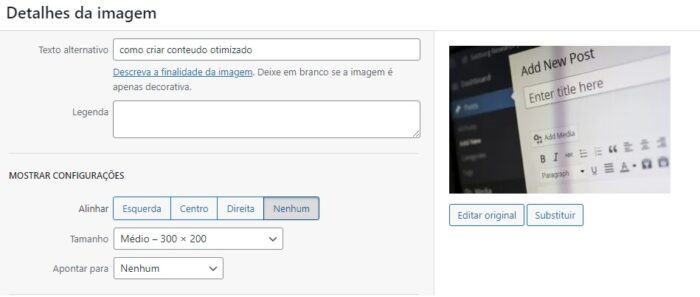
Describe in the alt attribute what the image shows. If the keyword fits naturally, great, but Google recommends avoiding excess keywords in alt, which also serves for those who use screen reader. This helps to Improve SEO from the blog.
21. Use the primary keyword in image file name and title
When adding images, also use the primary keyword in the name of the image file, with words separated by hyphen (e.g. content-optimised-seo.jpg).
22. Avoid copyright infringement of images
Check to ensure that you have the right to publish the media to prevent copyright infringement with digital photos and videos. A good solution is to use a copyright-free image deposit, such as: Pixabay.
23. Use the main keyword in the meta description
In addition, include the main keyword in an original meta description. Google does not define fixed limit and cuts the stretch according to the screen space, which usually happens close to 160 characters; so put the essentials at the beginning.
24. Use the main keyword in the first paragraph
Another Optimization Tip SEO OnPage it is to include the main keyword in the first paragraph of the text, because search mechanisms tend to give more value.
25. Use the keyword naturally in the text
Don't get involved in too many keywords. Use the term when it makes sense in the phrase; there is no ideal keyword density.
26. Use each secondary keyword at least once in the text.
Support the primary keyword by adding each related keyword at least once in posting.
27. Add links to relevant internal pages
Always try to add links to other posts and pages posted on your website, adding relevant hyperlinks about the subject you are writing.
28. Add links to other high-quality web pages
Add relevant output links to other high-quality websites to give credit and create links from reliable sources.
29. Set external links to open a new page
Review the external links on your page and configure them to open in a new tab if you prefer to keep readers on your site. This is a choice of user experience and does not change SEO; when using target=”_blank”, include rel=”noopener”.
30. End with a decoy sentence
As all good blog posts are written with one goal in mind, end with a decoy phrase that tells the reader what you want him to do next, such as accessing other related and relevant content.
31. Write alternative agendas
Go back to the title and write a few more variations to create a more powerful title. Choose the best title among your new options. Make sure it includes the main keyword and is concise and attractive. The final title must have less than 60 characters to be fully displayed in the search.
32. Optimize social sharing

Encourage readers to release their posts by creating shareable content that includes button-on links so users share directly on social networks like WhatsApp, LinkedIn, Facebook and X (formerly Twitter).
33. Check SEO on the page.
Once the post is posted, make sure you don't miss any SEO optimisation steps by running it through tools like Semrush or Ahrefs. . Another very important tool is the Yoast, which helps to show possible errors and failures in your text.
Conclusion
Whenever you think about writing content to your blog, or page, it's good to keep an eye out for all the tips that are present here, as they can help and greatly your content to be seen by your target audience in search engines.
As well as information quality, UX (user experience) is extremely important and makes all the difference at the time of the netizen read its content. So we can say that this is one of the main factors of positioning and relevance of a page/blog post to the “eyes” of Google algorithm.
We hope that you have taken advantage of the tips, and if so, be aware for more publications on our blog.
Want a content plan with the right keywords for your blog?
FREQUENTLY ASKED QUESTIONS
Why is it important to create an initial title before writing the post?
Creating an initial title helps to focus on the subject and ensure that content delivers what it promises, facilitating the organization of ideas.
How to identify the target audience for a blog post?
To identify the target audience, use a buyer's personal model, which helps to outline the reader's ideal profile and direct writing more effectively.
What is the importance of using keywords in content?
Key words are essential for SEO optimisation, as they help search engines understand the theme of posting and improve content visibility in search results.
What should I do to ensure that my content is original?
To ensure the originality of content, create unique texts and never copy from other sites. In addition, provide the appropriate citations and links when using third party information.

Caio Nogueira is a SEO, GEO, link building and Digital PR expert and co-founder of WebSyd, website creation agency and SEO consulting founded in 2016. It acts with organic search strategies, digital authority construction and brand optimisation for search engines and artificial intelligence platforms. Throughout his trajectory, he participated in more than 1000 projects involving SEO, website development, content marketing and authority acquisition through backlinks and Digital PR. At WebSyd, it participates in the planning of strategies to increase organic visibility, lead generation and presence of companies on Google and AI-based search engines. As an author, it publishes content on SEO, GEO, website creation, link building and digital authority, sharing analyses, strategies and practical experiences related to organic growth of companies. Its contents and contributions have also been published in companies and vehicles of technology and marketing such as Wix, HostGator, Duda, Neil Patel, Locaweb and E-Commerce Brasil.
View all posts


 Estimate the cost

