
How to Do Not Index the Page on Google and Avoid It Appearing in Search
Summary (TL;DR)
Find out how to protect data and optimise your site's SEO with indexing control techniques!
Here you will learn what it means to index a page on Google, the strategic reasons for opting for non-indexation and the main methods to ensure that only relevant content appears in search results. From avoiding penalties for duplication of content to protecting private or temporary areas, the text explains how to implement essential practices for efficient management of your website.
We explore indispensable tools such as meta tags in index, robot.txt file settings and Google Search Console, showing how to use them in a practical and effective way.
With insights into common errors and plugin recommendations like Yoast SEO, you will have all the information to ensure that your site is always optimised, secure and aligned with SEO best practices. Check out and raise control over your online presence!

Quick answer: to not index a page on Google, use the meta tag robots with noindex (or the X-Robots-Tag header) and leave the page released in robots.txt, so Google can read the tag. To quickly remove an already indexed URL, use the Search Console removal tool as well. The robots.txt alone does not prevent indexing, and for duplicate pages the path is to canonical tag.
With over 8 billion research processed daily, Google is one of the biggest engines of opportunity to boost sales, increase visibility of a brand and attract new audiences. But despite this huge volume of searches, there are situations you might want to do not index the page on Google.
Whether to protect private data, keep test areas off the radar or avoid penalties for duplicate content, choosing not to index a page can be crucial for managing a website. The process may seem technical, but it is essential for those who want to have more control over what is displayed in the searches.
Do you want to know how this works and the reasons for adopting this practice? Continue with us and check out the full content!
What does it mean not to index a page?
Index a page means to allow search engine robots, like Google, read and add this page to the index of results displayed to users. These robots, also called crawlers, go through the internet sites, analyze the content and determine whether it should be shown in a survey.
Indexed pages appear in the results, while Unindexed pages are intentionally blocked, either for technical or strategic reasons.
Opt by do not index a page on Google it can be an important decision to protect data, avoid confusion with duplicate content or keep irrelevant pages out of public reach. Let's understand some of the most common reasons for this choice:
Test areas
The test areas of a site are used for testing, adjusting and revisions of features. These environments usually contain provisional or incomplete content, which should not be displayed in the search results.
Leaving these indexed pages can cause confusion for users and even harm the site's SEO. Block indexation from these areas helps to ensure that only the final and approved content is visible.
Duplication of content
Duplicate pages can be harmful to SEO, as they confuse search engines on which version to prioritize in the results. . When a site has repeated versions of the same page or content, the best practice is to prevent duplicates from being indexed.
For duplicate pages, the path is to canonical tag pointing to the main version or a 301 redirect. O robot.txt file is not good for this: if Google does not track the page, it also does not see the indication of the main version.
Private pages
Not all content of a website is intended for the public. pages with sensitive information such as internal data, administrative portals or confidential documents; need to be protected.
Blocking the indexation of these pages is essential to prevent them from being accessed by unauthorized users or inadvertently displayed in search results. In addition, this practice reinforces the security and privacy of the site.
Main methods to avoid indexing pages
If you need to stop that right pages of your site appear in the search results, there are effective methods to this. Next, we will detail the main strategies, how to use meta tags noindex, configure the robot.txt file, use Google Search Console and implement HTTP headers.
Each of these techniques has its particularities and can be applied according to the need of your website. Shall we go?
Meta tag noindex
Meta tag noindex is one of the most direct ways to prevent a page from being indexed by search engines. This tag is added to the HTML code of the page and instructs search robots to ignore the content during indexing.
To implement, just include the following code in the section <head> from the page you want to hide:

This tag can be combined with other attributes such as “nofollow”, which prevents robots from following links within the page. A practical example of application would be in thank you pages after a purchase, where indexing does not add value to the user and may even cause confusion.
File robots.txt
The robot.txt file is an important tool to control the access of search robots to the pages of your website. It works as a guide that instruct which URLs can or cannot be accessed by the crawlers.
To block specific pages, you can use the command Dysallow in the robot.txt file, as in the example below:
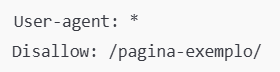
It is worth noting that the Dysallow prevents the robots from accessing the URL, but it does not prevent it from being indexed if it has already been found by another method, such as external links. For greater safety, it is recommended to combine the use of meta tags noindex with robots.txt.
Google Search Console
The Google Search Console It's a powerful tool for manage the presence of your site in search results. . It allows know if the site is indexed and possible indexing problems.
If a page has already been indexed and you want to remove it, Search Console offers a specific functionality for this.
In the panel, go to “Removals” and then to “New Request”, as in the image below:
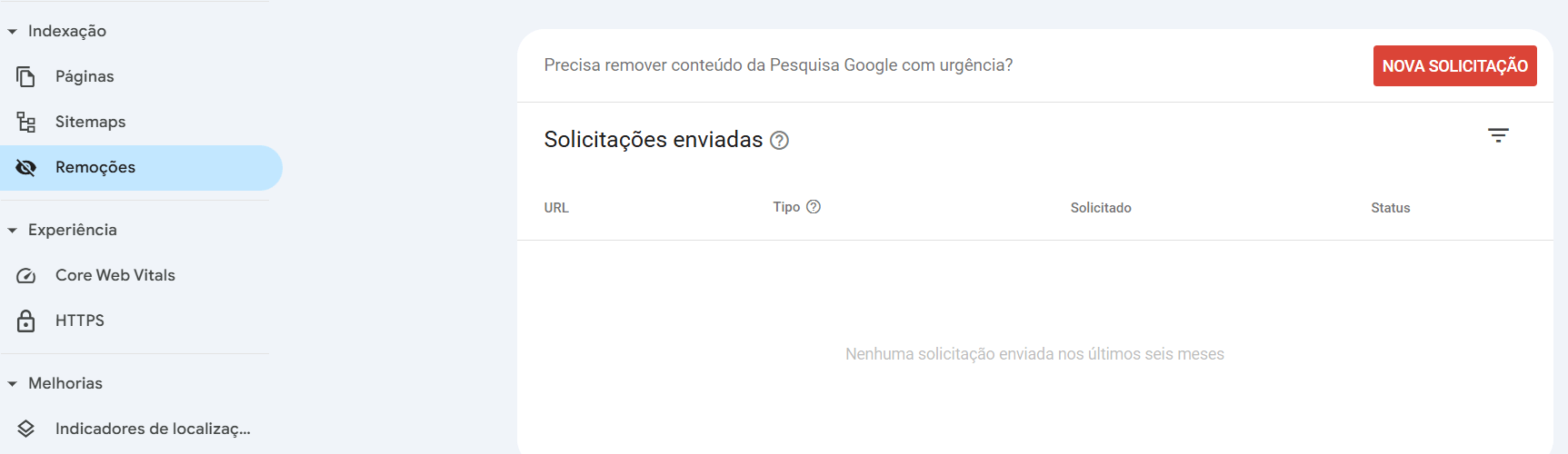
Enter the link of the page you want to hide, check the desired option below and confirm under “Next”.
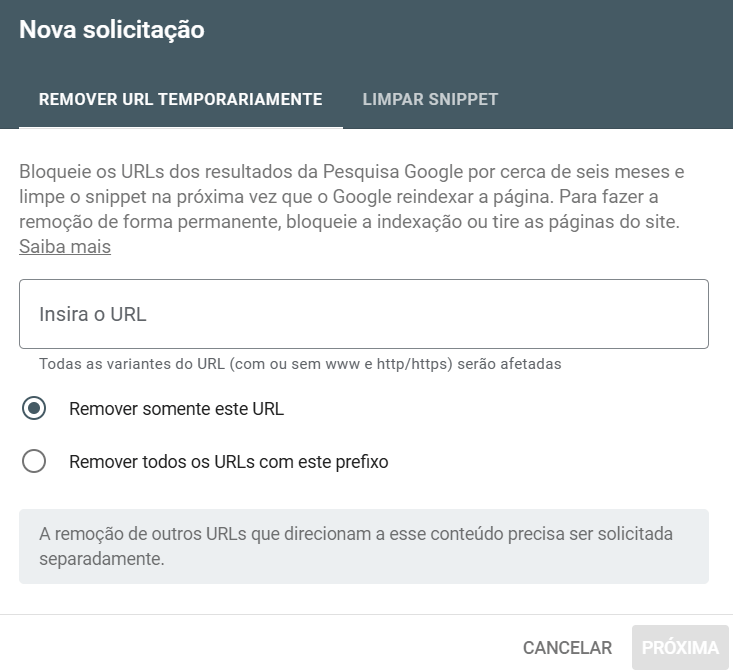
In addition, it is possible to monitor whether the pages are blocked correctly or if there is any indexing problem. This method is ideal for temporarily removing content while you adjust the settings on the site.
HTTP Headers
Another way to prevent page indexing is by using HTTP headers on the server. This technique is configured directly in the web serverLike Apache or Nginx, and instruct robots not to index the page by accessing it.
To implement, simply add the following line to the server configuration file:

This method is particularly useful in situations where you do not have direct access to the HTML code of the page or want to apply the rule globally to an entire category of the site.
Scenarios where not indexing makes sense
There are specific situations where deindexing a URL on Google is the best choice to protect information, avoid confusion or improve SEO performance. For example, login or administrative pages they do not need to appear in the search results, since they are intended only for internal users and can represent security risks if exposed.
Another scenario is the duplicate content control, which can cause penalties on the searchers. If the same content appears on multiple pages of your site, search engines may not know which to prioritize, affecting your authority.
Finally, temporary pages, how landing pages experimental or specific campaigns can be hidden to prevent users from finding them before the right time.
Recommended tools and practices for managing indexing
For WordPress sites, plugins like Yoast SEO and RankMath they are indispensable to manage indexing of pages. They allow you to apply the meta tag noindex directly through the WordPress interface, without the need to edit the code manually. In addition, they offer SEO information that helps to keep your website optimised.
Tools like Google Search Console are also useful to monitor and avoid indexing. It allows you to check which pages are blocked, identify problems and fix them quickly. The use of plugins combined with Search Console forms a robust strategy to manage indexing.
Common errors while trying to avoid indexing
When setting up page deletion, it is important to avoid errors that may compromise your goals. A common mistake is incorrectly configure meta tag in index, how to apply it only in parts of the site or forget it completely on pages that need to be hidden.
Another frequent problem is the inappropriate use of robots.txt. . Many administrators try to block content already indexed using only the Dysallow, which does not remove URLs from Google results. For this, it is necessary to combine methods such as the use of tools to block indexing and removal requests in Search Console.
In addition, the lack of monitoring It's a critical mistake. Without follow-up, you may not notice that sensitive pages have been indexed again, compromising the site's privacy or strategy.
Final Considerations: How to Do Not Index Page on Google
Avoiding page indexing on Google is a key practice to protect sensitive information, optimise SEO, and control content displayed on searchers. Using tools such as SEO plugins, Google Search Console and robot settings.txt can facilitate this process.
Remember to regularly review the indexing settings of your website. Frequent adjustments ensure that your most important pages are being prioritized in the search results, while those that should not be displayed remain hidden effectively.
Ensure that your website is always optimised and secure with the WebSyd, talk to our experts and raise your online presence to the next level!
FREQUENTLY ASKED QUESTIONS
What is an unindexed site?
An unindexed site is the one that search engines such as Google do not display in search results. This can occur by intentional settings, such as using meta tags noindex, blockages in robots.txt, or even due to technical problems that prevent tracking and indexing.
How do I know if my website has been indexed?
You can check if your website has been indexed in Google by typing site:seudominio.com in the search bar. This will display all pages of your currently indexed site. Tools such as Google Search Console also provide detailed information on site indexing.
How not to index a website on Google?
Use the meta tag robots with noindex (or X-Robots-Tag header) and leave the pages released on robots.txt, so Google can read the tag. Robots.txt alone prevents tracking, but the URL may still appear in the results.
How to remove indexing from Google?
Apply the meta tag to the index on the page and, to take it out urgently, use the Removals tool from Google Search Console, which hides the URL for about six months. Do not block the page on robots.txt before Google reads the noindex, otherwise it does not see the tag.

Caio Nogueira is a SEO, GEO, link building and Digital PR expert and co-founder of WebSyd, website creation agency and SEO consulting founded in 2016. It acts with organic search strategies, digital authority construction and brand optimisation for search engines and artificial intelligence platforms. Throughout his trajectory, he participated in more than 1000 projects involving SEO, website development, content marketing and authority acquisition through backlinks and Digital PR. At WebSyd, it participates in the planning of strategies to increase organic visibility, lead generation and presence of companies on Google and AI-based search engines. As an author, it publishes content on SEO, GEO, website creation, link building and digital authority, sharing analyses, strategies and practical experiences related to organic growth of companies. Its contents and contributions have also been published in companies and vehicles of technology and marketing such as Wix, HostGator, Duda, Neil Patel, Locaweb and E-Commerce Brasil.
View all posts


 Estimate the cost

