
How to find out if my website is indexed on Google
Summary (TL;DR)

We often pay attention to day-to-day work and forget to take care of the little details of our business. One such detail may be about the indexation from your website. You have asked yourself, for example: is my site indexed in Google?
It may seem difficult to happen, but we here at WebSyd face this problem until recently. From September 2023 until February 2024 our website was not indexing the posts of our blog.
This caused a great problem in our positioning of several pages, and especially the new ones that did not rank because they were not indexed. This has caused us to lose several leads for almost five months!
Fortunately we have managed to resolve this situation, and today we are here to help you solve it too!
Did your website stop indexing out of the blue? He never indexed? Are you scared if that happens and you don't know what to do? Continue reading this content of ours and we will show you how to solve this problem in a very simple and quick way!
What is Site Indexation:
Google indexing sites is a fundamental process to ensure that online content is available and accessible to users around the world.
In simple terms, indexing is the act of adding web pages to Google's database, allowing them to be found and displayed in search results when users look for relevant information.
Consider an example:

Imagine that Google is a huge virtual library, and indexing is the process of cataloging and organizing all available books (or web pages) so that they can be easily found by readers (or users).
A key aspect of site indexing is the role of Google crawlers, also known as Googlebots.
These bots are like digital explorers that run the web continuously, following links from one page to another and collecting information about the content of each page they find.
Crawlers analyze the text, images, links and other elements of a web page to understand what it is about and determine its relevance for users' search queries.
Once Googlebot discovers a new page, it adds it to Google's index, making it available to be displayed in the search results.
The importance of indexing for the online visibility of a website cannot be underestimated. Without proper indexing, your site may be virtually invisible to users looking for information related to your content.
By ensuring that your site is indexed by Google, you significantly increase your chances of being found by the users who are actively searching for what you have to offer.
This all makes indexing the first crucial step in putting your website on the web spotlight and ensuring its online presence.
Methods to Check Index:
There are several ways to check whether a site is indexed on Google, each offering valuable insights into the online visibility status of your website. Below, we explore three main methods to perform this verification:
Direct Google Search:
A simple and direct method is to perform a direct search on Google using the operator “site:”, followed by the URL of the site you want to check. For example, by typing “site:example.com” into Google’s search bar, you will see a list of all the pages on e.g.com site that have been indexed by Google. Look:

If your site appears in the results as in the image above, this means that at least some of your pages are indexed.
Google Search Console:
The Google Search Console it is a free tool offered by Google that provides detailed information about the performance of your site in search results.
By checking your Google Search Console website, you can access specific reports on indexing status, including how many pages have been indexed, whether there are tracking problems and more.
Just access Google Search Console, add your website and check the indexing status in the coverage section.
Robots.txt File Check:
- Create a file robots.txt: Use a simple text editor like Notepad or TextEdit. Save the file with the name “robots.txt”.
- Add rules to robot.txt file: This file controls which parts of your site can be tracked by search engines. Each rule is an instruction on what to allow or block.
- Upload the file to the root of your website: The robot.txt file should be at the root of your site to work properly. For example, if your website is www.example.com, the robot.txt file should be accessed at www.example.com/robots.txt.
- Test the robot.txt file: After uploading, check that it is publicly accessible and if search engines can analyze it.
Here is a simple example of a robot.txt file:
makefile
Copy code
User-agent: Googlebot
Dysallow: /nogooglebot/
User-agent: *
Allow: /
Sitemap: https://www.example.com/sitemap.xml
What does that mean?
- Googlebot cannot track URLs starting with https://example.com/nogooglebot/.
- Other user agents can track the entire site.
- The sitemap is at https://www.example.com/sitemap.xml.
Be sure to follow formatting and location guidelines to ensure that the robot.txt file works properly. If you have any questions about how to do this, please contact your hosting company.
Remember that indexing is just the first step towards a successful online presence, and it is important to continue monitoring and optimizing your website to ensure its continuous relevance and visibility.
Indication Problem Solution:
Google indexing can be a complex process and sometimes obstacles arise that may prevent your pages from being properly indexed. Here are some common issues that may affect your site indexing and suggestions to resolve them:
Errors in Robots.txt File:
The robot.txt file is a powerful tool to control Google's crawlers access to your website. However, errors in the robot.txt file can inadvertently block crawlers' access to important parts of your site.
Check your robot.txt file for errors and make sure that you are not accidentally blocking access to pages you want to index.
Fix any errors found to ensure that your website is fully accessible to Google crawlers.
Tracking Problems:
If Google encounters problems while tracking your site, it may affect your ability to index your pages properly.
Check for tracking problems using Google Search Console and solve any identified issues such as broken pages, incorrect redirections or slow loading of pages.
Maintaining a clean and well-organized website can facilitate the work of crawlers and improve indexing your site.
Google penalties:
In some cases, your site may be penalized by Google for violating its quality guidelines. This may result in a decrease in your site's rating of search results or even complete removal of Google index.
If you suspect that your website has been penalized, check Google Search Console for any notices or penalty messages and take the necessary steps to correct any problems of compliance with Google guidelines.
When facing site indexing problems, it is essential to act quickly to solve any problems and ensure that your website is properly indexed by Google.
By correcting errors in the robot.txt file, solving tracking problems and ensuring compliance with Google guidelines, you can maximize your website's online visibility and achieve better results in search results.
Always remember to regularly monitor your site indexing status and take proactive action to resolve any problems that may arise.
I've done all this and it hasn't worked out, so what now?
Now we have our gold tip! If none of this we talked about solves your problem, you can use an indexing tool.
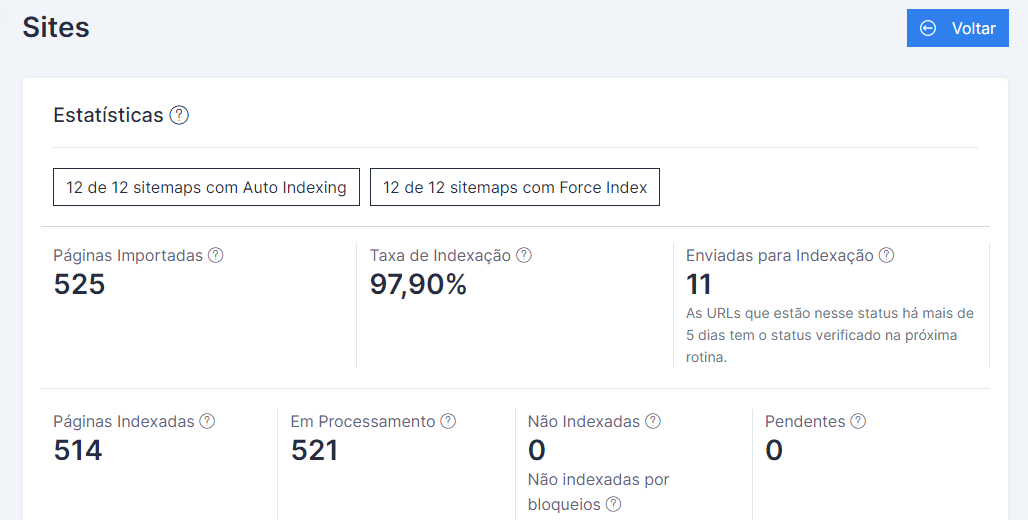
We also tried to index our posts in every way we showed them in this post, but nothing worked. Then we discovered a method that forces indexing and that worked in a few hours. This is the tool. SCP Turbo.
Look at a print with our result:
According to the tool's own website, it acts as follows:
“When you first connect and activate a website, we search all your URLs, check the status of the index up to 2,000 of them and extract your search analysis data from the last 30 days.
After that, we monitor your URLs daily in search of new pages, new index status and new analytical research data.”
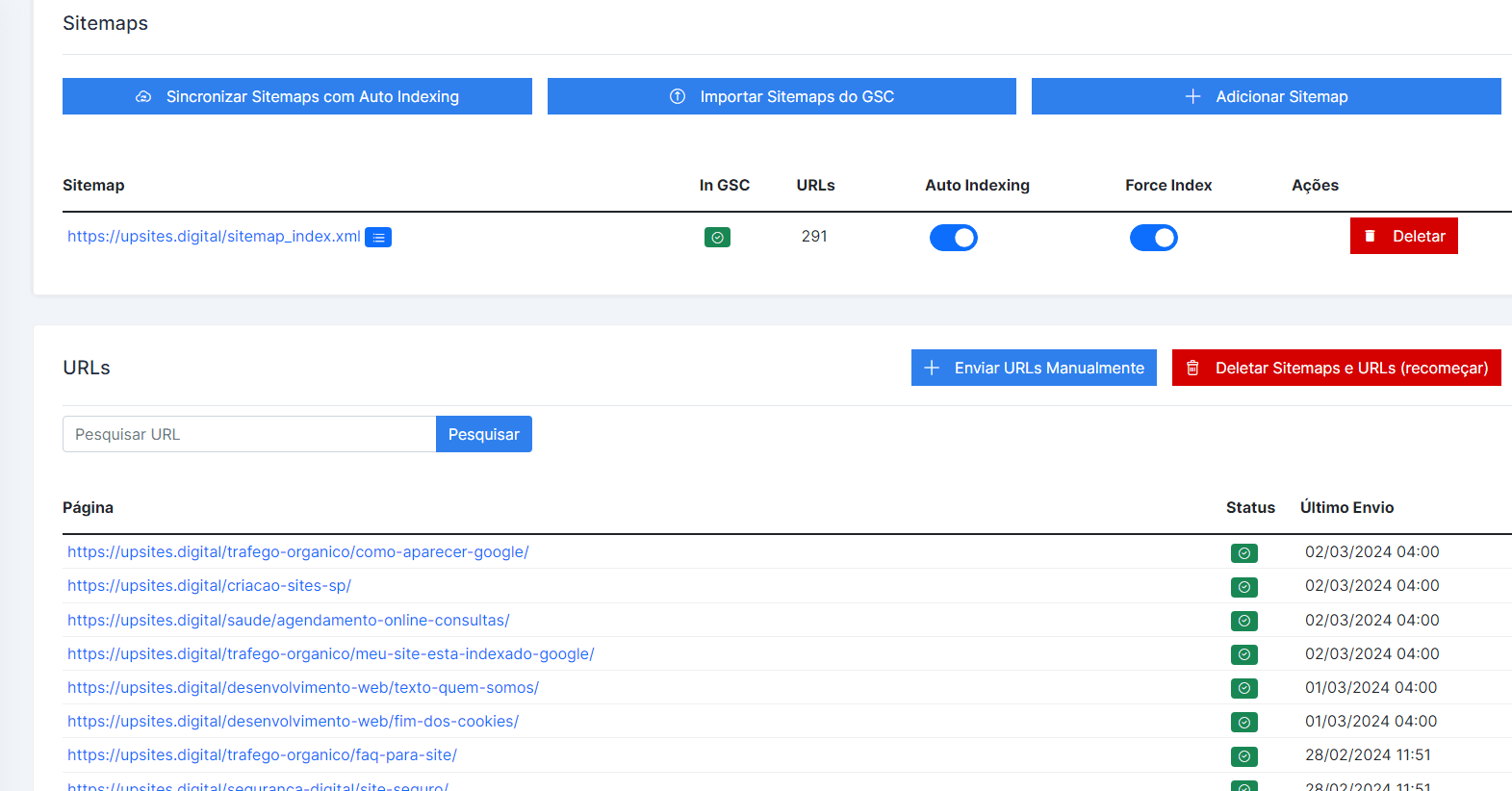
In it you will log in with your account, and register your website. The process is very simple. With the site registered, it already starts to work and soon its pages will all be indexed.
How long does a new site take to appear on Google
In WebSyd projects, the new site usually appears on Google about 2 days after the final release.
Conclusion:
When we arrive at the end of this article, it is important to review the main points addressed about site indexing on Google.
Indexation is the fundamental process that allows your website to be found and displayed in search results, thus ensuring your online visibility and ability to attract qualified traffic.
We highlight the importance of checking your site indexing regularly to ensure its visibility in Google's search results.
By means of methods such as direct Google search, the use of Google Search Console and verification of the robot.txt file, you can monitor your site's indexing status and identify possible problems that may be affecting your online visibility.
Finally, we strongly encourage website owners to use the tools such as SCP Turbo and methods presented in this article to check and resolve indexing problems of their websites on Google.
By taking proactive steps to ensure that your site is properly indexed, you can maximize your online presence and achieve better results in Google search results.
Always remember that indexing is just the first step towards an effective online presence.
Continue monitoring and optimizing your website is essential to ensure its continuous relevance and visibility.
With effort and dedication, you can ensure that your website excels in the online setting and achieves its maximum potential for success.
FREQUENTLY ASKED QUESTIONS
What is site indexing on Google and why is it important?
Google site indexing is the process by which Google adds its pages to your database, making them available to appear in search results. It is important because it ensures that your website can be found by users seeking relevant information, increasing visibility and attracting qualified traffic to your business.
How can I check if my website is indexed on Google?
You can check if your website is indexed on Google in various ways:
- Direct Google Search: Enter “site.com” in the Google search bar to see all indexed pages.
- Google Search Console: Use this free tool to access detailed reports about your site's indexing status.
- Robots.txt File Check: Make sure this file is not blocking Google crawlers access to their important pages.
What to do if my website is not being indexed by Google?
If your website is not being indexed, follow these steps:
- Check and fix the robot.txt file to make sure you're not blocking important pages.
- Use Google Search Console to identify and correct tracking problems.
- Fix duplicate content problems using canon tags.
- If necessary, use tools like SCP Turbo to force the indexation of their pages.
How can SCP Turbo help index my website?
SCP Turbo is a tool that can force the indexing of your website's pages quickly and efficiently. By registering your site in the tool, it checks the indexing status of its URLs and monitors new status and analytical data daily. This helps ensure that your pages are indexed and visible in Google search results within a few hours.

Caio Nogueira is a SEO, GEO, link building and Digital PR expert and co-founder of WebSyd, website creation agency and SEO consulting founded in 2016. It acts with organic search strategies, digital authority construction and brand optimisation for search engines and artificial intelligence platforms. Throughout his trajectory, he participated in more than 1000 projects involving SEO, website development, content marketing and authority acquisition through backlinks and Digital PR. At WebSyd, it participates in the planning of strategies to increase organic visibility, lead generation and presence of companies on Google and AI-based search engines. As an author, it publishes content on SEO, GEO, website creation, link building and digital authority, sharing analyses, strategies and practical experiences related to organic growth of companies. Its contents and contributions have also been published in companies and vehicles of technology and marketing such as Wix, HostGator, Duda, Neil Patel, Locaweb and E-Commerce Brasil.
View all posts


 Estimate the cost

