
Site Recast Checklist: 15 Project Steps
Summary (TL;DR)
In this post, let's talk about the importance and essential steps of reformulating a website. Recasting a website is not only changing your appearance, but involves strategic actions to improve user experience, performance and SEO.
This guide presents a checklist with 15 detailed steps to successfully conduct renewal, through performance analysis, layout planning, content production and usability testing, ensuring that the site meets public expectations and technical requirements.

Quick answer: the essential steps of a reformulation are: diagnosis of the current site, definition of objectives, analysis of competitors, URL map and redirections 301, new architecture, content, responsive design, SEO on-page and technical, speed, accessibility, testing and post-launch monitoring. The most critical point of not losing traffic is the redirecting map. At WebSyd, custom-made websites depart from R$5,000 and are ready in about 45 business days; online stores take about 60 days.
The recast of the site is not just giving a new face to the look. It involves a strategic and technical work that aims to improve the performance, user experience and reach of your company. If your site has an outdated layout, navigation difficulties or speed problems, it's time to think about a complete recast. But where to begin?
This guide presents a 15 essential steps detailed checklist for you to rephrase your website successfully. Our goal is to simplify this process by presenting all the steps clearly and practically, so that anyone can understand and apply.
Want to turn your site into a powerful marketing and sales tool? Learn what to do and which tools and features to aggregate throughout the project.
So let's dive into this step by step of reformulation!
Understanding the Need for a Recast
Recasting a website is necessary for several reasons. In many cases, companies realize that their website is no longer reaching the expected results or face recurring user complaints about usability. Over time, technologies change, designs evolve and users' expectations increase. A site that was created five years ago, for example, may have become outdated both visually and technically.
An old website can damage the image of the company and, worse still, lead to loss of visitors and business opportunities. Performance problems, poor SEO, lack of responsiveness for mobile devices and outdated design are just some of the warning signals.
Signs that your site needs a recast
If you are not sure if your site needs an update, here are some clear signs that it is time to invest in a recast:
- Low performance: If your site is slow to load, visitors will probably leave before they even see its content.
- Out-of-date design: An old-fashioned design can pass a negative image and affect the credibility of your business.
- Lack of responsiveness: With increased use of mobile devices, your website needs to adapt to all types of screens.
- Navigation problems: If users are having trouble finding what they're looking for, it's time to reorganize the information.
- Traffic drop: If your site is showing a drop in the number of visitors, it may be a sign of SEO problems or lack of update.
By identifying these signs, it is essential to plan a strategic reformulation, following a checklist that will ensure that your new site meets the expectations of the public and technical requirements.
Site Recast Checklist: 15 Essential Steps
Current Performance Analysis
Before any change, it is essential to evaluate the current state of your site. That involves one. full audit, where you check:
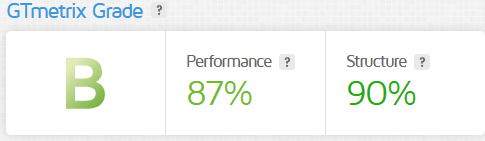
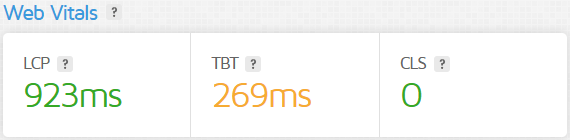
- Load Speed: Slow sites have high rejection rates, so use tools like Google Pagespeed Insights and GTmetrix to identify performance problems. For example, if large images or unnecessary scripts are slowing down the site, it's time to optimise them.
- Broken Links: Links that lead to non-existent or error pages can harm the user experience and your SEO. Use tools like Screaming Frog to identify and correct these links.
- Responsivity: Test your website on different devices and screen sizes to ensure it is accessible and usable on all types of devices. Sites that are not mobile-friendly lose relevance, especially because mobile traffic represents a significant portion of visits.
One performance analysis well executed helps to define a comparison base to measure the success of the reformulation.
See an example of analysis by WebSyd' GTMetrix:
Competing Research and Analysis
Here, the focus is to understand how your competitors are performing online. Make one detailed search, observing the following aspects:
- Design: See if the site design competitors are modern and intuitive. One example would be to observe how restaurants use high quality images and presentation videos to enchant the audience.
- Features: Analyze relevant features such as live chats, integration with social networks or online booking systems, depending on your sector.
- SEO and Content: Analyze the keywords used and how content is structured on competing websites. For example, please note whether they have well-structured blogs with informative content or well-optimised landing pages for conversion keywords.
This study allows you to take advantage of opportunities your competitors are missing, as well as replicate good practices.
Definition of Goals for the New Site
This is where you define what you want to achieve by recasting your website. Having clear and measurable goals is essential to guide the project. Examples of objectives include:
- Improve User Experience: Increase the rate of stay on the site and reduce the rejection rate. This can be done by improving the navigation or layout of pages.
- Increase Conversions: This may mean capturing more leads, close more sales, or get more subscriptions in newsletters. To achieve this goal, you can add more evident CTAs (called for action) or ask custom questions to capture the visitor's interest.
- SEO and Online Visibility: If one of the goals is to improve SEO, you should focus on practices such as content optimisation, choice of keywords and link building strategies.
Having these well-defined goals helps to maintain focus throughout the project and also measure success after completion.
Target Public Identification
A site will only be really efficient if it is designed thinking about yours target audience. . To do this, it is necessary to create detailed personas, which are fictional representations of their ideal customers, based on real data. Such persons shall include information such as:
- DemographyAge, gender, location and educational level.
- Interests and Needs: What is your audience looking for? For example, if your business is a gym, your audience can look for information about training, exercise plans and school schedules.
- Navigation Behavior: How does this audience consume content? Do you prefer videos, short texts or e-books?
With this information in hand, you can adapt the design, content and functionality of your site to better meet visitors' expectations. A practical example is to adjust the tone of voice and content complexity for a younger audience, or create specific landing pages for each user profile.
Layout Planning and Navigation Structure
Based on the identification of the target audience and defined goals, it is time to plan how the content will be organized. A navigation structure It needs to be intuitive, so visitors can easily find what they're looking for. Some recommended practices include:
- Light and Simple Menus: Split the main menu into categories that make sense to the user. For example, on an e-commerce site, the menu may have sections such as “News”, “Promotions”, “Product Categories” and “Contact”.
- Navigation Maps: Create a sitemap to define all the pages and their hierarchies. This is essential to avoid “orphaned” pages (without internal links) and improve browsing experience.
- Breadcrumbs: Add breadcrumbs navigation to help the user orienteer, especially on large websites.
In addition, avoid over menus and submenus. A simple, clean structure is more efficient and prevents the visitor from getting lost on the site.
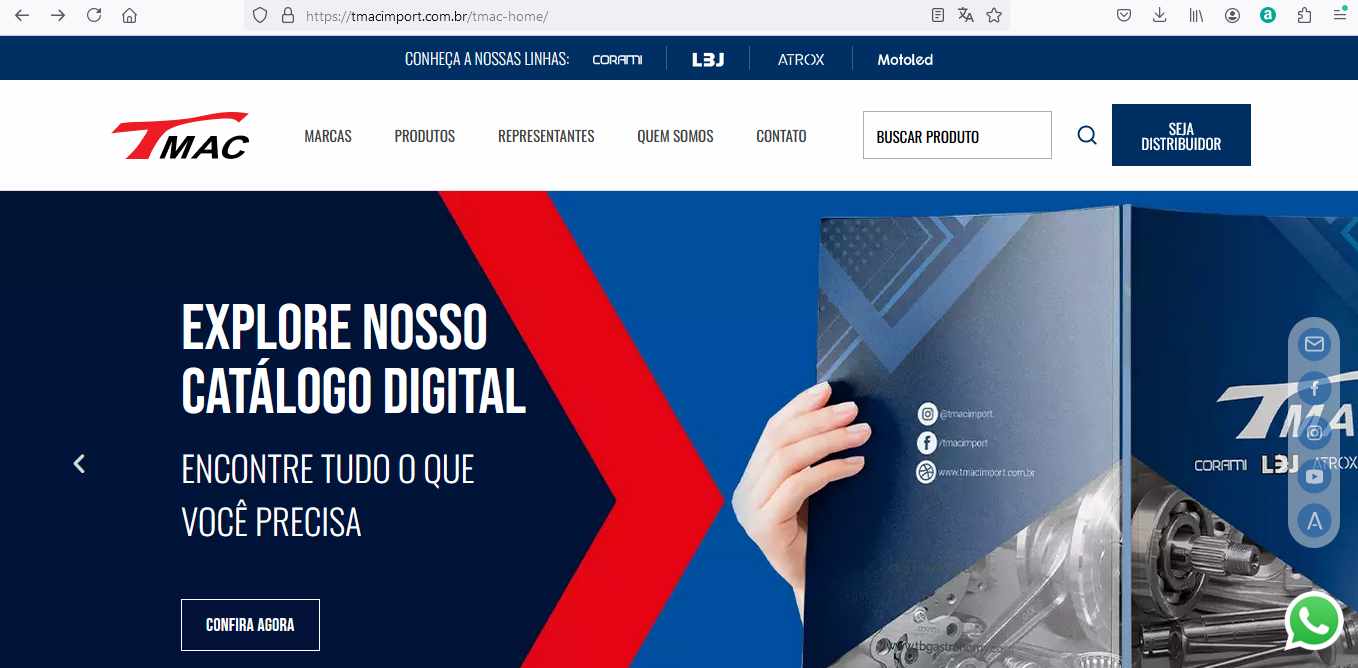
See this example of a site with ideal layout and structure, from our client TMAC Imports:
Choose from Suitable Platform and Tools
Choosing the right platform for your new site is a strategic decision. There are several options in the market, each with its pros and cons. Some of the main ones are:
- WordPress: Ideal for blogs, institutional websites and small online stores. It offers flexibility and a wide range of plugins.
- Shopify: Recommended for e-commerce, it is a robust and easy to manage platform.
- Custom Development: For more advanced specific needs and customizations, opting for a customised solution may be the best choice, especially if your site requires unique integrations or complex features.
In addition to the platform, it is essential to consider other tools such as content management systems (CMS), SEO plugins and security solutions. . A practical example would be to use the plugin Yoast SEO on a WordPress site to optimise the content and pages.
Creation of Wireframes and Prototypes
With navigation planning and the choice of the defined platform, it's time to start viewing what the site layout will look like. For this, we use Wireframes, which are simple outlines of the structure of the pages. They help organize the visual and functional elements in a practical and intuitive way, without focusing on design details such as colors and fonts.
- Wireframes: A Wireframe is like a low site plan, showing the layout of menus, content sections, CTA areas (called for action) and other features. For example, in the outline of a product page for an e-commerce, Wireframe would include location of images, descriptions, “buy” buttons and suggestions for related products.
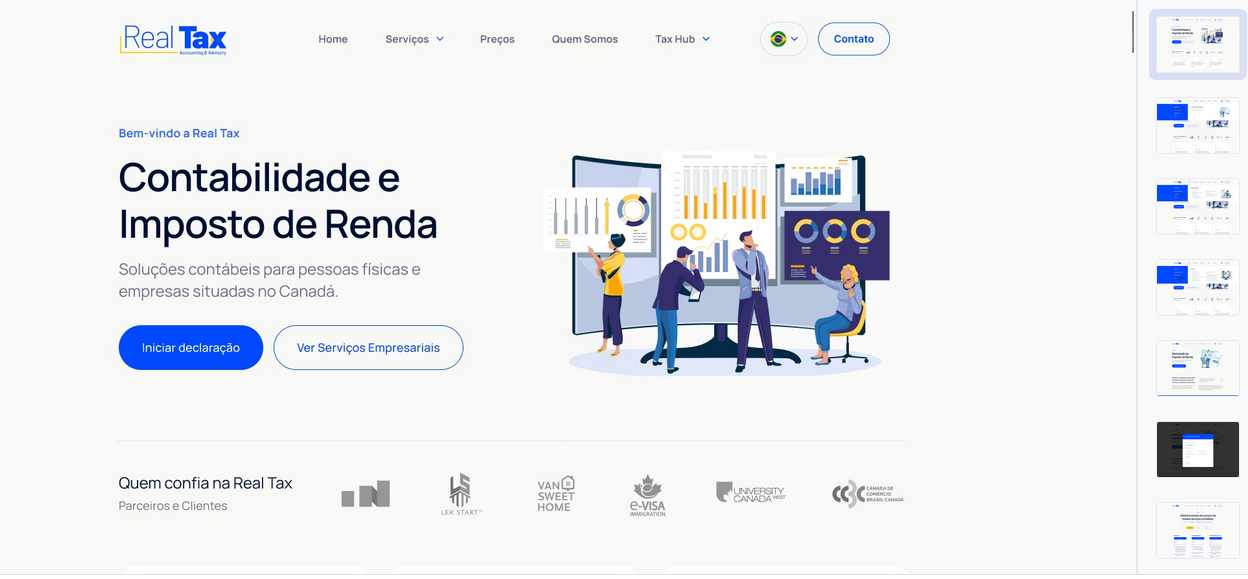
- Prototypes: Once Wireframes are approved, interactive prototypes can be created to simulate navigation. This allows you to test the user experience and adjust any problems before leaving for complete development. Tools like Figma and Adobe XD They're great at creating these prototypes.
This process reduces errors during development and avoids unpleasant surprises after the site is finished.
See this example of website prototype made by us via UsePastel:
Content Production and Optimization
Content is the heart of any website. Therefore, the creation and optimisation of texts, images and videos are crucial steps for a successful reformulation. When creating content, keep in mind the SEO and the relevance to the target audience. Here are some tips for producing and optimizing content:
- Content Creation Original: Invest in relevant and engaging texts that respond to visitors' doubts and encourage actions such as buying, requesting information or signing up for a newsletter. For example, if you are a technology site, creating practical guides and product reviews can be a great way to engage your audience.
- SEO Optimization: Use the most strategicly relevant keywords, but in a natural way, to improve your site ranking on search engines. Also, do not forget to optimise meta descriptions, titles and headers (H1, H2, H3) to facilitate the indexation.
- Images and Videos: Ensure that all images and videos are of high quality and optimised for the web, using compression and modern formats like WebP. . This helps maintain visual quality without compromising loading speed.
Optimized content not only improves ranking of your site, but also offers real value to the user, increasing conversion chances.
Responsible Design Implementation
In the current scenario, having a site that works perfectly on all devices is mandatory. O responsive design ensures that your site automatically adapts to different screen sizes, from desktops to smartphones. Some important practices to ensure responsive design are:
- Tests on Different Devices: Use tools like Google Mobile-Friendly Test to check the usability of your website on mobile devices. This is especially important because a lot of traffic comes from smartphones and tablets.
- Flexible Layouts: Use fluid grids (grids) and adaptive images that fit the screen size. For example, a three column desktop layout can turn into a single column on mobile devices.
- Content Priority: On smaller screens, highlight the most relevant information. Make sure the action buttons and menu are always visible and accessible.
A responsive site not only improves the user experience, but is also part of the experience on the page Google considers, alongside content and relevance.
You want WebSyd support on this project?

SEO On-page and Technical SEO
When it comes to site reformulation, SEO (Search Engine Optimization) should be one of the main pillars. There are two fronts to be worked on: SEO On-page and Technical SEO. . Both are key to ensuring that your site has good visibility in search engines.
- SEO On-page: Here, the focus is on optimizing the contents and elements of the page. Make sure that each page has a main keyword and that it is included in the title (H1), subtitles (H2, H3), meta description and body of the text. In addition, insert internal links to connect relevant content and strengthen the authority of your website in certain themes. For example, if your site is about tourism, link to detailed travel guides in blog posts about specific destinations.
- Technical SEO: This is the most structural part of SEO, and it involves ensuring that your site is in line with good technical practices for indexing and performance. Check if yours robot.txt file is configured correctly, create a XML sitemap updated and make sure that there are no tracking errors in tools like the Google Search Console. . Another essential practice is the correct use of canonical tags to avoid duplicate content.
These optimizations ensure that your site is not only well ranked, but also technically prepared to deal with changes in search algorithms.

Load Speed Optimization
The loading speed It is crucial for the user experience and also for SEO. Slow sites not only irritate visitors but are also penalized by Google. Here are some tips for improving speed:
- Images and Videos Compression: Use compression tools like TinyPNG or ImageOptim to reduce the size of images without compromising quality. In addition, consider using the format WebP, which offers superior compression compared to JPEG and PNG.
- CSS and JavaScript Mining: Remove unnecessary codes and whitespaces in CSS and JS files. This can be done through plugins in CMSs like WordPress, such as the Auto-optimise.
- Caching Implementation: Setting up caching, both on the server side and in the browser, helps to reduce the loading time of pages for recurring users. Tools like WP Super Cache or W3 Total Cache are excellent for this purpose.
Quick sites not only improve user experience, but also have higher conversion rates.
Integration of Features and Plugins
In this step, it is important to add features that improve the user experience and bring more value to your website. This can include from live chat to payment integrations. Some practical examples of features are:
- Chat Online: Add a live chat plugin such as Tawk.to or Zendesk Chat, to offer immediate support to visitors. This is especially useful on e-commerce and service sites.
- Dynamic Forms: Use form plugins to create custom fields for specific data collection. For example, if you have a Real estate, can add advanced filters in real estate search forms.
- File Conversion Tools: If your website handles technical or specific documents, such as engineering files, consider the implementation of formats conversion features. An example is the option to convert DWG for PDF, facilitating the visualization of technical projects by visitors without specific software.
By implementing relevant features, you turn your website into a real business tool.
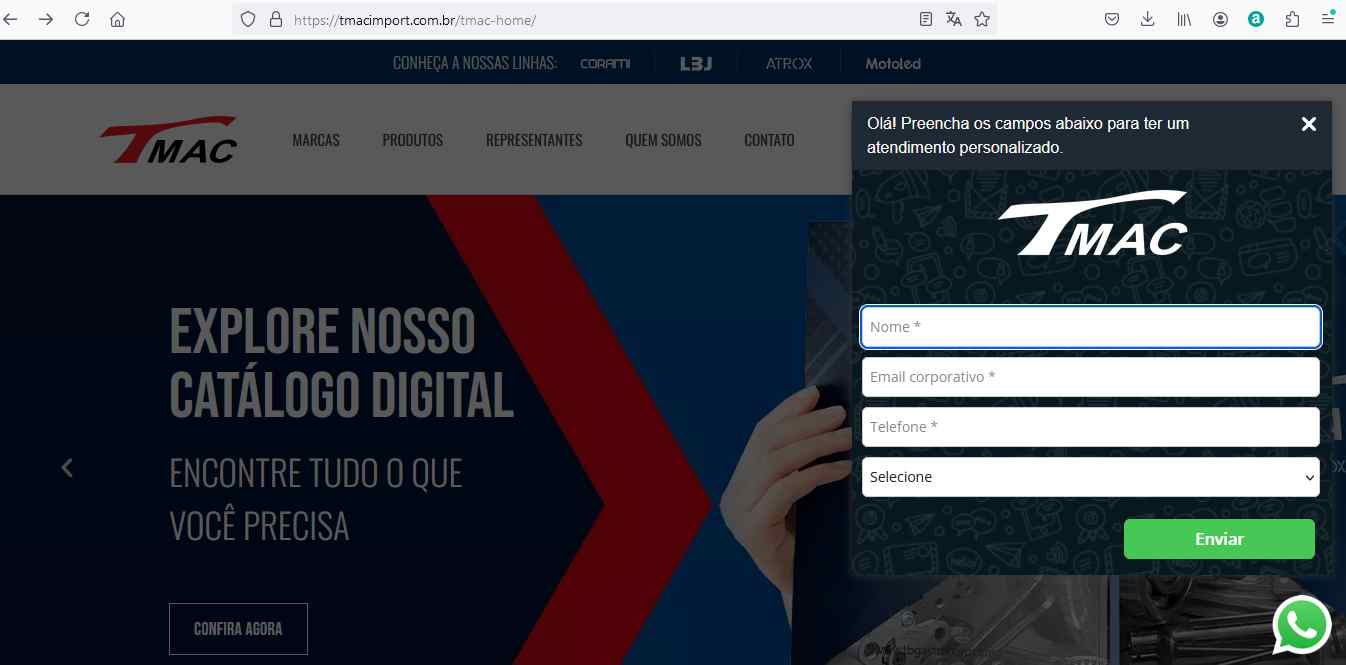
See an example we implemented on our Tmac client's site, integrated chat with WhatsApp:
Usability and Accessibility Test
Now that your site is almost finished, it's time to make sure it's easy to use and accessible for everyone. A usability and accessibility these aspects are often neglected, but they are crucial to provide a good user experience. For this, some important actions are:
- Usability Test: Perform tests with a group of users representing your target audience to identify navigation problems, confusing links or unintuitive buttons. Tools like the Hotjar can help you visualize where users are clicking, how they are browsing and where they are facing difficulties.
- Web Accessibility (WCAG): Make sure that your website complies with the WCAG (Web Content Accessibility Guidelines) accessibility guidelines, allowing people with disabilities to use the site without barriers. For example, add alternative text to images, create a good color contrast and support keyboard navigation.
- Browser Compatibility Test: Make sure your website works correctly on major browsers such as Chrome, Firefox, Safari and Edge. Sometimes small rendering differences can harm the user experience.
Doing these tests before launch is essential to avoid frustration from visitors and ensure that your site is prepared to receive anyone.
Final Test and Adjustment Phase
Before you launch your site reformulatedHe needs to go through one. detailed battery of tests to see if everything is working as planned. Here, the goal is to correct errors that may have gone unnoticed and ensure that the site is 100% ready to go on air.
- Functional Tests: Check all forms, links, buttons and interactive features to ensure that they are working properly. For example, if there is a contact form, make sure the emails are being sent correctly.
- Loading and Performance Tests: Use tools like the GTmetrix and Lighthouse to check if the site is fast enough and identify possible performance improvements.
- Safety Tests: Make sure that your website is protected from basic vulnerabilities such as SQL Injection and Cross-Site Scripting (XSS) attacks. Security plugins, such as Wordfence in WordPress, they can help in identifying faults.
The testing phase is the time to “polish” the project and ensure that it is prepared to impress the target audience.
Launch and Post-Release Monitoring
Finally, we come to the great moment: launch of the new site. . But the job doesn't end here! It is essential to monitor the performance of the site after launch to ensure that everything is working as planned and make necessary adjustments. Here are some post-release practices:
- Performance Monitoring: Use tools like the Google Analytics to monitor the behavior of users and identify possible improvement points. Metric analyses such as average length of stay, more visited pages and rejection rate.
- Bug Correction: Even with all the tests, it is common for some minor problems to be discovered after launch. Have a team ready to fix bugs quickly and effectively.
- Updates and Maintenance: The website needs continuous maintenance to ensure that the features remain up-to-date and secure. In addition, plan regular reviews of content to keep it relevant and optimised for SEO.
With efficient monitoring, you will be able to quickly detect problems and maintain the quality of the site in the long run.
Conclusion
Recasting a website is a complex project, but following this 15-step checklist, you can ensure that your site is renewed in a strategic, effective and result-oriented manner.
Remember that WebSyd can help in each of these steps by offering creation of professional websites and a SEO consulting complete to take your business to the next level.
Want to rephrase your site with WebSyd? Get a quote.
FREQUENTLY ASKED QUESTIONS
Why should I consider recasting my website?
Recasting the site is essential when it presents outdated design, low performance, navigation difficulties or is not responsive on mobile devices. Upgrading the site improves user experience, increases visibility in search engines and can boost conversions and sales.
What are the signs that my website needs a recast?
Some indicators include:
- Decreased number of visitors or increased rejection rate.
- Visually outdated design or not aligned with brand identity.
- Difficulties in navigation or confused structure.
- Slow loading time of the pages.
- Incompatibility with mobile devices.
If your website presents one or more of these problems, it is recommended to consider a recast.
What steps are involved in reformulating a website?
The recasting process generally includes:
- Analysis of the current performance of the site.
- Definition of clear goals for the new site.
- Identification and understanding of the target audience.
- Planning of layout and navigation structure.
- Production and optimisation of relevant content.
- Responsive design implementation.
- Usability and accessibility tests.
- Launch and post-launch monitoring for continuous adjustments.
Following these steps helps ensure that the new site meets users' expectations and business objectives.
How long does it take to rephrase a website?
The time required for the reformulation of a website varies according to the complexity of the project, site size and available resources. Simple projects can take a few weeks, while more complex sites may require several months of work. It is important to establish a realistic schedule and consider all the steps of the process to ensure a successful reformulation.

Caio Nogueira is a SEO, GEO, link building and Digital PR expert and co-founder of WebSyd, website creation agency and SEO consulting founded in 2016. It acts with organic search strategies, digital authority construction and brand optimisation for search engines and artificial intelligence platforms. Throughout his trajectory, he participated in more than 1000 projects involving SEO, website development, content marketing and authority acquisition through backlinks and Digital PR. At WebSyd, it participates in the planning of strategies to increase organic visibility, lead generation and presence of companies on Google and AI-based search engines. As an author, it publishes content on SEO, GEO, website creation, link building and digital authority, sharing analyses, strategies and practical experiences related to organic growth of companies. Its contents and contributions have also been published in companies and vehicles of technology and marketing such as Wix, HostGator, Duda, Neil Patel, Locaweb and E-Commerce Brasil.
View all posts


 Estimate the cost

