
Web Accessibility: What is it, guidelines and examples in 2026
Summary (TL;DR)
Web accessibility is essential to ensure that all users, regardless of their abilities, can access and interact with online content effectively. This post discusses the importance of accessibility, showing how it directly benefits people with disabilities, older adults, and improves the user's overall experience. In addition, accessibility practices such as alt text for images, keyboard navigation, and use of appropriate color contrasts are highlighted as ways to make the web more inclusive.
The post also explores the accessibility principles and guidelines established by WCAG, which provide clear criteria for developers to ensure that their websites are accessible. Principles such as perceptibility, operability, understanding and robustness are explained with practical examples of application.
Finally, tools and features are presented that facilitate the implementation of accessibility on WordPress sites, promoting digital inclusion and improving the general usability of websites. The adoption of these practices not only meets legal and ethical obligations, but also positions companies as leaders in innovation and inclusion.
Quick answer: Web accessibility is to develop websites that anyone can perceive, operate and understand, including those who use screen reader, navigate only by keyboard, have low vision or cognitive difficulty. The international reference is WCAG 2.2, from W3C, and in Brazil ABNT NBR 17225, from 2025. In practice: alternative text in the images, sufficient contrast, subtitles in videos, forms with labels and complete navigation by keyboard.
What is Web Accessibility and what is its importance?
Web accessibility is fundamental nowadays, and its importance only tends to grow as society becomes more digitized. In this topic, we will explore why web accessibility is crucial and how it benefits several groups of users.
- Promotion of Inclusion: One of the main reasons why web accessibility is so crucial is because it promotes digital inclusion. . Making websites accessible to disabled people, the elderly and other user groups means that everyone has the opportunity to access and interact with online content. This is essential to ensure that no one is left behind in the digital age.
- Benefits for People with Disabilities: Web accessibility brings a number of direct benefits to people with disabilities. For example, for visually impaired people, features such as screen readers and image descriptions allow them to browse the web and consume digital content. Similarly, people with motor disabilities can benefit from adaptable virtual keyboards and other assistive technologies that make web browsing more accessible.
- Facilitation for Elderly: In addition to people with disabilities, web accessibility is also crucial for the elderly. With the ageing of the population, it is increasingly important to ensure that websites are easy to use and understand for those with limited digital skills. Elements such as readable fonts, simple layouts and large buttons can make a big difference in the online elderly experience.
- Improvement of User Experience for All: An important aspect to be highlighted is that web accessibility does not only benefit specific groups of users, but everyone. For example, video subtitles are not only useful for people with hearing impairment, but also for those who are watching a video in a noisy or quiet environment. In the same way, web design with simplified navigation and fast loading benefits all users regardless of their abilities or circumstances.
In short, web accessibility is crucial nowadays because it promotes inclusion, directly benefits people with disabilities and the elderly, and improves user experience for everyone. It is an essential part of ensuring that the internet is an accessible and inclusive space for all users.
Principles and Web Accessibility Guidelines
Web accessibility principles and guidelines are fundamental to ensuring that websites are accessible to all users, regardless of their capabilities.
Established by Web Content Accessibility Guidelines (WCAG), these principles provide a set of criteria that developers should follow to ensure the accessibility of a website. Let's explore these principles and guidelines in more detail:
- Perceptibility: The principle of Perceptibility concerns the ability of users to perceive the content presented on a website. This includes ensuring that the content is presented in a perceptible way through different sensory modalities, such as vision, hearing and touch. Guidelines to achieve perceptibility include providing textual alternatives for non-textual elements (such as images and videos), ensuring sufficient contrast between text and background, and offering subtitles and transcripts for audio and video content.
- Operability: The principle of operability concerns the ease with which users can operate and interact with the site. This includes ensuring that all features of the site are accessible through a variety of input devices such as keyboard, mouse and assistance devices. Guidelines to achieve operability include ensuring that all features of the site can be operated using only the keyboard, providing enough time for users to interact with content and avoiding content that can cause seizures.
- Understandability: The principle of understanding concerns the ability of users to understand the content and operation of the site. This includes ensuring that the content is presented in a clear and understandable manner, with simple language and logical structure. Guidelines to achieve comprehensiveness include using clear and simple language, providing clear and predictable instructions, and organizing content logically and consistently.
- Robustez: The principle of robustness concerns the ability of the site to be interpreted correctly by a wide variety of user agents, including web browsers, assistance devices and future technologies. This includes ensuring that the website code is valid and compatible with web standards, and that the site is designed to deal well with misinterpretation. Guidelines to achieve robustness include using standard web technologies, ensuring that the code is semantically correct and testing the site on a variety of browsers and devices.
By following the principles and guidelines of web accessibility established by WCAG, developers can ensure that their websites are accessible to all users, providing a inclusive and equal experience on the web.
Compliance levels and success criteria
Each principle of WCAG is divided into guidelines, and each guideline into success criteria that can be tested. The criteria are classified into three levels:
- The: the minimum. Without it, part of the audience cannot use the site;
- AA: includes the criteria of level A and adds others. It is the most common goal in accessibility policies;
- AAA: the most demanding level. W3C itself does not recommend requiring AAA for entire websites, because some content cannot comply with it.
Some criteria of WCAG 2.2 frequently appearing in audits:
- 1.1.1 Non-textual content (A): images with alternative text;
- 2.1.1 Keyboard (A): all keyboard accessible functions;
- 1.4.3 Minimum contrast (AA): at least 4.5:1 for normal text and 3:1 for large text;
- 2.4.7 Visible focus (AA): the focused element needs to be visible;
- 2.5.8 Target size (AA): clickable areas with at least 24 pixels CSS, except exceptions, new criterion in version 2.2;
- 1.4.6 Improved Contrast (AAA): 7:1 for normal text.
The W3C Quick Reference allows you to filter all the criteria per level.
ABNT NBR 17225: the Brazilian standard
Since 2025 Brazil has had its own technical standard, the ABNT NBR 17225based on WCAG 2.2. It organizes the requirements by theme (keyboard, images, headers, forms, contrast, audio and video) and brings a checklist to check compliance.

Examples of Web Accessibility
Web accessibility is key to ensuring that all users, regardless of their abilities, can use and interact with websites and applications.
Here are some practical examples of how to apply web accessibility:
Alt Text for Images

Creating clear and descriptive alternative texts for images is an essential practice.
The alt text allows screen readers, used by people with visual impairment, to describe the images, providing a complete understanding of the visual content.
A great example of alt text use can be found on the site of Paralympic.org, which makes images and videos accessible to all visitors.
In the picture shows three players using sales competing in a goalball match. Therefore, the alt text was created describing exactly this: “Three players using sales compete in a goalball match.”
This not only helps users with visual impairment, but also improves SEO because search engines use these descriptions to index images
Navigation via Keyboard and Screen Reader
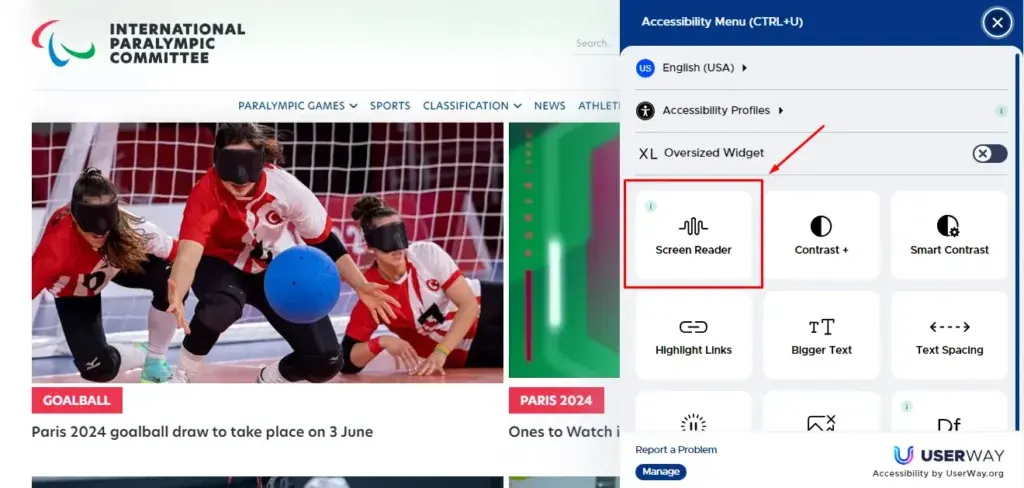
Many users with motor or temporary disabilities, such as an injury to the arm, depend on keyboard navigation.
Sites that allow navigation via tab keys, arrow keys and others, without a mouse, offer a more inclusive experience.
For example, the site of Paralympic.org allows efficient navigation via keyboard, facilitating access to all interactive elements .
In addition, compatibility with screen readers, who “read” the content of the page aloud, is crucial for visually impaired users.
Audio and Subtitle Transcripts
Providing transcripts for audio content and subtitles for videos is essential for accessibility.
This benefits people with hearing impairment and also those who prefer to read or are in environments where they cannot use sound.
Some examples of web accessibility with respect to transcripts (closed captures):
- YouTube: The platform allows automatic creation of subtitles and offers the option to add custom subtitles, making videos more accessible for people with hearing impairment.
- TED Talks: All videos on the TED site have multi-language transcripts and subtitles, ensuring global accessibility.
- Netflix: The streaming platform includes subtitle options and detailed audio transcripts for most of its contents, facilitating access to users with hearing and visual needs.
Colour Contrast and Legibility

Using a suitable color contrast and readable sources improves reading for all users, especially for those with low vision.
The image that we took the print, used in the example above, is from the site of Match Stoneware, which uses white text in black background, providing an excellent contrast that facilitates reading.
Accessible Forms
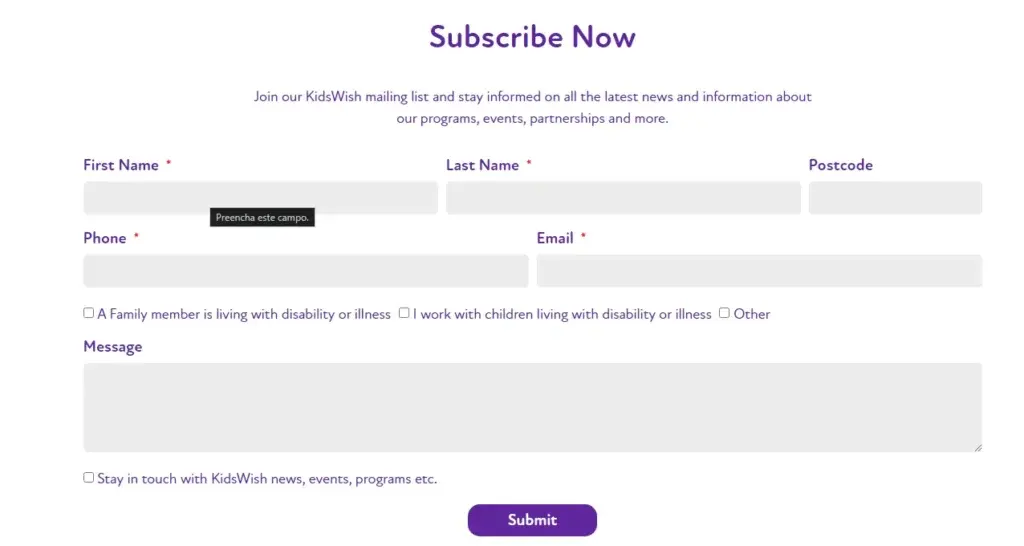
Ensuring that form elements have adjacent descriptive labels makes it easy to fill out for all users, including those who use screen readers.
Websites like KidsWish are designed with keyboard-friendly navigation and form elements clearly labeled, making the user experience more intuitive and accessible.
Implementing these practices not only benefits users with disabilities, but also improves the experience of all visitors to the site. Web accessibility is an essential practice that promotes digital inclusion, improving usability and general user satisfaction.
Web Accessibility Tools for Websites
To help evaluate and implement web accessibility, there are several tools and resources available.
Let's explore some options that can be useful for developers, designers and other professionals involved in creating accessible websites:
Web Accessibility Verification Tools
There are several online tools that can help verify the accessibility of a website in accordance with the guidelines established by WCAG.
Some examples include:
- WAVE (Web Accessibility Evaluation Tool): Tool that provides detailed reports on possible accessibility problems on the site.
- AChecker: Tool that evaluates the accessibility of web content and offers suggestions for correction.
- Axe: Open source tool that identifies accessibility problems and provides detailed information to solve them.
Web Accessibility Plugins for Browsers
There are also plugins available for web browsers that can help identify and fix real-time accessibility issues. Some examples include:
- Axe Browser Extension: Extension that allows checking the accessibility of a website while browsing it.
- Web Developer: Extension for browsers that offers a number of useful tools for web developers, including accessibility checks.
Web Accessibility Practice Guides
Several online guides and resources provide web accessibility guidelines and guidelines.
The very W3C (World Wide Web Consortium) offers a complete guide to Accessibility Guidelines for Web Content (WCAG), which is considered the reference standard for web accessibility.
Online Web Accessibility Communities
Finally, there are online communities dedicated to web accessibility, where professionals can share knowledge, experiences and resources related to accessibility. Some examples include:
- A11Y Project: A Community initiative to help make web accessibility more accessible.
- WebAIM Community: An active forum where web accessibility professionals and enthusiasts discuss challenges, solutions and best practices to create a more inclusive web environment.
These tools and features are essential to ensure that websites are accessible to everyone, promoting digital inclusion and improving user experience for people with different needs.
Web Accessibility for WordPress
Ensuring that your WordPress site is accessible to all users is essential to promote inclusion and avoid possible legal problems.
Fortunately, there are several tools and plugins that facilitate the implementation of accessibility practices in WordPress.
Here are some recommended options to make your website more accessible.
Web Accessibility Plugins for WordPress
- WP Accessibility The plugin WP Accessibility it is a free solution that addresses common accessibility problems in WordPress themes. It adds several features such as the ability to highlight focusable elements, add jump links, check color contrast, among others. This plugin is ideal for beginners because it does not require coding knowledge and your options can be enabled or disabled directly in the WordPress settings panel.
- Ally (formerly One Click Accessibility) The Ally adds a toolbar for the visitor to resize fonts, adjust contrast, underline links and skip to content. It's easy to use, but it doesn't correct code problems or bring direct SEO gain.
- WP Accessibility Helper (WAH) The WP Accessibility Helper offers a range of tools to improve the browsing and visibility of your website's content. It includes options to change contrasts, remove complicated animations and use light or dark sidebar themes. This plugin is suitable for beginners and offers a premium version with additional features such as accessible pop-up windows and monochrome and sepia modes.
- accessWidget by accessiBe The accessWidget from accessiBe is a paid widget that allows the visitor to adjust text size, spacing and colors. Warning: in 2025 a FTC (US consumer protection body) He forced the company to pay $1 million for announcing that the widget would leave any site according to WCAG. Widgets help the visitor, but do not replace the site's correction.
- UserWay The UserWay is another powerful plugin that uses AI to scan and fix accessibility issues on your site. It includes features such as automatic alt text generation, color contrast correction and keyboard navigation support. In addition, it offers a friendly source for dyslexia and is available in 42 languages, making it a robust choice for sites that receive international traffic.
- Equalize Digital Accessibility Checker The Equalize Digital Accessibility Checker is a freemium plugin developed by accessibility experts. It offers feedback in real time, checking new or updated posts against more than 40 accessibility rules. This plugin is ideal to ensure continuous compliance with accessibility regulations.
Web Accessibility and Increase in Traffic and SEO
Web accessibility goes beyond complying with legal requirements and promoting inclusion, it can also have a significant impact on your website traffic and optimisation for search engines (SEO).
One study conducted in partnership with Semrush and BuiltWith analyzed 847 domains before and after implementing accessibility solutions.
The results showed that, on average, these domains had an increase of 12% in organic traffic after the adoption of accessibility practices.
In addition, 66.1% of the areas saw an increase of up to 50% in organic monthly traffic.
Let's explore some advanced practices that not only improve accessibility, but also increase traffic and enhance your site's SEO.
Benefits of Web Accessibility for SEO
Best experience on the page
Google evaluates the quality of a website based on user experience (UX).
Accessible sites usually have semantic structure, alternative texts and good browsing, which helps Google understand content and improves the experience on the page. Accessibility is not a direct ranking factor, but many practices coincide with SEO recommendations.
Resources that we have already mentioned in this post as simplified navigation, alternative descriptions for images and compatibility with mobile devices are some factors that improve accessibility and, consequently, SEO.
Increase in Site Stay Time
Users who find an accessible and easy-to-use website tend to stay browsing longer.
This improves engagement metrics that you follow in Analytics, such as pages per session and conversions.
Well structured and easily navigable content encourages users to explore more pages of the site.
Advanced Accessibility and SEO Tips
- ARIA (Accessible Rich Internet Applications) implementation ARIA is a set of attributes that make dynamic content more accessible to people with disabilities. Use ARIA attributes to better describe the behavior and functionality of widgets, forms and other interactive elements. For example,
aria-livecan be used for areas that dynamically update, informing screen readers about changes in content. - Use of Semantic Structures The semantic structure of HTML5 not only improves accessibility, but also helps search engines better understand the content hierarchy. Tags as
<header>,<nav>,<article>and<footer>clearly define the parts of your site, improving navigability for both humans and search bots. - Focus Control and Keyboard Navigation Make sure that all interactive elements can be accessed and operated via keyboard, with visible focus. Tab order must follow HTML order: use
tabindex="0"just to make a custom element focusable and avoid positive values that mess up navigation. Usearia-expandedto specify the menu status. - Regular Tests and Audits Perform accessibility audits regularly using tools such as the WAVE or Lighthouse Google, and complete with manual tests by keyboard and screen reader.
Conclusion on Web Accessibility
Web accessibility is a set of concrete practices, guided by WCAG 2.2 and ABNT NBR 17225.
The implementation of good accessibility practices is not only about meeting the needs of people with disabilities, but also promoting an inclusive experience for all users, regardless of their abilities or circumstances.
Web accessibility directly benefits people with disabilities, the elderly and, in fact, all users by improving the general usability of websites. The inclusion of alt text for images, keyboard navigation, audio and caption transcripts, use of appropriate color contrast and accessible forms are examples of how small changes can have a major impact.
In addition to practical benefits, web accessibility also has a strong commercial argument.
For new websites, include accessibility in the project from the beginning: fixing later costs more. Get a quote.
Therefore, investing in web accessibility is essential not only to promote inclusion and compliance with regulations, but also to improve user experience and increase site performance in search engines.
FREQUENTLY ASKED QUESTIONS
What does web accessibility mean?
Web accessibility refers to the practice of making websites and web applications usable by people of all skills and disabilities. This includes the creation of contents and interfaces that can be easily navigated and understood by users with visual, auditory, motor or cognitive disabilities.
What is web accessibility for?
Web accessibility serves to ensure that all people, regardless of their physical or cognitive abilities, can access and interact with online content. This promotes digital inclusion, allowing everyone to have equal access to information, services and opportunities offered on the web.
What are the Web Content Accessibility Guidelines?
Web Content Accessibility Guidelines (WCAG) are a set of recommendations developed by World Wide Web Consortium (W3C) to make web content more accessible. The guidelines cover various aspects, such as color contrast, content structure, navigation, and textual alternatives for non-textual elements. The current version is WCAG 2.2, from 2023; in Brazil, ABNT NBR 17225 (2025) is based on it.
What are the benefits of digital accessibility?
How to have accessibility on the site?
To have accessibility on the site, it is necessary to follow the WCAG guidelines, which include providing textual alternatives for images, ensuring that the site can be navigable via keyboard, using appropriate color contrasts, and creating a logical and clear content structure. Accessibility verification tools and plugins specific to platforms like WordPress can help in this process.
What is an accessible website?
An accessible website is one that can be used by all people, including those with visual, hearing, motor or cognitive impairments. It follows the accessibility guidelines to ensure that all elements of the site are understandable and navigable by any user.
Why should our pages of a website be accessible?
Our pages should be accessible to promote digital inclusion, ensuring that everyone can access and interact with the content. In addition to being a social justice issue, accessibility also improves user experience and can bring commercial benefits, such as increasing audience and better performance in search engines.
How do you know if the site is accessible?
To find out if a website is accessible, it is possible to use accessibility verification tools such as WAVE and Axe. These tools analyze the site and provide reports on accessibility problems and suggestions for improvements. In addition, conducting tests with real users, including people with disabilities, can help identify and correct accessibility problems.
What can we do to improve web accessibility?
To improve digital accessibility, it is important to follow the Web Content Accessibility Guidelines (WCAG), add text descriptions (alt text) to images, ensure that all features of the site can be accessed via keyboard, provide transcripts and subtitles for multimedia content, use appropriate color contrasts, and implement semantic HTML tags. In addition, performing accessibility tests regularly and using specific plugins for platforms such as WordPress can help identify and correct problems by promoting an inclusive experience for all users.

Caio Nogueira is a SEO, GEO, link building and Digital PR expert and co-founder of WebSyd, website creation agency and SEO consulting founded in 2016. It acts with organic search strategies, digital authority construction and brand optimisation for search engines and artificial intelligence platforms. Throughout his trajectory, he participated in more than 1000 projects involving SEO, website development, content marketing and authority acquisition through backlinks and Digital PR. At WebSyd, it participates in the planning of strategies to increase organic visibility, lead generation and presence of companies on Google and AI-based search engines. As an author, it publishes content on SEO, GEO, website creation, link building and digital authority, sharing analyses, strategies and practical experiences related to organic growth of companies. Its contents and contributions have also been published in companies and vehicles of technology and marketing such as Wix, HostGator, Duda, Neil Patel, Locaweb and E-Commerce Brasil.
View all posts


 Estimate the cost

