
Digital Accessibility: 6 Tips to Make Your Website Affordable
Summary (TL;DR)
Digital accessibility is essential to ensure that everyone can browse the web, a challenge still great in Brazil, where only 1% of sites are accessible, despite 25% of the population having some disability.
Web Content Accessibility Guidelines (WCAG) guide an inclusive web, addressing aspects such as video subtitles, alternative text for images and color contrast.
Adopting accessibility practices not only promotes inclusion and equality, but can also improve the reputation of companies and attract a more diverse audience, being an ethical obligation and an important step towards a more inclusive future.
Quick answer: digital accessibility is to build websites that people with visual, auditory, motor or cognitive disabilities can use, including screen reader and only by keyboard. The starting points are alternative text in the images, sufficient contrast, comfortable spacing, titles in logical order and keyboard navigation. The technical reference is WCAG 2.2 of W3C and, in Brazil, ABNT NBR 17225, published in 2025.
The public is large: according to the IBGE Census 2022, 14.4 million people aged 2 years or older have disabilities (7.3% of the population in this range), and 7.9 million of them have difficulty seeing. Among those 70 years of age or older, the proportion reaches 27.5%.
But have a site that adopts practices of digital accessibility It's not that complicated. There are laws and guidelines that govern the subject, as well as applications that make it simple.
Here you will better understand about digital accessibility and see simple tips to apply on your site and take a step towards an inclusive future. Shall we go?
What digital accessibility is
Digital accessibility is a key area in the universe of technology and the web, as it aims to ensure that all individuals, regardless of their skills, can fully enjoy the opportunities offered by the internet.
It focuses on eliminating barriers that can hinder or impede access to and understanding of online content by people with disabilities, the elderly or any user who needs adaptations.
One of the main pillars of digital accessibility is to make websites, applications, documents and other online resources more inclusive. This is achieved through various practices and guidelines that aim to make the web accessible to everyone.
The Web Content Accessibility Guidelines (WCAG), developed by World Wide Web Consortium (W3C), are a globally recognized set of standards that guide the creation of accessible online content. These guidelines cover aspects such as video subtitles, text alternatives for images, appropriate color contrast, logical content organization and more.
Digital accessibility is crucial to ensure that people with visual, auditory, motor or cognitive disabilities can use the internet effectively. This not only promotes digital inclusion, but also allows these people to participate fully in society, access vital information and have equal opportunities.
Companies and organizations that adopt digital accessibility practices demonstrate a commitment to equity and social responsibility, which can improve their reputation and attract a more diverse audience.
In short, digital accessibility is a fundamental approach that seeks to eliminate barriers that limit access to the web. It is an essential measure to promote the inclusion, equality and participation of all people in the digital age.
Therefore, investing in accessibility is not only an ethical obligation, but also an effective way to make the internet more accessible and inclusive for everyone.
Brazilian Inclusion Law
The Brazilian Inclusion Law came into force in July 2015 and governs the rights of people with disabilities and standards that must be complied with by all, including on the web. No for nothing is called the Statute of the Disabled.
ABNT NBR 17225
Since 2025 Brazil has a specific technical standard for web accessibility, the ABNT NBR 17225. . It is based on WCAG 2.2 and organizes the requirements by theme: keyboard, images and alternative texts, headers, links and buttons, forms, contrast, audio and video, as well as a checklist.
WCAG
The WCAG 2.2 (current version, 2023) should be the bedside book of any designer or web developer. It is based on four principles:
- perception: all elements of the site should be perceived by all users
- operationality: any user needs to be able to interact and navigate the site, regardless of device
- understanding: besides perceiving the content, it also needs to be fully understood by the user
- robustness: the site needs to be completely interpreted by assistive devices
But the guidelines go far beyond that. They give a true accessibility manual that standardizes the minimum requirements to be followed.
Tips to Make Your Website Inclusive
See five simple tips to make your accessible website (or at least start):
1. Use alt text
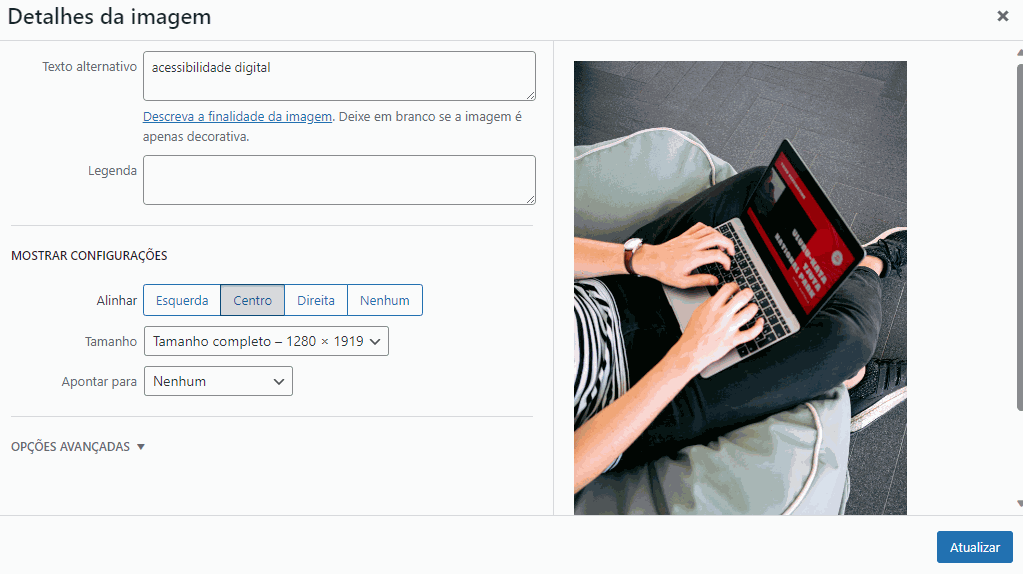
In today's digital world, images, buttons, links and infographics play a crucial role in creating an attractive and informative website. However, to ensure that all visitors to your site, including those with visual impairments, have a complete and meaningful experience, it is essential to incorporate the alternative text known as “Alt Text.”
The Importance of Alt Text
Alt Text is a textual description that is associated with visual elements on a web page. Its main purpose is to provide a textual representation of visual content, allowing people with visual impairment, who use screen readers, to understand what is being displayed on the page. That's fundamental to a inclusive user experience (UX).
Benefits of Using Alt Text
- Accessibility: Alt Text makes visual content accessible to all users regardless of their visual skills. This is essential to comply with web accessibility guidelines.
- Complete UX: By providing clear and concise descriptions of images, buttons and other visual elements, Alt Text improves the user experience, allowing all visitors to understand the content and navigate effectively.
How to Implement Alt Text
The implementation of Alt Text is direct and can be carried out as follows:
- Images: When adding an image to your site, provide a significant description in the “alt” attribute of the image tag. For example, “A dog playing on the beach.”
- Buttons and Links: When creating buttons or links, use descriptive text that clearly conveys the purpose of the button or where the link leads. Avoid generic texts like “Click here.”
- Infographics: For infographics, provide a textual description of all visual content, including graphics and subtitles.
Adequate incorporation of Alt Text is a fundamental practice to create an inclusive and accessible website. By doing so, you not only meet the needs of a diverse audience, but also improve the overall usability of your site, contributing to a complete and positive user experience.
2. Colour Contrast
Color contrast plays a key role in creating an accessible and friendly website for all visitors. It is especially important to ensure that text and visual elements are easily readable and understandable. Here, we will discuss the importance of this aspect and provide practical guidance on how to implement it effectively on your website.
Why Color Contrast Is Important
- Visual accessibility: Adequate contrast between text and background is essential to allow people with visual impairments or reduced vision to read content clearly. This includes those who have vision difficulties due to conditions such as myopia, astigmatism or partial blindness.
- Legibility: Adequate contrast also improves text readability for all users. Low contrast text can be difficult to read, causing eye fatigue and pushing visitors away.
Tips for Choosing High Contrast Colors
- Background Text: Make sure the text has a clear contrast to the background. The dark text on a clear background or vice versa usually works well. Avoid combinations of colors that cause reading difficulties.
- Check Accessibility Standards: Please refer to accessibility guidelines, such as WCAG (Web Content Accessibility Guidelines), for specific guidance on recommended contrast levels. There are online tools that can help verify compliance with these guidelines.
Visual Examples of Good Practice
Black text on white background is a classic example of high contrast that provides excellent readability.
Avoid using text and background colors that are very similar, such as light gray on white.
If you use images or graphics with embedded text, make sure the text has appropriate contrast to the background of the image.
Color contrast plays a critical role in creating an accessible and easy-to-read website. By adopting high contrast colors, you not only improve accessibility for a wider audience but also make your site more enjoyable to use, providing an enhanced reading experience for all visitors.
3. Suitable line spacing
Tight text wears out and makes reading difficult, especially for people with low vision or dyslexia. A WCAG 2.2 (criteria 1.4.12) uses as a reference that the site continues to work when the user increases spacing to:
- the height of the line at least 1,5 times the font size;
- space between paragraphs of at least 2 times the font size;
- space between letters of 0.12 times and between words of 0.16 times the font size.
In practice, set 1.5 line-height in the run text, avoid boxes with fixed height that cut the text and limit the width of the lines to facilitate reading.
4. Hierarchization of page content

Hierarchising the content of a page is an essential practice not only to improve accessibility, but also to optimise SEO and general understanding of your website. Hierarchization involves the organization of content in a structured way, where the most important information is highlighted and presented clearly and logically.
For accessibility, hierarchization is crucial because it helps people who use screen readers to understand the structure of content. This includes the appropriate use of titles and subtitles, list markers and other elements that highlight the order of importance of information.
Content hierarchy also positively impacts SEO, as search engines value well-structured websites. By using HTML headers (H1, H2, H3, etc.) for titles and subtitles, you not only improve accessibility, but also signal to search engines the relevance and organization of your content.
For example, when creating an article, you can use a H1 header for the main title, H2 for the sections subtitles and H3 for topics within the sections. This creates a clear hierarchy that benefits all users, including those who depend on screen readers and search engines, resulting in a more accessible experience and better ranking of research results.
5. Offer Alternative Navigation Options
Offering alternative browsing options is essential to ensure that all types of users have an accessible experience on their website. These options not only meet the needs of people with disabilities, but also provide a more flexible and effective user experience for all visitors.
People with visual impairments, for example, can benefit from simplified navigation menus that facilitate the location of essential information. This includes the availability of shortcut keys and options to skip repetitive content, such as page headers, which are particularly useful for screen readers.
Provide alternative browsing options such as “back to top” or “jump to main content”, allows users to quickly navigate the site, saving time and making the experience more enjoyable.
By incorporating alternative browsing features, you not only make your site more accessible, but also improves usability for all visitors by creating a more inclusive and friendly online environment. These practices not only meet accessibility requirements, but can also result in a wider and more satisfied audience.
Extra Tip: Ally plugin (formerly One Click Accessibility)
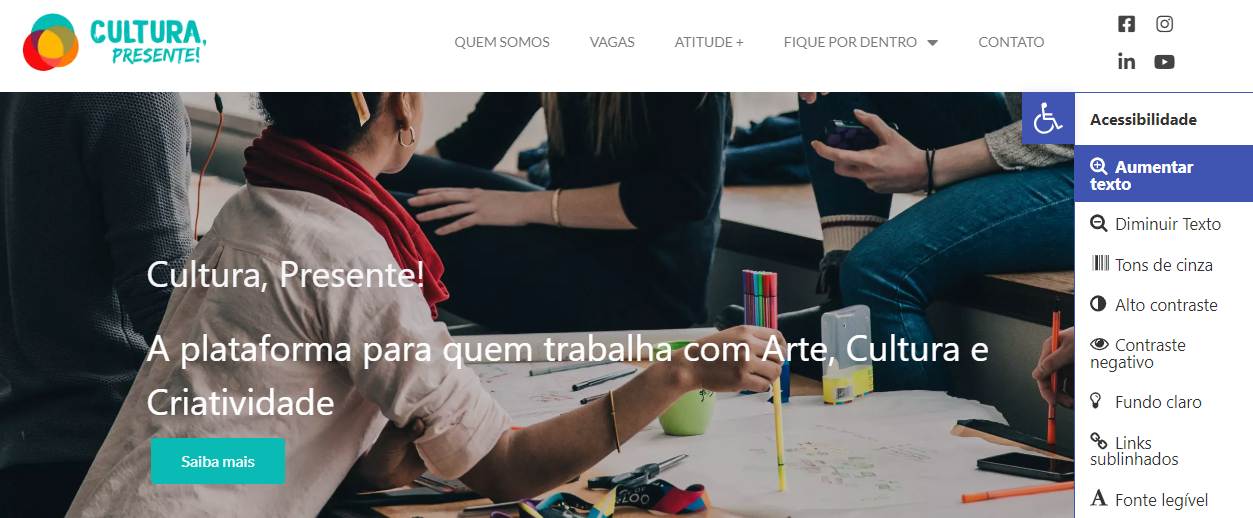
The plugin Ally (formerly One Click Accessibility) adds to the WordPress site a toolbar with accessibility features. It helps, but does not replace the work on code and content: Accessibility bars and widgets do not make a site according to WCAG on its own.
While many accessibility issues require direct adjustments to content, One Click Accessibility offers a simplified solution by adding essential accessibility features with minimal configuration without the need for technical expertise.
The accessibility toolbar includes:
- Font resize control (increase/decrease).
- Grayscale option.
- Negative contrast mode.
- High contrast rate.
- Clear background theme.
- Underlined in links.
- Selection of readable fonts.
- Convenient links to Sitemap, Comments and Help Pages.
In addition, the accessibility features offered by the plugin allow:
- Enable the “Pulverize to Content” function for faster browsing.
- Add focus of topic structure to focalizable elements.
- Remove link destination attributes.
- Insert reference point functions into all links.
- Easily customize the style of the toolbar by customizing.
With One Click Accessibility, you can improve your website's accessibility in a practical way, making it more inclusive for all visitors.
Conclusion
The five tips and the plugin are a start. To find out where your website is, run an automatic test (such as WAVE or Lighthouse), navigate only on the keyboard and, if possible, ask a person who uses screen reader to test the main pages.
By adopting practices such as the use of alternative text, high color contrast, adequate line spacing, content hierarchy and offering alternative browsing options, you not only meet the needs of people with disabilities, but also improve the experience of all visitors to your site.
Digital accessibility is not only an ethical obligation, but also an opportunity to reach a wider and more diverse audience. By implementing these tips, you are demonstrating your commitment to inclusion and contributing to a more accessible and user-friendly web.
If you're going to create or redo the site, ask for accessibility from the project: it comes cheaper than fixing later. Get a quote.
FREQUENTLY ASKED QUESTIONS
What is digital accessibility?
Digital accessibility refers to the practice of making websites, apps and other online resources accessible to all people, including those with disabilities. This involves removing barriers that can hinder or impede access to and understanding content by users with special needs.
Why is digital accessibility important?
Digital accessibility is crucial to ensure that everyone, regardless of their physical, sensory or cognitive abilities, has equal access to information and services online. This promotes inclusion and allows people with disabilities to participate fully in digital society and have the same opportunities as other users.
What are some common practices to make a website accessible?
Common practices include the use of alternative text for images, ensuring color contrast suitable for easy reading, using adequate line spacing, organizing content logically and clearly, and offering alternative navigation options such as keyboard shortcuts or “jump to main content” links.
How can I check that my website is accessible?
You can start using online accessibility assessment tools that analyze your website in search of common accessibility problems. Following W3C Web Content Accessibility Guidelines (WCAG) is also an effective way to ensure that your website meets international accessibility standards. In addition, considering feedback from disabled users can offer valuable insights for improvements.

Caio Nogueira is a SEO, GEO, link building and Digital PR expert and co-founder of WebSyd, website creation agency and SEO consulting founded in 2016. It acts with organic search strategies, digital authority construction and brand optimisation for search engines and artificial intelligence platforms. Throughout his trajectory, he participated in more than 1000 projects involving SEO, website development, content marketing and authority acquisition through backlinks and Digital PR. At WebSyd, it participates in the planning of strategies to increase organic visibility, lead generation and presence of companies on Google and AI-based search engines. As an author, it publishes content on SEO, GEO, website creation, link building and digital authority, sharing analyses, strategies and practical experiences related to organic growth of companies. Its contents and contributions have also been published in companies and vehicles of technology and marketing such as Wix, HostGator, Duda, Neil Patel, Locaweb and E-Commerce Brasil.
View all posts


 Estimate the cost

