
What is meta description and how to plan?
Summary (TL;DR)
The meta description is a strategic summary of the page displayed in the search results.
It helps the user understand content, increases the potential to click and strengthens their SEO strategy.
Check out the full content to learn how to plan, write and optimise your descriptions.

Understand what is meta description is essential for any SEO strategy. It works as a brief description of the page's content, appearing in search results to help the user decide if that link responds to what it seeks. Even though it is not a direct ranking factor, a good meta description can increase the click rate and improve the organic performance of the page.
Planning this element carefully is a simple way to make your content more attractive, clear and competitive on Google and other digital channels. Understand how the meta description works, where it appears and why it is worth treating as a strategic part of page optimisation.
What's meta description?
The meta description is a short text inserted in a page's HTML code to summarize its contents. It appears, in many cases, below the title in the search results, functioning as a call that presents to the user what he will find when clicking on that link.
Meta description on Google
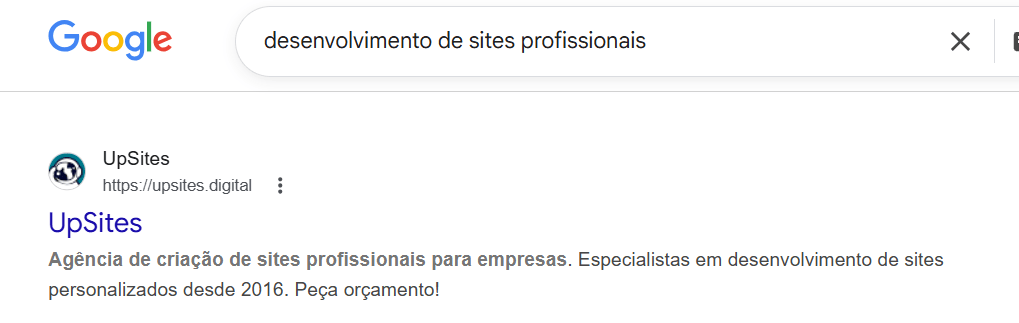
In the Google, the meta description appears just below the title of the page and URL in the research results. It helps the user understand quickly if that content answers your question. When well written, it increases interest in clicking and improves CTR, i.e. the page's click rate.
Meta description on social networks
On social networks, the meta description can also be used as a prior when a link is shared, depending on the page configuration and social tags such as Open Graph. This helps to make sharing more attractive, as it presents a clear description of the content even before the user clicks.

What's your importance?
The meta description is important because directly influences how your page is perceived before clicking. . It works as a textual display in search results and can be decisive to attract more qualified visitors. Check out the main reasons for planning it well:
Increases click rate
A clear, objective and persuasive description goal can increase the page's CTR. When the user quickly identifies that the content responds to your search, the chance to click increases. This is especially important in competitive results, where several sites dispute attention on the same screen.
Improves user experience
The meta description helps the user understand what to expect before accessing the page. This reduces frustrated clicks and improves traffic quality. When the description is aligned with actual content, the visitor tends to stay longer on the site.
Reinforces page relevance
By including the main keyword and a description consistent with the search intention, the meta description reinforces the theme of the page. Even if Google can rewrite the snippet displayed, a well-planned description increases the chances of presenting a more strategic message.
Supports SEO strategies
Although it is not a direct factor of ranking, the goal description contributes to organic performance by improving the click on the results, being a stage of SEO Onpage. . More qualified clicks can strengthen page performance over time, especially when combined with good content and good experience.
Differentiates its result from competition
On a result page full of similar options, a good meta description can be the detail that makes your link stand out. Using a clear promise, real benefit or objective call helps the user choose their content instead of another.
How to plan a good meta description?
Planning a good meta description requires clarity, objectivity and strategic intention. . It needs to summarize the content of the page, arouse interest and show the user why it is worth clicking on their result. Check out the main care to create more efficient descriptions:
1. Respect character limit
The ideal thing is that the meta description has on average, between 150 and 160 characters, which is the most common display track in Google results. When the text goes far beyond this limit, it can be cut with reticence (...), leaving the message incomplete.
So get to the point. Prioritise the most important information at the beginning of the description and avoid too long sentences. The goal needs to function as a quick call, not an explanatory paragraph.
2. Include the main keyword
Insert main keyword in the meta description helps to reinforce the relationship between user search and page content. When the researched term appears in the description, Google can highlight it in bold, making the result more visible.
But the use must be natural. Avoid repeating the keyword in a forced manner. The ideal is to fit it into a fluid phrase, clearly showing that page responds to the user's doubt or need.
3. Use mental triggers and benefits
A good meta description not only describes the content, it also offers a reason for clicking. . To do so, it is worth using mental triggers in moderation, such as clarity, urgency, curiosity, authority or direct benefit.
For example, instead of writing “See information about web design”, it's better to use “Understand how to create a website professional, which steps to follow and how to avoid common errors in the project”. . The second option shows value, anticipates benefits and makes the click more attractive.
4. Add a call to action (CTA)
A good meta description should encourage the user to act. Small Calls for Action help make the result more persuasive and increase the chances of clicking. This is because the user quickly understands what you will find when accessing the page.
CTA doesn't have to be aggressive. Simple and objective phrases usually work better, especially when combined with clear benefit and aligned search intention.
Examples of CTA for meta description:
- Check out the full guide
- See how it works.
- Discover the main steps
- Understand everything about the subject
- Learn how to apply in practice
- Learn how to improve your results
- See examples and practical tips
- Check the step by step
5. Avoid common errors
Even though it is a short element, the meta description may harm the SEO strategy when it is ill-planned. . Some errors make the text unattractive, confusing or even irrelevant to the user and search engines.
In addition, repetitive problems on multiple pages can harm the organization and efficiency of site optimisation as a whole.
Common errors that should be avoided:
- Leave meta description blank
- Exaggerate in the use of keywords
- Create too many generic descriptions
- Duplicate the same target in multiple pages
- Overcome the recommended character limit
- Do not reflect the actual content of the page
- Do not include clear benefit or context
6. Do tests
There is no single formula to create the best meta description. Small changes in text can significantly change the page's click rate. So, it is worth testing different approaches over time.
You can adjust calls, description size, tone of communication or way to present the main benefit. Monitoring CTR in Google Search Console helps to understand which pages need improvements and which descriptions are performing better.
Example of meta description
Understanding the theory helps, but visualizing a practical example makes planning much easier. Check out a simple title and meta description template applied to an SEO optimised page:
Page title
The page title should be clear, objective and contain the main keyword. It needs to quickly show the user about what content is and arouse interest in click.
Example of title:
How to create a professional website for companies in 2026
Meta description
The meta description should complement the title, summarizing the content of the page in a strategic and persuasive way. The ideal is to show benefit, context and encourage click without exaggeration.
Example of meta description:
“Learn how to create a professional website for companies in 2026, check out practical tips, trends and the main steps to get started.”
Tools for optimizing meta description
Today there are several tools that help create, review and track meta descriptions more strategically. Some assist in the technical optimisation, while others help analyze user performance and behavior in search results. Check out the main ones:
Yoast SEO
Yoast SEO is one of Most popular plugins for WordPress when the subject is on-page optimisation. It allows you to easily edit titles and meta descriptions, as well as showing previews of how content will appear on Google. It also offers alerts on optimal size and use of keywords.
Rank Math
Rank Math is another tool widely used in WordPress and stands out for the modern interface and advanced features. In addition to facilitating the creation of meta descriptions, it helps in general page optimisation, SEO analysis and integration with structured data.
Ubersuggest
Ubersuggest helps mainly in Keyword research and competition analysis. . It helps identify relevant terms that can be used strategically in the meta descriptions to increase relevance and click potential.
SEMrush or Ahrefs
SEMrush and Ahrefs are more complete SEO platforms, used for technical analysis, keyword research, competition and organic monitoring. They help identify optimisation opportunities, analyze CTR and understand which pages can improve performance with more strategic descriptions.
Google Search Console
Google Search Console is not a tool to create meta descriptions, but for analyze results. . With it, you can track impressions, clicks, CTR and page performance on Google. This helps identify which meta descriptions are working well and which ones need to be adjusted.
Meta description well planned generates more clicks
The meta description may seem a small detail, but it has a direct impact on how the user sees his page in search results. It's essential for those looking for a digital transformation. . When well planned, it improves CTR, reinforces the relevance of content and makes your SEO strategy more efficient.
If you want to optimise your pages with more strategy, the WebSyd offers SEO consulting complete to improve titles, descriptions, content and organic performance. Talk to our team!
You want a website that manages contacts? Get a quote.
FREQUENTLY ASKED QUESTIONS
Does the meta description need to be different on each page?
Yeah. Each page must have a unique and aligned meta description to the specific content it presents. This helps Google better understand the page proposal and avoids duplicity, which can harm SEO strategy and decrease the relevance of the displayed results.
What happens when the meta description exceeds the character limit?
When the description goes beyond the recommended limit, Google usually cuts part of the text and adds reticence (...). This may harm the main message and reduce the impact of the call. Therefore, it is important to write objective and well-structured descriptions.
Is it worth using emojis in the meta description?
In some cases, yes, especially when they make sense to the public and to the tone of the brand. However, the use should be moderate and strategic. Excess of emojis can leave the result polluted visually and convey less professionalism in certain niches.
Can I automate the creation of meta descriptions?
Yes, there are tools and plugins that automate this process, especially on large websites. Even so, personalised descriptions tend to generate better results because they can transmit benefits and context in a more strategic and humane way.
What is the biggest mistake when writing a meta description?
One of the most common errors is to create generic descriptions that do not arouse interest in the user. Another frequent problem is exaggerating the keywords, making the text artificial. The meta description needs to be clear, useful and naturally persuasive.
Does Meta description influence the user experience?
Yeah. It helps the user quickly understand what you will find on the page before you even click. When the description is aligned with actual content, navigation becomes more satisfactory and reduces the chance of frustration after access.
Do small sites also need to optimise meta descriptions?
Yes, you do. Regardless of the site size, meta description helps improve presentation in search results and increase click potential. In competitive markets, small details can make quite a difference in organic performance.
Is it necessary to review old meta descriptions?
Yeah. Reviewing old descriptions can improve CTR and update pages to new SEO strategies. Changes in search intention, competition or user behavior may require adjustments to keep content competitive in the research results.

Caio Nogueira is a SEO, GEO, link building and Digital PR expert and co-founder of WebSyd, website creation agency and SEO consulting founded in 2016. It acts with organic search strategies, digital authority construction and brand optimisation for search engines and artificial intelligence platforms. Throughout his trajectory, he participated in more than 1000 projects involving SEO, website development, content marketing and authority acquisition through backlinks and Digital PR. At WebSyd, it participates in the planning of strategies to increase organic visibility, lead generation and presence of companies on Google and AI-based search engines. As an author, it publishes content on SEO, GEO, website creation, link building and digital authority, sharing analyses, strategies and practical experiences related to organic growth of companies. Its contents and contributions have also been published in companies and vehicles of technology and marketing such as Wix, HostGator, Duda, Neil Patel, Locaweb and E-Commerce Brasil.
View all posts


 Estimate the cost

