
How to Implement Comments Systems in News Portals

Quick answer: to implement comments on a news portal, choose between the native system of CMS (such as WordPress), an external service (such as Disqus) or comments via social networks; configure moderation and spam filter, require simple login or registration, publish rules of coexistence and ensure that comments load without delaying the page.
The Comments systems for portals play a key role in the relationship between the site and its readers. They function as a bridge that connects content creators to the public, allowing direct dialogues, healthy discussions and even debates on relevant topics. In addition, comments are a thermometer of the impact of content, showing what it engages and what can be improved.
But why is this so important? Simple: when readers interact, the length of stay on the site increases, which is great for both engagement and SEO metrics. A news portal that invests in comments builds a more dynamic space, where users feel valued and encouraged to return.
Let's understand what the benefits and strategies are to implement comment systems on news portals, from how to engage your audience to the advantages of SEO that this interaction provides.
Why Implement Comments on News Portals?
Allowing comments on your news portal is not just a way to collect feedback, but a strategy for boosting participation and create a community around its content.
In addition, well-implemented comment systems help to increase reader retention, strengthen site authority and even improve the ranking in search engines.
Check out the reasons why you should implement comments:
Increased Public Participation
Comments systems encourage readers to actively engage with content. When people can express their opinions, ask questions or share experiences related to the theme, they feel more connected to the portal. This transforms passive readers into active participants, promoting a continuous cycle of interaction.
Another important point is that comments can inspire new agendas and contents. . If many readers ask questions about a particular topic or share similar views, this may signal opportunities to address complementary topics or clarify doubts in new articles.
See the example of the site GameVicio:

Note that users contribute to the content of the post, giving an opinion is talking about the subject. In this way it is possible to enrich the content and bring a better user experience.
Community Construction and Loyalty of Readers
Implementing comment systems creates a space where readers not only interact with content but also with each other. This dynamic strengthens the sense of community, making the portal more than just a place to consume news, but a meeting point for relevant discussions.
For example, the audience that consumes G1 news is usually different from the audience that accompanies Young Pan. Each portal has its own community and this is very effective for loyalty to those accompanying it.
The truth is that when readers realize their voices are heard, loyalty increases. They return regularly to the site, not only to read the news, but to follow up discussions and participate in them. This relationship of trust and engagement is one of the greatest advantages of comment systems.
Improvements in SEO due to User Generated Content
Comments are not only a form of interaction, but also a powerful SEO tool. . The content generated by users, such as opinions and questions, adds new keywords and topics related to the page, increasing the site relevance for search engines.
In addition, Google algorithms value pages with high interaction, considering them more dynamic and useful for users. Thus, allowing comments can help improve the ranking of the portal, attracting even more readers.
Comments Systems Types
The choice of the ideal comment system for your news portal depends on several factors, such as ease of use, available features and integration with website design.
There are native options offered by content management systems (CMS), such as WordPress and Drupal, as well as third-party tools that add advanced features and greater interactivity.
Understanding the differences between these options helps in implementing comments on websites in a strategic and effective way, ensuring a quality experience for readers. Shall we check the options?
Native Solutions
The native systems are aqueles that are already integrated into the most popular CMS such as WordPress and Drupal, offering basic features for those who want to start enabling comments without relying on external tools.
In the WordPress, the comment system is activated by default. It allows readers to fill in basic information such as name, email and comment itself. The moderation of online comments is facilitated with the possibility to review and approve each interaction before publication. Consider an example of the native system:
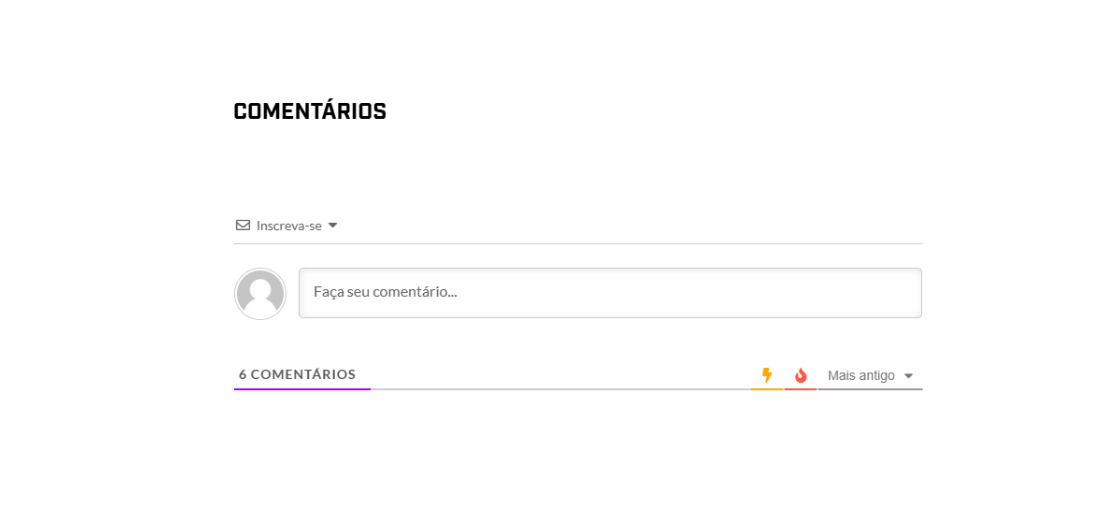
To extend its features, plugins like Jetpack and Akismet can be installed, adding integration with social networks and spam protection. Despite its simplicity, it lacks more advanced features such as automatic notifications to users or voting systems in comments.
The Drupal it also offers an integrated comment module to the system core, allowing customizations in appearance and operation. Moderateness can be adjusted to require prior approval or allow free comments.
In addition, Drupal offers flexibility in configuration, allowing you to add extra fields and notifications to users. However, it is necessary to install additional modules for social networking integration or spam protection. Although it is more complex, it is a robust solution for those seeking total control.
These solutions are practical and easy to implement, especially for news portals that want simplicity and security. However, its limitations in terms of interactivity can be a point of attention for those seeking high engagement.
Third Party Tools
Third party tools offer more advanced features for online comment moderation and an interactive experience for users. They are developed by external companies and can be integrated into any website, becoming a popular choice for news portals.
The Disqu is one of the best known systems and offers features such as automatic notifications of responses, voting system in comments and integration with social networks. It allows you to create engaged communities, but it can display ads in the free version, which may bother some administrators. In addition, it can impact the loading time of the page.
Another option is the IntenseDebate, which also offers features such as chained comments, email notifications and the possibility of integration with social networks. However, its outdated design and lack of regular updates may compromise the user experience, especially on mobile devices.
The Facebook Comments allows readers to use their social network accounts to comment, which facilitates user identification and reduces anonymity. Despite this, the dependency on Facebook platform can be a risk, since changes in API or even discontinuation of the service may directly impact the site's comments.
Finally, the OpenWeb stands out for being a modern solution, with features such as real-time discussions, engagement analysis and integration with the site design. However, it is a paid tool, which may be a barrier to smaller portals.
Each of these tools presents advantages and disadvantages, being important to evaluate the specific needs of the portal to choose the best comment system for WordPress or other CMS.
Step-by-step to Implement a Comments System
Now that you know the importance of comments and most used systems, let's step by step implement. Know that the implementation of a comment system on a website is a strategic process that requires technical planning and attention to design and functionality.
Choice of the ideal tool: decision criteria
To select the best comment system for your website, consider important criteria such as:
- Platform compatibility: verify that the tool is compatible with the CMS used;
- Available Features: analyze resources such as moderation, integration with social networks and automatic notifications;
- Ease of use: ensure that both administrators and readers can use the system without difficulty;
- Impact on performance: evaluate whether the solution affects the site's loading time;
- Security and privacy: consider tools with anti-spam filters and that comply with data protection laws;
- Cost-benefit: compare the free and paid plans by evaluating the available budget.
A well-founded choice facilitates the creation of a website functional and efficient news, promoting strategies to engage readers with comments.
Technical configuration and portal integration
Now let's step by step technical to set up and integrate into the portal:
- Tool installation:
access the management panel of your CMS;
Install the plugin or module corresponding to the chosen comment system;
- Initial settings:
Adjust permissions for readers to comment (with or without moderation);
Configure notifications to alert administrators and readers about new comments;
- Visual integration:
Add comment system code to the site template, aligning it with design;
- Tests and validation:
Perform tests to ensure that the system works correctly on different devices and browsers.
Customization for alignment with site design
Customizing the comment system ensures that it integrates harmoniously to layout from the portal. Adjust colors, fonts and styles to reflect the visual identity of the site, maintaining a cohesive experience for the user.
Also, enjoy the flexibility of some tools to add unique features such as custom icons or interaction options that stimulate user engagement, creating a more immersive experience.
Moderation and Security
Moderateness is essential to maintain a healthy environment on websites that have comment areas. Good practices include regularly reviewing comments, approving relevant content and deleting offensive messages or out of context.
The use of antispam filters and artificial intelligence can help automatically identify inappropriate comments, saving the moderation team time. Tools like Captcha or Akismet are great options to reduce spam volume and increase portal security.
Finally, it is important to define clear moderation policies such as not to tolerate hate speeches or unauthorized promotional content. This promotes a respectful space and encourages the participation of readers with constructive opinions.
Best Practices to Engage Readers with Reviews
Encouraging active participation of readers is fundamental. Add questions at the end of subjects or invite the audience to share your opinions and experiences related to the theme. This type of approach promotes engagement of users in a natural way.
Another recommended practice is the frequent interaction of the portal team. Replying to comments shows attention and creates a direct connection with the public, strengthening the relationship with the brand.
In addition, implement gamification, as stamps or highlights for the most engaged readers. This stimulates interaction and creates a more active community around the site.
Considerations: Comments Systems
A poorly optimised comment system can negatively impact the site's loading time. Choose Tools light and compatible with CMS to minimize this problem and improve the user experience.
Another very important point is to ensure that the system works perfectly in mobile devices, since much of the traffic of news portals comes from smartphones and tablets. Test regularly to avoid display failures.
Finally, monitor interaction metrics such as number of comments and average reading time. This information helps to evaluate strategy performance and adjust the system as needed.
A well-implemented comment system not only enriches user experience, but also strengthens relationship with audience. With proper planning and right tools, it is possible to create a dynamic space for exchange of ideas, increasing the engagement and reach of the portal.
Evaluate the needs of your website and start the implementation process today! If you need help, count on WebSyd. . Our team is here to help you.

Caio Nogueira is a SEO, GEO, link building and Digital PR expert and co-founder of WebSyd, website creation agency and SEO consulting founded in 2016. It acts with organic search strategies, digital authority construction and brand optimisation for search engines and artificial intelligence platforms. Throughout his trajectory, he participated in more than 1000 projects involving SEO, website development, content marketing and authority acquisition through backlinks and Digital PR. At WebSyd, it participates in the planning of strategies to increase organic visibility, lead generation and presence of companies on Google and AI-based search engines. As an author, it publishes content on SEO, GEO, website creation, link building and digital authority, sharing analyses, strategies and practical experiences related to organic growth of companies. Its contents and contributions have also been published in companies and vehicles of technology and marketing such as Wix, HostGator, Duda, Neil Patel, Locaweb and E-Commerce Brasil.
View all posts


 Estimate the cost

