
Micro interactions for website: a complete guide [+ examples]
Summary (TL;DR)
In this post we will show you what micro interactions are for websites, how they can transform the user experience and best practices to apply them.
We will explore the role of these small interactions in interface design (IU), why they are important, their main components, and how to use them to create a more intuitive and engaging navigation.
We will also see practical examples, tools for creating common microinteractions and errors to be avoided, ensuring that your site or application stands out with a memorable experience.

Quick answer: microinteractions are small visual or sound responses to a user's action, such as the heart that fills up while enjoying, the button that changes when sending a form or weak password warning. They confirm that the action worked, guide the next step and avoid mistakes. They should be quick, discreet and respect those who prefer less movement on the screen.
When we talk about creating a charming experience in the digital universe, website microinteractions emerge as the small heroes of interface design (IU). These discrete and often underestimated elements are responsible for adding life to the interfaces, transforming a common navigation into a memorable experience.
Imagine that feeling of satisfaction when giving “like” on a photo on Instagram or watching a subtle animation while waiting for the upload of a page. These moments not only humanize digital interactions, but also build an emotional connection with the user.
However, microinteractions are not just “cute”. They play important roles in web usability and user experience. . Whether it is guiding actions, giving instant feedback or improving overall aesthetics, these subtle details help shape positive perceptions of a website or application.
Dan Saffer, author of the book Microinteractions: Designing with Details, argues that these small interactions are the glue that unites the elements of design and usability.
In this complete guide, let's understand what microinteractions are because they are important and how to use them. See examples, best design practices and tools to start designing interactive experiences that delight and engage.
What are micro interactions?
Microinteractions are small moments of interaction between user and interface, designed to communicate something or guide actions intuitively. They can be as simple as a visual notification when filling out a form field or as elaborate as animations that make the loading process more enjoyable.
These interactions do not exist only to adorn, they have a clear purpose: to improve web usability and create a more fluid experience.
For example, when typing an incorrect password into a login, it is common for an error message to appear accompanied by a red icon or a discrete sound. This is a classic example of microinteraction: it instantly and clearly informs the error, without the user having to guess what went wrong.
Another example is the “like” button on Instagram, which displays an animated explosion when pressed, or the typing indicator in the WhatsApp, which signals that someone is responding. These details make interactions more human and dynamic.
Without the micro-interactions, a website can look cold and mechanical.
Think about how much the X bird (old Twitter) spinning during feed update makes the moment more tolerable. These small elements not only entertain, but also ensure that the user understands what is happening, reducing frustrations and increasing engagement.
In the universe of UI designIt's these details that create an emotional connection and leave a lasting impression.
Why are microinteractions important?
Microinteractions are essential because they make interaction with a website or app more intuitive, efficient and pleasant. . They serve as a bridge between the user and design, ensuring that simple actions are carried out clearly and effortlessly.
These little details help create a fluid and consistent browsing experience, improving overall usability. Check out some of the reasons why you should implement this feature in design:
- Guides users during important actions;
- Makes navigation more dynamic and interesting;
- immediately informs the status of an action;
- Small visual details convey professionalism.
For example, subtle animations, such as the loading button or interactive icons, create the feeling that the site is modern and reliable.
When these interactions are well designed, they show that there was be careful with the user experience, which improves the perception of quality and increases the likelihood of return of the visitor.
Components of a microinteraction
According to Dan Saffer, microinteractions are composed of four main elements: trigger, rules, feedback and loops and modes. . These components ensure that each microinteraction functions as a well-adjusted mechanism, from the moment it is activated to the final response displayed to the user.
Trigger
The trigger is the element that initiates microinteraction and can be triggered by the user or system. An example of user trigger is to click on a button, slide the screen or scroll the page.
The triggers triggered by the system are automatic, such as a notification that appears when completing an action, or an alert to save changes while closing a tab without saving them.
Rules
The rules determine what happens after the trigger is activated. . They define the behavior of microinteraction and must be logical for the user.
For example, when touching the icon of a flashlight in an application, it is expected that the light will be activated immediately. This predictability is essential for the user to trust and understand interaction.
Feedback
The feedback is the visual, sound or tactile response which informs the user of the result of its action. A common example is when we fill out an online form: fields with errors are highlighted in red, while the correct ones are green. This immediate feedback eliminates doubts and helps the user to complete tasks more safely.
Loops and modes
Loops define for how long the microinteraction continues or how it adapts over time. For example, a loading animation can last until the process is completed.
The manners, however, are configured states which remain active until the user changes them, such as keeping the stopwatch running in a productivity application until it is paused. These two elements ensure consistency and adaptability to microinteractions.
Types of microinteractions on websites
There are several types of microinteractions that can transform a site in a dynamic experience and engaging. Check out some of the main:
Loaders
Loading microinteractions are key to keeping the user engaged while an action is processed, such as loading a page or executing a command.
They help the reduce the perception of waiting time, turning a potentially frustrating moment into something visually pleasing. Some examples are animations of spinning circles, progress bars or creative messages that inform the status of the load.
Interaction buttons (hover, click)
Interactive buttons, which change when passing the cursor or clicking, are one of the most common examples of microinteractions. When a user passes the mouse over a button and it changes color, grows or displays a shadow, there is a visual confirmation that that element is clickable. That's it. improves usability, guiding the user intuitively.
These microinteractions can also be used to highlight priority actions. For example, a “Buy Now” button that changes color when passing the cursor encourages click and reinforces call for action.
Action Confirmations (like, share)
Action confirmations are microinteractions that immediately show the user that an action has been successfully completed. A classic example is the heart of Instagram that “explodes” in a small animation when clicked. This not only confirms the “like”, but also provides a Satisfactory moment that encourages engagement.
Subtle notifications and feedback
Subtle notifications and feedback keep users informed about what is happening on the site without interrupting your experience. A simple example is the discreet warning of “successfully sent message” that appears after sending a form.
These microinteractions are designed to be quick and clear, transmitting useful information without overloading the interface.
Best practices for designing microinteractions
When well applied, microinteractions enrich the user experience, but the excess of information or animations can cause confusion and harm navigation. To avoid that, it's fundamental. balancing creativity and functionality.
Check out this complete guide with seven essential practices to design microinteractions efficiently and impactingly:
1. Think of simplicity and purpose
Simplicity is the soul of successful micro interactions. They must have a clear goal and be direct, without unnecessary distractions. For example, an animation that indicates the progress of uploading a file is functional and intuitive, while an interaction full of exaggerated effects can confuse and overload the user.
2. Keep the user informed and involved
Microinteractions are the communication bridge between the system and the user. They must provide immediate feedback, either to confirm an action or to report an error. A classic example is a progress bar during loading, which prevents the feeling of abandonment on a static screen.
In addition to information, they must keep the user engaged. Instead of a simple “carrying...” message, how about a fun animation or a creative message? These details keep the user involved, improving your perception of the site or app.
3. Be attentive to the user’s goals
Microinteractions should always contribute to user goals, helping reduce friction and make navigation more efficient. A good example of this is online forms that validate real-time information, signaling correctly filled fields or highlighting errors.
4. Create emotional connections with a human touch
If well thought out, interaction can turn a cold and mechanical site into a more humane and warm experience. Small details, such as an animated emoji that appears when sending a successful form, or friendly messages on the upload, reinforce the emotional connection with the user.
5. Make sure you're responsive.
Microinteractions should work perfectly on different devices and screen sizes, ensuring a consistent experience. A button that responds to the touch of the mobile should be as effective as on the desktop, without delays or failures.
6. Show predictability in interactions
Users are accustomed to certain visual and interactive patterns. Respecting these conventions, such as using green for successful and red actions for errors, is essential to maintaining intuitive experience.
7. Be brief and objective
Microinteractions need to be fast and direct. The name itself indicates that they should be “micro”, i.e. short and instantaneous actions. If an animation takes more than a second, it can generate impatience and harm the user experience.
Tools for creating microinteractions
Creating efficient and impacting microinteractions requires appropriate tools that allow you to integrate dynamic animations and interactions in a fluid way into the projects. Learn some tools with practical and versatile solutions to bring your designs to life:
Lottie
Lottie is a revolutionary tool in the universe of digital animations. Based on JSON format, it allows you to create, edit and integrate lightweight and scalable animations on any platform, whether for web or mobile devices.
In addition to ensuring visual quality in different dimensions, Lottie is highly recommended for creating microinteractions such as animated buttons, interactive icons and smooth transitions.
Principle
The Principle is ideal for those who want to design animated and interactive interfaces, whether for multi-screen applications or more specific animations. It stands out for its intuitive interface and robust features that allow you to create smooth transitions, simulate user interactions and test full flows before implementation.
The tool is widely used by designers who seek to create immersive and dynamic experiences, offering flexibility to test ideas and adjustments in real time.
Adobe XD
The Adobe XD it is a powerful platform for design and prototyping of interfaces, focusing on creating engaging user experiences. Whether for websites, apps, games or voice interfaces, it offers complete features to design wireless frames, high-fidelity prototypes and responsive animations.
One of its advantages is its integration with other Adobe tools such as Photoshop and Illustrator, allowing you to reuse creative assets easily. It also supports 3D transformations and the use of videos and animations, making it ideal for modern and dynamic designs.
Examples of successful micro interactions
Microinteractions can transform the experience into something intuitive and memorable. Check out below some examples of popular websites and platforms that use microinteractions effectively to engage users, simplify processes and improve browsing:
Password Error Feedback: Gmail
A classic example of successful microinteraction is Gmail password error feedback. When a user does not meet security requirements when entering the password, the platform provides a clear and instant message, highlighting that the password is incorrect.
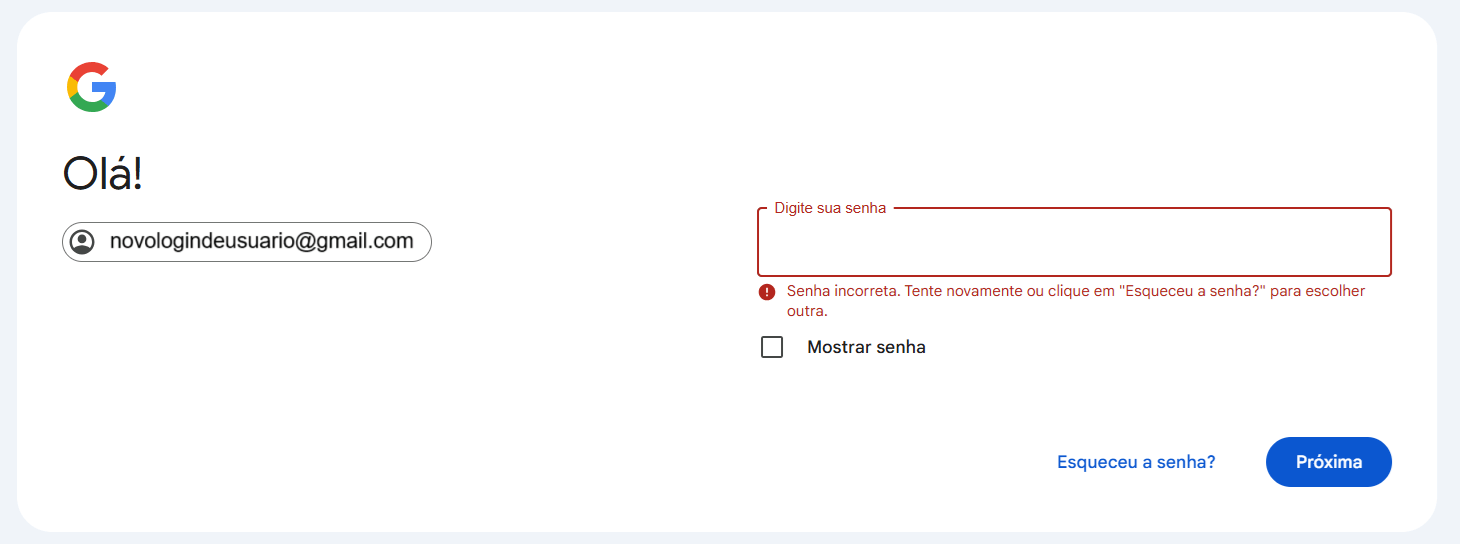
You also find these microinteractions in email applications. It is a simple and direct way to warn the user that he made a mistake, and still present an option to correct the action. These simple actions help the user and consequently UX of your website.
Hotspots that help you navigate: Grammarly
Grammarly uses subtle micro interactions in its integration process to guide new users. Flashing icons, known as hotspots, appear on the screen, indicating important features in a discreet and attractive way. When clicked, they reveal additional information that helps the user better understand the tool's features.
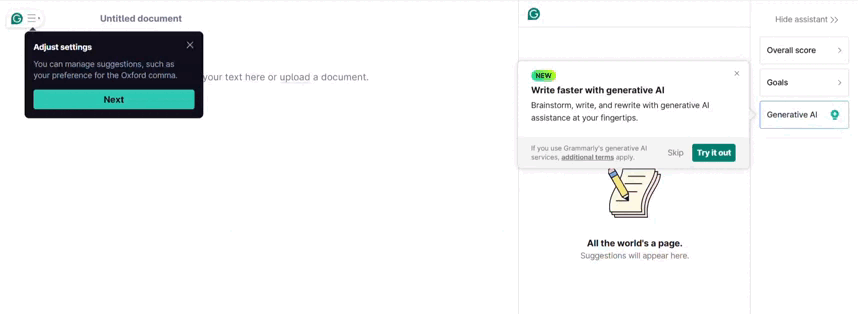
Interactive emojis on the like button: Facebook
On Facebook, reactions to posts are an iconic example of microinteractions that create engagement. . By pressing the like button, a list of interactive emojis appears, allowing users to choose reactions such as “I loved”, “haha”, “wow”, “sad” and “rage”.

Common Errors when implementing Microinteractions for Website
Although powerful, microinteractions can harm the user experience if they are not well planned. Some of the most common errors are:
- Create animations that do not add value to the experience;
- To pollute the interface with unnecessary interactions;
- Use styles or animations that do not match general design of the site;
- Ignore users with specific needs or using assistive devices;
- Design interactions that do not work well on different mobile devices or browsers.
So, avoid overloading the interface with excessive animations. . Although microinteractions are captivating, exaggerating can make the site visually confusing and negatively impact usability.
Besides, it's essential consider accessibility. . Use functional microinteractions for users with visual, hearing or motor impairments, offering alternatives such as text descriptions and compatibility with screen readers.
Ensure that microinteractions run on mobile devices it is also essential, given the greater number of users who access the internet through these devices.
When well used, microinteractions have the power to transform common interfaces into memorable experiences.
Do you want well-designed microinteractions on your site? Get a quote.
FREQUENTLY ASKED QUESTIONS
What are micro interactions?
Microinteractions are small interactions between the user and the interface of a website or application. They are designed to guide actions, provide feedback or make navigation more intuitive. Examples include upload animations, subtle notifications and buttons that change when passing the cursor.
What is the importance of microinteractions on a website?
Microinteractions make the user experience more fluid and enjoyable. They help guide the user in important actions, improve usability and create an emotional connection to design, making the site more modern and professional.
What are the components of a microinteraction?
The main components of a microinteraction are:
- Trigger: which activates the interaction, such as a click or scroll.
- Rules: define the expected behavior after the trigger.
- Feedback: informs the user of the result of the interaction, visually or soundly.
- Loops and modes: control the duration and repetition of interaction.
What are common examples of micro interactions?
Examples include the “like” button on Instagram, which displays an animation when clicked, progress bars while loading a page and visual feedback when filling out a form, such as fields highlighted in green or red.

Caio Nogueira is a SEO, GEO, link building and Digital PR expert and co-founder of WebSyd, website creation agency and SEO consulting founded in 2016. It acts with organic search strategies, digital authority construction and brand optimisation for search engines and artificial intelligence platforms. Throughout his trajectory, he participated in more than 1000 projects involving SEO, website development, content marketing and authority acquisition through backlinks and Digital PR. At WebSyd, it participates in the planning of strategies to increase organic visibility, lead generation and presence of companies on Google and AI-based search engines. As an author, it publishes content on SEO, GEO, website creation, link building and digital authority, sharing analyses, strategies and practical experiences related to organic growth of companies. Its contents and contributions have also been published in companies and vehicles of technology and marketing such as Wix, HostGator, Duda, Neil Patel, Locaweb and E-Commerce Brasil.
View all posts


 Estimate the cost

