
Site FAQ: What to put in your site's frequently asked questions?
Summary (TL;DR)
In this post we will talk about how to do and what to put in the FAQ section of a professional website.
Creating an FAQ is a powerful way to improve the user experience (UX) and optimise for search engines (SEO) is by creating a FAQ.
The FAQ serves as a practical guide for visitors, answering their most common questions clearly and directly. In addition, by including relevant keywords in questions and answers, you not only help users but also signal search engines that your site is a reliable source of information.
This article explores in detail the importance of the FAQ, from its creation to its integration into the site design. It provides practical tips on how to plan FAQ content, write and format for SEO and UX, and keep the FAQ up to date over time. In short, investing in the continuous creation and optimisation of a FAQ can be an intelligent strategy to improve the usability and visibility of your online site.

Quick answer: a good FAQ for the site gathers the real questions that come to the service (time, price, payment, delivery, guarantee, how the service works), with short and direct answers, grouped by theme and linked to pages that deepen each subject. Since August 2023, Google has only shown the FAQ as a rich result for government and health websites; for the others, the gain is in the visitor's experience and in having clear answers that searchers and AI assistants can cite.
Next: how to plan, write, position and maintain the FAQ, and where it enters your SEO strategy.
Understanding the Importance of FAQ
A FAQ answers before the customer asks: reduces repeated contacts in the service and raises objections at the time of decision.
For SEO, the FAQ helps when questions use the words the customer types and answers are complete. This favors long tail searches and AI responses. The rich result of Google FAQ, however, was restricted to government and health websites; Mark FAQPage will not generate the highlight for most companies.
Not to mention that a well-structured FAQ can significantly improve the internal link structure from your site, making it easier for search engines to track and index your content.
FAQ Content Planning
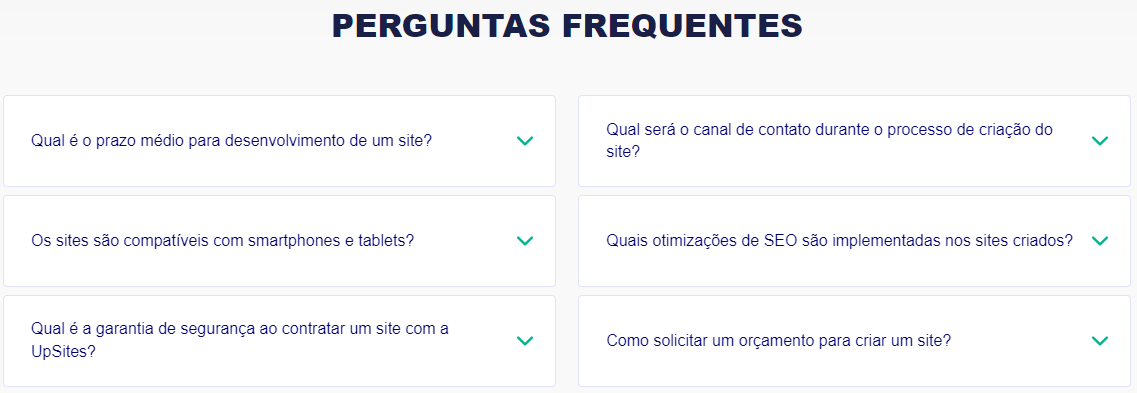
When it comes to setting up a FAQ that really resonates with your visitors, the secret lies in careful content planning. Imagine yourself in the place of users and think about the doubts they might have while browsing your site.
Does that sound like a challenge? I'll give you some tips to make this process a little easier and more effective.
First, start by collecting data. Analyze support emails, social media comments, and even direct conversations with your customers.
What are the doubts that appear most often? These are the jewels you want to include in your FAQ. But don't stop there! Also use keywords search tools to understand what are the most sought-after terms related to your business.
This will help you formulate the questions in a way that echoes what users are looking for.
Now, with a list of questions in hand, it's time to organize them logically. Try to group them by themes or categories.
For example, if you have an e-commerce, categories like ‘Send’, ‘Payments’, and ‘Returns’ can be a good start.
This not only makes it easier for users to find what they are looking for, but also helps create a clear and intuitive structure for their FAQ.
Remember, the goal is to get users to find answers to your questions quickly and without friction.
A well-planned FAQ is like a map that guides the user, making your site experience as smooth and enjoyable as possible.

Efficient Writing and Formatting for SEO and UX
By writing and formatting the FAQ to optimise both UX and SEO, follow these best practices:
- Be Clear and Concise: Draw direct answers, avoiding unnecessary jargon. This makes content accessible and easy to understand for all users.
- Incorporate Keywords: Use relevant keywords naturally in questions and answers to improve SEO without compromising the naturality of the text.
- Use Formatting to Highlight: Use lists, subtitles and bold for important points. This helps in text scanning, allowing users to quickly find the information they seek.
- Internal Links: When applicable, include links to other pages of your website in the answers. This encourages exploration and improves the structure of internal links to the site.
- Visual Feedback: Provide icons or visual signals, such as arrows or signs of more and less, to indicate expansion and contraction of responses. This improves the browsing experience in the FAQ.
These practices not only improve the user experience, making the FAQ a valuable and easy-to-use feature, as well as optimizing content for search engines, increasing the visibility of your website.
Integrating the FAQ to Site Design
Efficiently integrating the FAQ to your website design is essential to ensure that it is easily accessible and visible to users, while contributing positively to the overall experience of the site.
Here are some comprehensive strategies and considerations on how to effectively accomplish this:
Visible Positioning Strategies
- Strategic Location: Place the FAQ in a clearly visible section of the site, such as the main menu or footer. This ensures that it is easily found by users looking for quick answers.
- Dedicated Page vs. Integration: Consider creating a dedicated FAQ page to centralize all questions, facilitating the search for answers. Alternatively, integrate frequently asked questions into relevant pages (such as products or services) to provide useful information in the appropriate context.
- Visual Indication: Use attractive icons or illustrations that draw attention to the FAQ section. Attractive visual design can encourage users to explore questions and answers.
Responsive Design and Accessibility
- Compatibility with Mobile Devices: Make sure the FAQ is easily navigable on mobile devices. O responsive design of the site it is crucial because a large portion of web traffic today comes from smartphones and tablets.
- Reading Facility: Use readable fonts, appropriate text sizes and color contrast enough to ensure that everyone, including visually impaired users, can read the content without difficulty.
- Keyboard Navigation and Screen Readers: Ensure that the FAQ is keyboard navigable and accessible by screen readers, allowing users with different skills to access information.
- Expansion and Collapse Controls: Implement expansion and collapse features for FAQ questions and answers. This not only makes browsing more intuitive but also helps in the organization of content, allowing users to focus on the information they need.
- Usability Tests: Perform regular usability tests to identify and correct any barriers users may face while accessing the FAQ. Direct feedback from users can provide valuable insights into how to improve FAQ accessibility and visibility.
By implementing these design strategies and considerations, you can ensure that your website FAQ is not only a useful tool to answer users' questions but also an integral element that improves the user experience and accessibility from the site.
Continuous FAQ Optimization

Continuous optimisation of the FAQ is essential to maintain its relevance and effectiveness in improving both user experience and SEO.
Here are some approaches and tips for monitoring, collecting feedback and updating your FAQ, ensuring that it continues to meet the needs and questions of users.
Performance Monitoring and Feedback Collection
- Data Analysis: Use web analytics tools to monitor how visitors interact with the FAQ page. Observe metrics such as page length of stay, click rates and output rates to identify content that arouses the most interest or requires improvements.
- Direct Feedback: Encourage users to leave feedback on frequently asked questions, either by means of a “was it helpful?” button next to the answers or through contact forms. This can provide valuable insights into the clarity, usefulness and scope of the answers provided.
- Suggestion Box: Implement a box of suggestions so users can submit their own questions they did not find in the FAQ. This not only helps to identify gaps in your content but also actively involves users in improving the FAQ.
FAQ Update and Expansion
- Research Trend Analysis: Regularly review the research trends related to your sector and integrate questions relevant to your FAQ. Tools like Google Trends and Keyword Planner can offer insights into what users are looking for.
- Sector Change Based Review: Keep the FAQ up to date with the latest information, products, services and policy changes. This is crucial to ensuring that the answers remain accurate and relevant.
- Expansion Based on New Users Needs: As your site grows and evolves, new questions will arise. Maintain a dynamic process to regularly add new questions and answers to the FAQ, especially those generated from feedback from users and suggestion boxes.
- Constant Review and Refining: Periodically, review the FAQ to eliminate redundancies, update outdated responses and improve clarity of explanations. A well-cared FAQ is a reflection of the site's commitment to the quality of information and user satisfaction.
- Integration with Other Content: Consider linking FAQ responses to blog posts, videos, or other informative features from your site for a deeper exploration of topics. This not only enriches the content of the FAQ but also improves the internal link structure of your site, benefiting SEO.
By implementing these practices, you can ensure that your website's FAQ is a living tool that grows and adapts to the constantly changing needs of your users while contributing significantly to the optimisation of your site for both search engines and user experience.
Checklist: How to build your website FAQ?
- List the 10 to 20 questions that most come through WhatsApp, e-mail and phone.
- Group by theme (price, deadline, payment, delivery, support).
- Answer in the first sentence and complete with the necessary detail.
- Connect each answer to the page that deepens the subject.
- Review every quarter with what the service and Search Console show.
FREQUENTLY ASKED QUESTIONS
Why is a FAQ important to the user experience (UX) on a website?
A well-designed FAQ significantly improves the user experience (UX) by providing quick and clear answers to the most common questions. This facilitates navigation, reduces frustration and increases visitors' satisfaction, making their interaction with the site more enjoyable and efficient. A FAQ acts as a useful guide, helping users find the information they need effortlessly.
How can a FAQ contribute to the optimisation of search engines (SEO)?
It helps when questions use the terms that the client searches and answers are complete, which favors long tail searches and AI assistants' responses. Since August 2023, Google has shown the rich FAQ result only for known government and health websites.
What are the best practices to create an effective FAQ?
Answer in the first sentence, without jargon; use the terms that the client searches, without forcing keywords; group questions by theme; link the answers to the pages that deepen the subject; and use questions that open and close, accessible by keyboard.
How to keep the FAQ up-to-date and relevant?
Review the FAQ every quarter: add the new questions that come to the service, use Search Console to see which searches lead to the page, remove outdated answers and ask for feedback with a “Was this answer helpful?” button.

Caio Nogueira is a SEO, GEO, link building and Digital PR expert and co-founder of WebSyd, website creation agency and SEO consulting founded in 2016. It acts with organic search strategies, digital authority construction and brand optimisation for search engines and artificial intelligence platforms. Throughout his trajectory, he participated in more than 1000 projects involving SEO, website development, content marketing and authority acquisition through backlinks and Digital PR. At WebSyd, it participates in the planning of strategies to increase organic visibility, lead generation and presence of companies on Google and AI-based search engines. As an author, it publishes content on SEO, GEO, website creation, link building and digital authority, sharing analyses, strategies and practical experiences related to organic growth of companies. Its contents and contributions have also been published in companies and vehicles of technology and marketing such as Wix, HostGator, Duda, Neil Patel, Locaweb and E-Commerce Brasil.
View all posts


 Estimate the cost

