
Rejection links: SEO guidance and advice
Summary (TL;DR)
In this post, we talk about the importance of managing and rejecting bad backlinks to protect your site from possible Google penalties.
We explain how Google's link rejection tool works, the types of links you should consider rejecting, and we offer guidance to keep your backlink profile healthy.

Quick answer: Google Search Console's disavow link rejection tool serves to ask Google to ignore backlinks specific. According to Google, most websites don't need it because systems already ignore most spam links on their own. Use only in two cases: when Search Console shows a manual action by artificial links, or when you know that the site has purchased links or participated in links schemes that it cannot remove. Rejecting good links does not generate punishment, but it makes the site lose their value.
But what about the bad backlinks? They're the ones that come from spam sites, links networks or hacked pages. For cases where these links cannot be removed, Google has created the link rejection tool.
We created this guide to detail this feature. We will explain how Google's link rejection tool works, list links that you should reject and share expert opinions on the process.
What does Google's link rejection tool do?
Launched in 2012, the tool to reject Google links allows you to ask Google to disregard selected backlinks. The goal behind the tool reject links is essentially clear your backlink profile and free you from any backlinks with spam and low quality that can decrease the classification of your site in the research mechanism.
Link rejection is a last resort. By mistake rejecting good links does not generate penalty, but makes Google ignore these links, which can reduce the performance of the site. Most of the small businesses And medium size won't need the tool.
That said, if you have received a manual action message in Google Search Console similar to the below, it is time to reject the links.
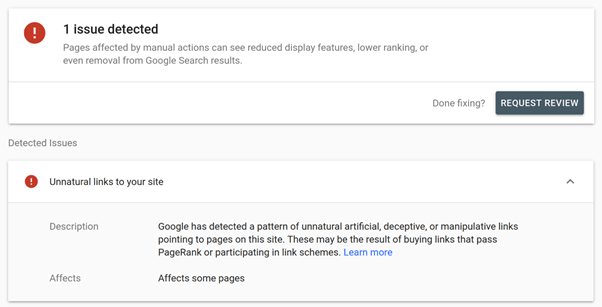
This Google notice indicates that there may be invalid links, spam links or artificial links to yours site. . They may be linked to link schemes: manipulation tactics designed to help you get a higher rating. This may include the purchase and sale of links, trading of high-volume links and the use of programs to bring links automatically to your website.
In order not to get to this point, avoid buying links without rel=”sponsored” marking and stay away from link schemes. To understand what Google considers manipulation, read the Google Search spam policies.
If you receive this manual action, first try to remove the links by asking the owners of the sites. Whatever you cannot remove, send to a .txt file in link rejection tool Search Console. The tool has no immediate effect: Google applies the rejection as it tracks back pages with these links, which may take weeks.
Rejecting links by google tool
After removing and rejecting the links, send a request for reconsideration in the manual stock report, explaining what was done. The request only applies to those who received manual action; falls by algorithm have no reconsideration.
To better understand your backlink profile, you can check the “Links to your website” section in Google Search Console.
This information can help you identify spam sites with links to your content. You can export this list and sort the file to locate all suspicious links on your own rejection list and examine each of them carefully. This informal backlink audit will help you find all the obscure backlinks that can result in an algorithmic Google penalty.
4 types of link you should consider rejecting

Bad backlinks come in many different ways. Below are some examples of the most common types to be observed. Although this list does not include all types of links you should reject, it is still a good starting point.
Spam links for comments and forums
Google does not necessarily disapprove of users who access related content in comments or forums. However, it is difficult for webmasters who use forums to fill their backlink profile. If you access trusted websites and try to flood the comments or forums sections with links to your site and no additional context, Google will see this as spam and you can penalize it.
Expired domain links
Links coming from domains that have expired and were purchased by third parties can now stay on spam pages. In this case, they stop helping; evaluate rejection only if they are part of a pattern of artificial links.
Links of low quality and spam sites
It may be worth rejecting spam sites with many external links or websites that seem to have been hacked. This may also be a sign that your site is being targeted by a negative SEO attack. If you do not reject these links, be aware of the Search Console Panel manual actions section to ensure that no future action is needed.
Network links of private blogs
Private blog networks (PBNs) are large groups of blogs and websites managed by the same website owners to build backlinks between them and make their content have a higher rating on Google. They were a great trend some years ago, but they are no longer seen as a viable white hat SEO technique. In 2014, Google turned its back on PBNs and started taking steps to completely deindex them. A good way to identify them is if several sites have very similar backlink profiles or if a site is constantly being linked. If you recognize any PBN links to your website, consider rejecting them.
Conclusion
With this we come to the conclusion that although receiving links is extremely beneficial for your site, not all links are really worth it. Some may even harm your site and so you always need to be aware of the profile of backlinks you are receiving.
A help from an SEO professional is very welcome to assist you with these details. We recommend monitoring since the site creation until the moment you decide to disable it, because SEO analysis is an essential factor for your site to gain positions and ranking in the main search engines.
Enjoy our blog and read about Hosting: Linux or Windows?
Needing a professional website? Get a quote.

FREQUENTLY ASKED QUESTIONS
What is Google's link rejection tool?
Google's link rejection tool allows you to ask Google to disregard specific backlinks, especially those of low quality or spam, that may harm your site ranking.
When should I use the link rejection tool?
Only in two cases: when Search Console shows a manual action by artificial links, or when the site purchased links or participated in links schemes that it cannot remove. On most sites, Google already ignores spam links by itself.
What types of backlinks should I consider rejecting?
Consider rejecting spam links in comments and forums, expired domain links, low-quality and spam site links, and links from private blog networks (PBNs).
What to do after rejecting bad backlinks?
If the site has received a manual action by artificial links, please send a request for reconsideration in Search Console's manual stock report explaining what was removed and rejected. Without manual action, there is no request to do: Google gradually applies rejection as it tracks the pages with these links again.

Caio Nogueira is a SEO, GEO, link building and Digital PR expert and co-founder of WebSyd, website creation agency and SEO consulting founded in 2016. It acts with organic search strategies, digital authority construction and brand optimisation for search engines and artificial intelligence platforms. Throughout his trajectory, he participated in more than 1000 projects involving SEO, website development, content marketing and authority acquisition through backlinks and Digital PR. At WebSyd, it participates in the planning of strategies to increase organic visibility, lead generation and presence of companies on Google and AI-based search engines. As an author, it publishes content on SEO, GEO, website creation, link building and digital authority, sharing analyses, strategies and practical experiences related to organic growth of companies. Its contents and contributions have also been published in companies and vehicles of technology and marketing such as Wix, HostGator, Duda, Neil Patel, Locaweb and E-Commerce Brasil.
View all posts


 Estimate the cost

