
Site Maintenance 2026: How to take care of your site in the right way
Summary (TL;DR)
Maintenance of websites, blogs and digital platforms involves continuous adjustments and optimizations to ensure security, functionality and growth.
It is important to avoid expensive problems, improve SEO, keep the site up-to-date and maximize the number of visitors. The process includes checking site speed, correcting images and content, ensuring responsiveness, protecting against attacks and implementing marketing strategies.
Without maintenance, websites can face costly inactivity and customer loss. Therefore, investing in regular maintenance is essential for the long-term success and sustainability of any website.
Site maintenance is the continuous work of updating the system, plugins and content, backing up, tracking security and speed and correcting errors after the site is on the air. It prevents the site from getting slow, vulnerable or outdated, and protects the investment made in professional website creation service.
However, this topic is still little discussed between marketing professionals and entrepreneurs. There are still people who believe that the simple creation of a page is sufficient, but consistent results can only be observed when continuous improvement efforts are made.
Invest in site maintenance, regular updates, promote SEO improvements and, most importantly, protect your website to avoid the risk of wasting all your time and money invested.
This article will show what are the main aspects of site maintenance to be observed after the website is already on the air. Don't forget that all these points are fundamental to the success of the site. Without this plan, it's easy to get off course, dishearten and not be able to move the site in the right direction.
Why is site maintenance important?

To avoid future problems, site maintenance is essential. Correct maintenance services can do more than just keep your website running. They can also improve the overall experience on your site and improve your company's growth.
For example, a company can add pages and features as it grows on the market. In this way, you can share your news and manage the content more and more.
Website maintenance seems to be an easy step to skip if the budget is tight. Why not just pay for website creation agency And then let the site run on its own until it starts having problems? Isn't it cheaper to solve problems than to stop them?
However, things don't work that way. Just as a careless car can lead to extensive and expensive repairs, so does a neglected website that leads to extensive and costly corrections as well as long periods of inactivity that cost you customers and money.
Here are just a few of the reasons why site maintenance is an important aspect of any successful website:
- Website maintenance avoids expensive problems;
- Site maintenance can improve the optimisation of your search engine;
- Site maintenance keeps your website up to date and attractive;
- Site maintenance maximizes the number of visitors your site can manipulate.
Central elements of your website maintenance plan
First of all, before understanding how site maintenance really works, it is very important that a document be created in order to control the management of the website.
This document doesn't have to be incredibly chic. Even something as simple as a Google Drive DOC that your entire team has access to, or a large list of tasks on Trello, will make quite a difference.
Think of it as a comprehensive task list that will help your site succeed in the future. If you have a team working on your website, this can be a great way to give people an idea of long-term vision and at the same time be able to divide it into actionable daily or weekly tasks.
If you count on a webdesign agency, you can skip that step. But otherwise, he's very important!
You want a website maintenance budget? Talk to WebSyd!
How to maintain the site
Check out below how site maintenance is possible through updates and management.
1. Clear all post-release tasks
Launching a website can require a lot of energy and effort. However, once the period of happiness and relief is over, it is time to get back to work. As site releases are usually very stressful, it is likely that some crucial errors on your website have passed blank.
In this way, it is important to correct them as soon as possible. Next you will check which are the main errors that may have gone unnoticed. Of course, in an ideal world all these steps would have been completed before launch, but there is no problem if something was left behind.
What really matters is making the changes as soon as possible.
Check the speed of the site
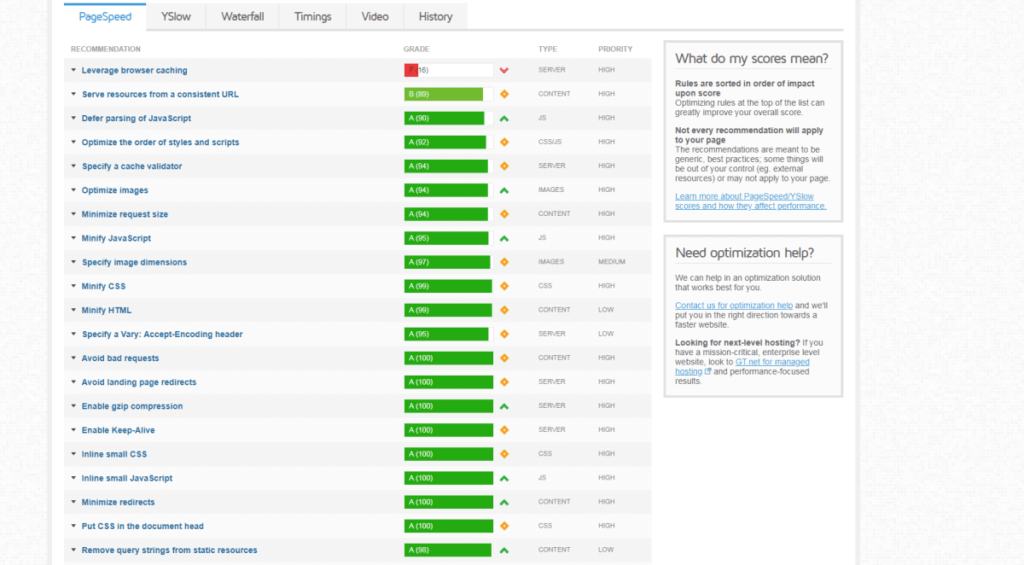
Having a website that loads fast will improve your user's overall experience and help you get a higher ranking in search engines. To begin with, use a tool such as GTMetrix or Google Pagespeed Insights to see the current performance of your website.
Make sure you have a schedule that includes regular checks to ensure your performance is not decreasing over time.
Check all images
Sometimes the images may be in the wrong size or it is possible that there are some duplicate images. Do a search on the site to ensure that all images are correct.
To further increase site speed, it is possible to use a tool like the TinyPNG to compact your images before loading them.
Review the content
If you have launched your site in a hurry, your content may still contain errors that will affect your visitors. Some basic things to analyze include checking your entire content in relation to spelling errors and incorrectly used words, ensuring that the content is properly optimised for search engines.
Here it is possible to realize how useful it can be to rely on a website creation agency. . After all, that's a lot of detail to pay attention to, isn't it?
Responsiveness Check
Do you know what your website is like on multiple devices? It is difficult to determine the size of the screen your visitors will use to access your website. For this reason, it needs to be displayed and executed correctly in various screen sizes.
If you have multiple devices in your office, open the site on each of them and spend some time browsing to see how it works.
Fill out the forms and registrations
You are likely to have multiple engagement paths on your site. This includes elements such as email registration forms, contact forms, buttons, navigation links and anything else that requires visitor interaction to work. Get in each of them to see if everything's working.
Also, make sure to check that your site has broken links, which lead to a page with “Mistake 404”. Book a time to click on all active links on your site or use tools like Semrush to automatically check this.
Create and send your XML sitemap
Your XML sitemap helps Google trackers to more easily determine the structure of your website. This file will list all relevant URLs you want to rank on Google. This is a crucial aspect of maintaining and improving SEO on the site.
You want a website maintenance budget? Talk to WebSyd!
2. Site Maintainer: Security

Without a proper site maintenance plan and a schedule, there is a greater risk that your website will become insecure and vulnerable to hacker attack. . None of these situations is easy to deal with, however they can be easily avoided through the steps below:
Common maintenance protocols
To avoid unnecessary headaches, stay informed about maintenance procedures and remain faithful to a regular protocol of site maintenance.
Regular site backups
Backup of your site is something that should be done regularly, preferably daily, especially for those who update the site frequently. If the server fails for some reason, or if your site is hacked, or even you make a serious mistake, your updates may disappear.
Therefore, it is necessary to ensure that your site backups are working. Every week, check the backups of your site to ensure that they are occurring within time, are being safely stored outside the hosting server and occasionally make sure these backups work.
It is worth noting that the frequency of your backups will depend on how often you update your site. When running a site backup, make sure to store it in a secure location.
Make sure themes and plugins are up to date
If your site has been developed at WordPress platform or in a similar CMS, it will be vulnerable the moment it is not updated.
When WordPress launches a new version, it is an obligation to update your site. Not doing this will make you vulnerable. Plugin updates should be treated in the same way, because every software update is also protection. Often, it takes a few minutes to update your themes and plugins.
Run a database scan
Your database is similar to your library. In time, it becomes crowded and disorganized. If your site runs on WordPress, we recommend using a plugin like WP-Optimize .
Run routine tests on the site
It is important to consistently monitor website data by checking the performance, loading speed and traffic numbers of your site. Google Search Console can provide all kinds of valuable data and information about the performance of your website.
Complex passwords
The more complex your passwords are, the harder they'll be to guess. You should also consider having a policy in which your passwords are protected by tokens.
Consider it a firewall
The firewalls will elevate your security. They act as an additional barrier to prevent your site from being hacked by hackers and other bad things.
Protect your administrative directories
The administrator and login areas of your website are especially vulnerable. You can protect them through the above firewall and also by installing plug-ins that limit the number of login attempts allowed.
Keep your website software up to date
Most sites are built on a content management system, which means it's software that can be potentially exploited. We use WordPress for various reasons, but one of them is that it is constantly updated, improved and made safer.
You want a website maintenance budget? Talk to WebSyd!
3. Site Maintenance: Create and execute website-integrated marketing strategies

For your website to succeed, you will need to somehow increase traffic and customers. Its launch may have caused a great impact, but what then to do to sustain this moment?
Fortunately, there are several methods of online marketing for this. We will not approach each of them in detail, but we will give you an overview of the channels on which you can concentrate your efforts.
When choosing which marketing method is best for your company, it is important to start with the central question: where is my audience? By responding to this, you can create a plan on how best to achieve them using the following methods:
Social media
Social media can be strongly integrated into your website and used to create a community of active followers who are willing to share both your content and purchase from you. The content published on your site and posted on social networks can also help build the authority of your brand, which will consequently increase your sales conversions.
Content marketing
Essentially, content marketing provides value to your readers through relevant content. This is usually done in the form of blogs, eBooks, special reports, articles, infographics, among others.
This is not strictly a technical maintenance problem of the site, but we think it's very important to keep it up-to-date with its contents. A regular blog or publishing schedule that provides relevant content will keep your visitors returning happy and engaged.
The search engines will like you very much too. Therefore, publish relevant content and publish it frequently.
Email marketing
Email marketing is the method of collecting email addresses from visitors to your website, so you can provide value and convert them into leads and customers. This is usually used simultaneously with content marketing and other marketing methods. It is necessary to be smart and observe whether the site is correctly picking up visitors' emails and data, so that from this the email marketing campaigns work properly and have good results. Good site maintenance can help a lot at this point.
Search Engine Optimization (SEO)
In general, SEO will help your site rank higher in search engines for terms related to your business. For the site to always be well positioned on Google, it is necessary to perform constant maintenances on it in order to improve it more and more according to the search algorithm. One SEO consulting is the service indicated to achieve the expressive results.
4. Site Maintainer: Optimization of pages
You may not think you have enough traffic to start optimizing your website immediately. But proper optimisation of page elements is crucial if you want a website that provides the growth of your business.
Okay, but what elements of the pages do I need to optimise?
Ideally, it would be nice to test all the elements of your site (over time), from the color of your link to the size of your source. However, we recommend starting with the four areas below as they will have the greatest impact on their results:
- the titles of the pages;
- the CTA of the pages;
- the design;
- The social evidence displayed.
Tools to test what needs to be optimised on pages
When it comes to optimizing page elements, there are a number of free and paid tools that will help a lot. To begin with, it is worth knowing that the old Google Analytics Content Experiments function, which then gave way to Google Optimize, no longer exists: Google Optimize was terminated in September 2023. Today, A/B tests can be done with third-party tools integrated into the Google Analytics 4.
These tests allow you to do content experiments, so that it is possible to optimise your site by improving small elements. The data collected from these experiments will allow you to make better design decisions.
Basic notions of site maintenance
Being a site owner comes along with certain responsibilities. You can't just build and forget. Well, you can, but as we've seen so far regular site maintenance is a necessity if you want your website to succeed.
Regular maintenance may:
- Keep your website safe. Sites are hacked and sites invaded lose visitors and traffic;
- Avoid you losing everything while maintaining a regular backup schedule;
- Avoid disgruntled users because something does not work or you have provided a broken or corrupted link;
- Keep regular visitors happy, giving them up-to-date information and exciting news.
Finally, below is a list of weekly, monthly and annual tasks that form a solid and complete site maintenance strategy. Use this list as a guide so you don't forget anything! She'll sum up all the content.
Weekly site maintenance tasks
- Check the site backups;
- Check for broken links and pages;
- Update at least one part of the content.
Monthly and quarterly site maintenance tasks
-
Speed up page loading times.
If you want to improve the success of your website, check the loading time of your pages and improve if so.
-
Check the browser compatibility.
The design of your website should appear correctly on all major web browsers. By checking your compatibility with the browser regularly, you can detect any display problem before losing business.
Annual Site Maintenance Tasks
-
Review your strategy on the web.
Over time, your company will grow and evolve. Your message can change. Your target audience can change. The number of visitors you need to accommodate can change. Keeping up to date with these changes means regularly reviewing your web strategy and implementing any necessary changes.
-
Update web design
Web design trends change quickly. For example, the responsive design for mobile devices has moved from optional to necessary for most websites. Adjusting (or updating) your design every year, you can incorporate new important trends, scale your design to changes in site traffic and maintain your beautiful website.
-
Evaluate your website for consistency.
In time, your site may lose a little consistency. New contents may not match the old ones. New sources may not be implemented throughout the site. New design graphics on one page may not mix harmonically with graphs on other pages. Finally, an annual review of your website can help you maintain the appearance of the site consistent in general.
How much does site maintenance cost?

At WebSyd, there are two levels. The monthly plan of the Express Website, R$ 114 per month, covers server, technical maintenance and support; does not include changes to the site. The Site Care Plan departs from R$ 305.90/month and includes Cloud hosting with CDN, speed optimisation, weekly update of plugins, theme and WordPress, 3 change tickets per month (up to 5 changes each), backup, monitoring uptime, security, SSL, monthly report and technical support. Email accounts are not included.
Unless you put aside your business to try to do this maintenance, you'll need to hire a web design company to help you keep your site running smoothly.
In addition, there may be other expenses such as site backup, domain name maintenance and so on.
However, the maintenance cost of your website It will be much smaller in the long term than correcting any problems that may arise. For example, the services of a web design company may cost you a monthly fee, but their support can save tens of thousands of real in business fees and losses if the site crashes or breaks.
So, as seen throughout the article, there are several things to be done in site maintenance. So it's much better to hire one website creation agency to do this job with quality!
You want a website maintenance budget? Talk to WebSyd!
FREQUENTLY ASKED QUESTIONS
What is site maintenance?
Website maintenance is the process of reviewing, updating and managing a website to ensure its continuous functioning and security. This includes software and plugin updates, bug fixes, data backup, performance optimisation, site security against hackers, content updates, and improvements in usability and user experience.
How much does a site maintenance cost?
The cost of maintaining a website may vary widely depending on factors such as the size and complexity of the site, the frequency of necessary updates, and the level of technical support required. At WebSyd, the monthly plan of the Express Website (server, technical maintenance and support; does not include changes to the site) costs R$ 114 per month, and the Site Care Plan, with hosting, updates, backup, security, support and change tickets, part of R$ 305.90/month. It is recommended to request a custom budget to obtain an accurate estimate based on the specific needs of your website.
How is site maintenance done?
The maintenance of a website is performed regularly and includes several activities. This involves updating the content management system (CMS), plugins and themes for the latest versions, fixing any problems or bugs that arise, performing regular site backups, monitoring and improving website security, optimizing site performance for faster loading, and updating content as needed to keep the site up-to-date and relevant. Maintenance may also include analysis of traffic data and implementation of improvements based on this analysis.

Caio Nogueira is a SEO, GEO, link building and Digital PR expert and co-founder of WebSyd, website creation agency and SEO consulting founded in 2016. It acts with organic search strategies, digital authority construction and brand optimisation for search engines and artificial intelligence platforms. Throughout his trajectory, he participated in more than 1000 projects involving SEO, website development, content marketing and authority acquisition through backlinks and Digital PR. At WebSyd, it participates in the planning of strategies to increase organic visibility, lead generation and presence of companies on Google and AI-based search engines. As an author, it publishes content on SEO, GEO, website creation, link building and digital authority, sharing analyses, strategies and practical experiences related to organic growth of companies. Its contents and contributions have also been published in companies and vehicles of technology and marketing such as Wix, HostGator, Duda, Neil Patel, Locaweb and E-Commerce Brasil.
View all posts


 Estimate the cost

