
Steps in Software Development: from Briefing to Launch
Summary (TL;DR)
In this post you will learn about all the essential stages of developing efficient and secure software.
From the first briefing with the client, through the survey of requirements, technical planning, choice of technologies, prototyping, architecture, programming and testing, to the publication and continuous evolution of the solution, we show how a structured process avoids rework, ensures deadlines and improves user experience.
We end with practical tips to avoid the most common errors, such as lack of validation with users, communication fails with the technical team and absence of planning.
The goal is to show that the success of a software project depends not only on the idea, but mainly on strategic execution at each stage.
Quick answer: the stages of software development are: 1) briefing and requirement survey; 2) planning and prototype; 3) architecture and design; 4) programming; 5) testing and validation; 6) launch; 7) support and evolution. Skipping steps, especially planning and testing, is the most common cause of delays and rework.
Creating an efficient and functional system requires much more than a good idea. As steps of software development need to be well structured to ensure that the project meets the actual needs of the customer, works properly and is delivered within the deadline. When this structure is ignored or poorly applied, the risks increase, and so do the costs.
The CHAOS reports of the Standish Group They've been showing for years that most of the software projects are late, they're over budgeting or they're canceled. The most common reasons are lack of planning, constant changes in scope, absence of tests and poor communication. Therefore, following a well-defined process makes a difference.
See the step by step of a complete project, from the first briefing to release.
Step 1: Briefing and Responding
The first step to a software project for companies Whatever. successful is understand the problem deeply It will be resolved. This stage involves active listening, information gathering and the start of custom systems planning with a focus on what the customer really needs.
This is where the bases are laid, and the better defined they are, the less likely they will be to rework in the next stages.
Meeting with stakeholders
Gathering all parties involved in the project is essential to ensure that everyone shares the same vision. Stakeholders include not only the client, but also end users, managers and technicians. This one. initial conversation aligns expectations, points out specific demands and helps anticipate possible obstacles even before the creation of the system.
Understanding the problem to be solved
More than creating a modern system, the goal is to solve a real pain of business. Therefore, this stage requires careful analysis: which bottleneck will the software solve? What manual tasks will be automated? What processes need to be optimised? With these answers in hand, the team already begins to draw the solution more assertively.
Definition of objectives, desired features and initial scope
Now it's time to transform ideas into functionalities. . For example: a delivery system may need order tracking, integration with payment means and a simple administrative panel. On the other hand, a financial system may require detailed reports, data security and banking integration. All of this makes up the initial scope of the project.
Documentation and alignment of expectations
All requirements raised must be documented and validated with the customer. This document serves as a reference throughout the process, ensuring that the technical team and those involved are on the same page. A good one alignment from the beginning avoids frustrations in the end and makes planning of custom systems much more efficient.
Step 2: Planning and Prototyping
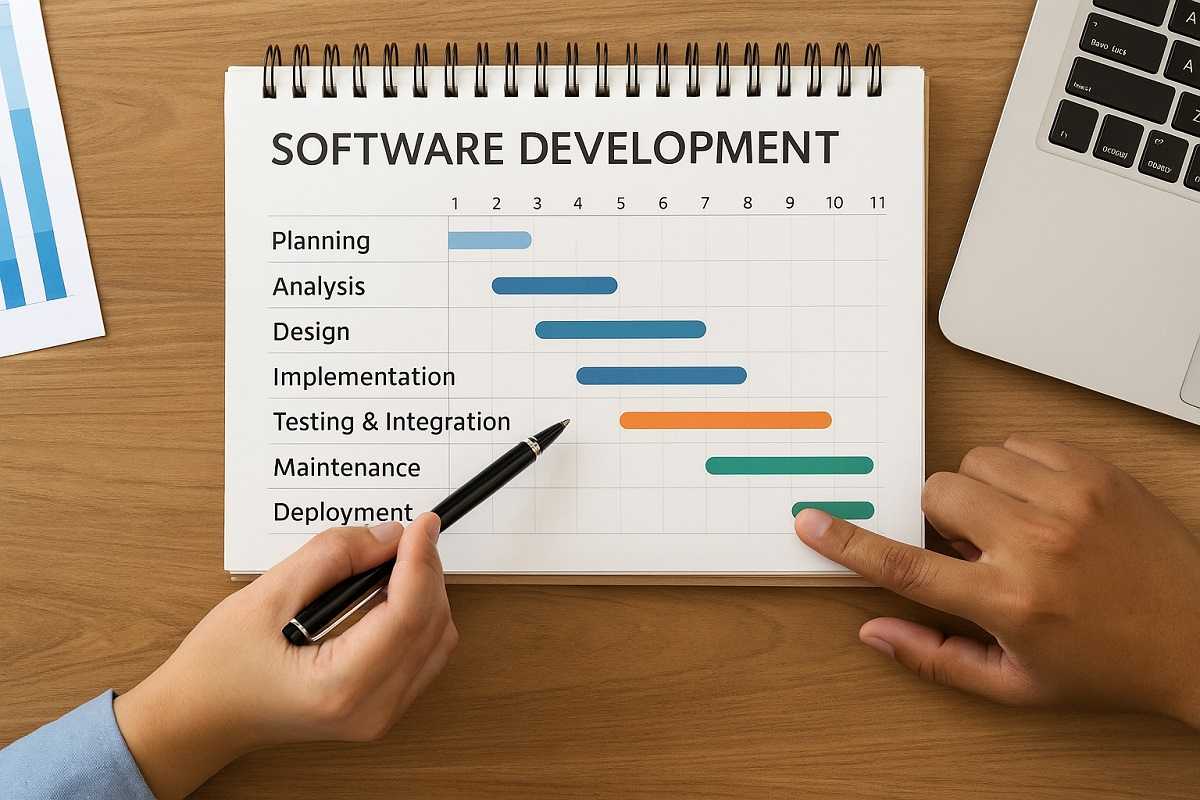
With the requirements in hand, the visual and technical structure of the project begins. This phase transforms ideas into navigable prototypes and defines the schedule of software development, the technologies that will be used and the deliveries of each step. The clearer the planning, the greater predictability and control over deadlines and investments.
Creation of main Wireframes and Flows
Wireframes are visual sketches of the system screens, without final design, but already showing the organization of elements. They help the customer to visualize what navigation will be like, identify improvements and validate the main streams before the code begins to be developed.
Choice of basic technologies
Each project requires a technical architecture different. The choice between languages such as JavaScript, Python or C#, frameworks such as React or Laravel, and databases like MySQL or MongoDB depends on the specific needs of the system, the desired scalability, and the team that will develop it.
Roadmap of deliveries
It is important to divide the project into steps, starting with the MVP (Minimum Viable Product), which delivers the essential features as soon as possible. Next, future versions with improvements and new features can be released. Having a well-defined roadmap helps maintain the evolution of the organized and strategic system.
Estimated costs and deadlines
With the defined steps and scope, it is possible to estimate the costs and execution times. Practical example:
- Wireframes and navigable prototypes: 1 to 2 weeks
- Functional MVP: 1 to 3 months
- Future versions with continuous improvements: vary according to demand
- Average costs: vary according to the size, scope and integrations of the system
This forecast serves as a basis for the schedule of software development and for investment decisions throughout the project.
Step 3: Architecture and Software Design
This is the stage that defines the backbone of system. . A good software design needs a well-planned architecture to ensure security, performance, scalability and ease of maintenance. This is where the most strategic technical decisions are made, and they directly influence the success of long-term development. Find a software house Professional is the most recommended to avoid errors in project execution.
Backend and frontend structuring
The backend is the invisible part of the system, responsible for logic, security, database and integrations. The frontend is the interface with which the user interacts. At this stage, it is defined as these two layers will talk, ensuring that the user experience be fluid and that the data are handled correctly behind the scenes.
See this example of one of our customers, Grupo Marista, who we integrate software into their website. See how you combined and added design:

Definition of integrations
Many systems depend on integrations with external services such as payment gateways, shipping platforms, ERPs or CRMs. Here they are defined which APIs will be used, how the consumption of this information will be made and what authentication and response standards will be adopted to ensure reliability and security in the data exchanged.
Safety, scalability and performance standards
The system needs to be prepared to grow without losing efficiency. At this stage, standards such as Secure authentication, sensitive data encryption, modular structure to facilitate upgrades and cache strategies to optimise performance. Thinking about these points from the beginning avoids expensive refractions in the future.
Step 4: Development (Programme)
With the architecture ready, begins to encoding phase, where planning becomes reality. The developer team starts building the system, functionality by functionality, always prioritizing what is most strategic. This process needs to be well organized, with deadlines, deliveries and active communication between the parties involved.
Iterative development
Adopting agile methodologies like Scrum or Kanban allows divide the project into short and manageable cycles. . This facilitates continuous delivery of results, adaptation to changes and constant validation with the customer, ensuring that the software evolves according to real needs.
Programming of functionalities according to prioritization
Not everything needs to be ready at once. The team follows one list of prioritized features, starting with the most important ones for the operation of the system. This enables the launch of an MVP (Minimum Viable Product) with the essential functions and evolution of the project based on real use.
Code versioning and control
Tools like Git and platforms such as GitHub or GitLab are used to control all of the Code versions. . This allows the team to work together safely, avoid conflicts and record all changes made, ensuring traceability and development security.
Tracking with sprints and review meetings
During development, sprints (delivery periods) and follow-up meetings are held. These meetings ensure that the Team's in line, that any obstacles be resolved quickly and that the client monitors the progress of the project with transparency.
Step 5: Testing and Validation
Before putting a system into operation, it is essential to ensure that everything is working as expected. A testing step and software validation it seeks to identify failures, inconsistencies and opportunities for improvement, both from a technical point of view and user experience. The more judicious this phase, the lower the risks after launch.
Automated and manual tests
Automated tests are ideal for repeatedly validating critical features, while manual testing is useful to check specific flows, layouts and less predictable behaviors. Both are complementary and ensure that the system is stable, coherent and free from serious failures before moving on to production.
Validation with key users
Nothing replaces the look of who's really going to use the system. Invite Key Users to test the software in a controlled environment allows us to observe how they interact with the screens and features, besides raising real feedback about usability, clarity and possible bugs that escaped in technical tests.
Adjustments based on load, safety and functionality tests
In addition to experience, the system also needs to be tested in stress situations, such as simultaneous accesses, invasion attempts or extreme data. This phase focuses on the performance, safety and behavior of the system under pressure, so that it is ready for the real environment, with security and stability.
Step 6: Launch and Publication
With everything tested and validated, It's time to launch the software.. . This step involves putting the system on the air, connecting it to the necessary services and ensuring that users are ready to use it. The launch needs to be well coordinated, with available technical support and clear communication to avoid noises and instabilities.
Deploy in production environment
The publication of the system in the real environment (production) requires attention. . Final configurations of servers, domains, database and backups are made. This transition should be safe and well planned, minimizing the risk of interruptions and ensuring that the system is available to all users.
Integration with systems and services
Right after the deploy, the system needs to be fully integrated other platforms involved in the operation, such as ERPs, CRMs, automation tools or payment gateways. This integration ensures a continuous flow of data and optimizes business processes without manual rework.
User team training and technical delivery
For the system to be used correctly, it is essential train the teams that will operate it. . This phase includes presentations, tutorials and even custom manuals. It is also time to deliver technical documentation and administrative accesses, officially marking the end of delivery and the beginning of the support and evolution phase.
Step 7: Continuous Support and Evolution
The delivery of the system is not the end, but the beginning of a new cycle. After the launch, begins to maintenance and improvement phase, essential part of the software life cycle. This ensures that the system continues to function with quality, following business needs and evolving based on actual user experience.
Error monitoring
Monitoring tools help to identify faults in real time, like falls, slowness or unexpected behaviors. Fixing errors quickly prevents greater impacts and improves user confidence. It's a step that needs constant attention to maintain system stability.
User service
Having a structured support channel is indispensable. Direct contact with users helps solve questions, collect feedback and identify improvement needs. One efficient support reduces friction and ensures that system adoption takes place positively and continuously.
Updates and new modules based on real experience
As the system begins to be used, new demands arise. The experience of users reveals opportunities for create new modules, correct unintuitive flows or optimise existing functions. These updates keep the system relevant and functional over time.
Improvement planning
Continuous improvement is part of the software lifecycle. . This includes periodic meetings with stakeholders, usage report analysis, prioritization of improvements and definition of new versions. A software that evolves along with business becomes a true strategic ally.
Final Tips for Avoiding Development Problems
Avoiding common errors in development is possible with clear organization, communication and experienced partners. The success of a system depends not only on the technology used, but also on system development process as a whole, from the idea to the support after launch.
Do not skip planning steps
Each stage of the project has an important function. Skipping the planning can generate rework, poorly defined scope and delivery failures. Investing time in defining requirements, schedule and structure avoids problems in the future.
Validate scope with real users
Involving users from the beginning helps validate whether what is being planned really solves the problem. Practical feedback brings valuable data to refine features and ensure a more useful and intuitive system.
Having a constant communication channel with the development team
The communication between client and technical team must be constant and transparent. Having an IT team on demand dedicated to the project facilitates quick adjustments, solves doubts and ensures continuous alignment between what has been planned and what is being delivered.
Choose partners with similar project experience
Opting for a company that has already developed solutions similar to what you need reduces risks and accelerates the process. Partners with portfolio relevant bring baggage, good practice and strategic vision, fundamental to a successful system development process.
Why follow all stages of development?
Following the stages of software development is more than a matter of organization, it's what defines the quality, performance and success of your project. From initial briefing to continuous maintenance, each phase has a strategic role to ensure that the system meets business needs and is well received by users.
Do you have a project to get off the paper? WebSyd develops custom software. . Ask for a budget.
FREQUENTLY ASKED QUESTIONS
What are the stages of software development?
Software development involves seven main stages:
-
Briefing and lifting requirements
-
Planning and prototyping
-
Software architecture and design
-
Development (programme)
-
Tests and validation
-
Release and publication
- Support and continuous evolution
Following this flow ensures organization, predictability and better results in the project.
What is the initial phase of the software development process?
The first stage is the briefing and lifting requirements. . In it, the technical team deeply understands the problem that the system needs to solve, defines clear objectives, desired features and documents all customer needs. It is an essential phase to reduce future errors and ensure a well-defined scope.
Why is it important to perform tests before launching the software?
The tests ensure that the system works properly, is free of critical failures and provides a good user experience. The validation phase includes automated tests, manual testing, load testing and security, as well as validation with real users. This reduces risks in launch and avoids production problems.
Does the work finish after the software is released?
Nope. After the launch, the phase of support and continuous evolution. . This step involves system monitoring, bug correction, user feedback-based updates and continuous improvements to keep the software efficient, safe and aligned with business changes.

Caio Nogueira is a SEO, GEO, link building and Digital PR expert and co-founder of WebSyd, website creation agency and SEO consulting founded in 2016. It acts with organic search strategies, digital authority construction and brand optimisation for search engines and artificial intelligence platforms. Throughout his trajectory, he participated in more than 1000 projects involving SEO, website development, content marketing and authority acquisition through backlinks and Digital PR. At WebSyd, it participates in the planning of strategies to increase organic visibility, lead generation and presence of companies on Google and AI-based search engines. As an author, it publishes content on SEO, GEO, website creation, link building and digital authority, sharing analyses, strategies and practical experiences related to organic growth of companies. Its contents and contributions have also been published in companies and vehicles of technology and marketing such as Wix, HostGator, Duda, Neil Patel, Locaweb and E-Commerce Brasil.
View all posts


 Estimate the cost

