
How much does a Software Cost for my Company?
Summary (TL;DR)
In this post, you will understand how much software costs for small businesses and how different factors influence this investment, such as the type of license (SaaS or perpetual), the level of personalization, number of users and technical support.
We also showed the main categories of software available (such as ERP, CRM, financial management, productivity and collaboration), explaining how each can contribute to increasing efficiency, reducing errors and improving your business results.
We approach the difference between ready and customised software, highlighting the advantages and disadvantages of each model, so you can choose the solution best suited to your type of company and budget.
If you want to transform the way your company operates, automate processes and track growth with technology, this guide brings everything you need to make the best decision.

Investing in technology is no longer a differential and has become a necessity for those who want to improve productivity and optimise processes. When we talk about how much a software cost for small business, the value can vary according to the features offered and the level of customisation.
The price of a customised software usually departs from R$15,000.00 and can reach very high values, above R$100,000.00. Everything depends on the characteristics that the customer needs.
However, more than the price, what really matters is the impact an efficient system can bring on business management and growth.
A recent study with small business leaders revealed that 43% of respondents they are looking for new technologies to increase productivity and collaboration. This shows that even in smaller organizations, the adoption of smart software can transform day-to-day operations, reducing manual tasks and making processes more agile and accurate.
If you're considering investing in a system to optimise your business, it is important to understand the factors that influence cost and how to choose the best solution for your needs. Let's get to know the main options available, compare prices and show how software can be a strategic ally for your business. Check it out!
Software Types for Small Businesses
Small businesses can benefit from different types of software to improve their management, automation and productivity. . Since integrated ERP solutions and CRM up to financial systems and collaboration tools, the choice of optimal software depends on business needs.
Check out the mains below software types and how they can boost the efficiency of your company:
ERP (Enterprise Resource Planning)
ERP is a system that centralizes and integrates several administrative and operational processes of a company, facilitating decision-making and management of different business areas.
Can be used for:
- Stock and logistics control
- Supply and supplier procurement management
- Project planning and monitoring
- Risk management and compliance
- Accounting and financial control
The main advantage of ERPs it is the unification of information into a single system, avoiding failures in communication between sectors and ensuring more precision in data. In addition, process automation reduces the time spent on repetitive tasks, increasing team productivity.
CRM (Customer Relationship Management)
CRM is a system geared towards the customer relationship management, helping small businesses to organize contacts, follow negotiations and optimise care.
Can be used for:
- Register and customer history
- Lead management and sales opportunities
- Automation of follow-ups and interactions
- Analysis of service and loyalty metrics
Invest in one CRM software for small companies improves customer retention and enhances sales, as it allows a closer and more personalised monitoring of each negotiation. In addition, automation of contact processes reduces the loss of commercial opportunities.
Financial management
Financial management software helps to control the cash flow, organize accounts to be paid and received and generate financial reports that assist in the financial health of the business.
Can be used for:
- Cash flow control
- Issue of billings and fiscal notes
- Management of payments and receipts
- Generation of financial and tax reports
The great advantage of a financial system is to ensure greater control and organization of finances, avoiding manual errors and helping in forecasting expenses. With this, small businesses can reduce waste and improve their profitability.
Productivity Tools
Productivity tools are systems that help in the task management, work organization and process automation, helping small businesses to be more efficient in everyday life.
Can be used for:
- Task and project management
- File and document sharing
- Team productivity monitoring
- Automation of workflows
The use of these tools improves the organization and optimisation of time, allowing the team to work with more focus and efficiency. In addition, automating processes reduces errors and increases agility in the execution of tasks.
Collaboration Systems
Collaboration systems are essential for teams that need to work together, even from a distance. They facilitate communication, information sharing, meeting organization and the project management.
Can be used for:
- Instant team communication
- Videoconferences and online meetings
- Real-time document sharing and editing
- Integration of remote teams
By adopting collaboration systems, small companies gain in agility and efficiency, reducing the need for face-to-face meetings and improving the exchange of information between teams. This contributes to more alignment and productivity in the work environment.
Factors that Influence Cost
The price of one software for small businesses can vary widely, depending on different factors and forms of collection. Some solutions are acquired through monthly or annual subscriptions (SaaS), while others work with single payment (perpetual license).
In addition, aspects such as personalization, technical support and number of users also influence the final cost. Let's explain each of these factors to help you make the best decision for your business:
License (Perpetual vs. SaaS)
The software license defines how it will be purchased and used. There are two main models:
Life-long leave → The software is purchased only once and can be used indefinitely without recurring payments. However, support and updates can be charged separately.
SaaS (Software as a Service) → The software is made available through a monthly or annual subscription, usually hosted in the cloud. This model includes support, constant updates and scalability, being more flexible for growing companies.
see the model of a cloud management system integrated into one of our customers' website:
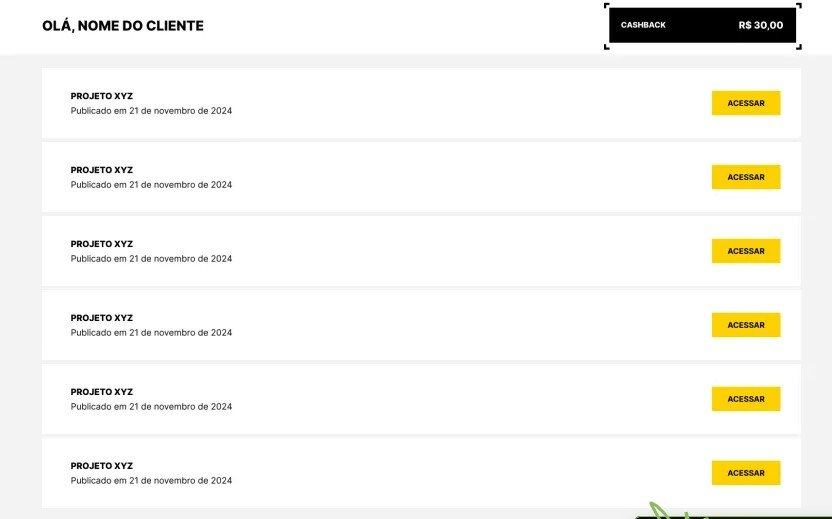
In this example, we realize that it is possible to manage various tasks separated by sectors. This facilitates when the company demands many areas of work.
Returning to the issue of licenses, the perpetual license may seem more economical in the long term, the SaaS model offers more flexibility, less maintenance concerns and predictable costs, which can be advantageous for small companies that want to optimise their spending.
Customization
The level of customisation and integration of a software also directly affects your price. Ready and standardized systems usually have a lower cost, but may not meet all the specific business needs. One already. software house that makes systems tailored, it can be more expensive.
If the company needs unique features, integrations with other platforms or a layout adapted to your workflow, the software may need to be customised tailored, which increases the cost of development. However, this customisation can be an essential investment to ensure operational efficiency and process optimisation.
Technical Support and Updates
Another factor that influences the cost is the level of technical support offered. Software that includes 24/7 support, priority service and frequent updates tend to have a higher cost, but these features are key to keeping the system always up-to-date and secure.
If the software does not have good technical support, unexpected problems can affect the operation of the company, causing damage. Therefore, before choosing software, it is essential to evaluate the quality of the support offered, the frequency of updates and the additional cost for maintenance.
Number of Users
The number of users who will use the system can also impact the final value of the software. Many platforms charge based on the amount of simultaneous accesses or the total number of registered employees.
If the company has a small team, a basic plan may suffice. However, for companies that need multiple accesses and different levels of permission, it is necessary to invest in more robust plans.
Ideally, choosing software that allows scalability so the company can increase the number of users according to their growth without changing systems in the future.
Software Ready vs. Custom Software
In the doubt about how to choose software for small business, it is important to understand the differences between ready software and custom software. . Both have the same objective: to automate processes, improve management and increase business efficiency. However, each option has its own characteristics, with advantages and disadvantages that should be analyzed according to the needs of the company.
Ready Software
The ready software is a solution already developed and made available for immediate use. . It is usually marketed in the SaaS (Software as a Service) model, with monthly or annual subscription plans. This type of system serves several companies in a standardized way, without the need for tailor-made development.
? Advantages:
- Lowest starting cost
- Fast and easy implementation
- Updates and support already included in the plan
- Ideal for companies with simpler processes
Disadvantages:
- Low flexibility for adaptations
- It may not meet all company needs
- Features and features may be limited to specific businesses
Custom Software
The custom software is developed to meet specific demands from a company. It can be created from scratch or adapted from an existing system, allowing full flexibility in the choice of features and integrations.
? Advantages:
- Solution fully adapted to business needs
- Greater control over features and integrations
- It can evolve as the company grows
- Better compatibility with other systems already used
Disadvantages:
- Higher initial cost
- Longer development time
- Need for specialised technical support
When do you choose each one?
Choose ready software if:
- You need a quick and affordable solution;
- Your company has standardized processes and does not need many customizations.
- Your initial budget is more limited.
Choose custom software if:
- Your company has specific demands that a ready software does not meet;
- You want a scalable system that grows along with the business;
- Personalized integrations with other systems are essential.
Real example: New Rio scheduling platform
WebSyd has developed the platform New River Pay Per Use, of scheduling business cleaning on demand. The customer chooses the service, schedule date and time online and pays with automatic charge. The project took 90 days.
Hidden Costs and Signatures
When assessing investment in software for your company, it is important to consider not only the initial cost or monthly subscription, but also the hidden costs that may arise during use.
Many solutions offer affordable plans, but charge extra fees for advanced technical support, integrations with other systems, additional storage or functionality upgrades.
In addition, in the case of subscription software (SaaS), the company may need extra modules as it grows, which can increase long-term costs. Therefore, before hiring a software, it is essential to analyze all the terms of the contract, possible additional charges and what will be the financial impact in the future.
How to Choose the Best Software for Your Company
The choice of the ideal software should take into account your business needs, available budget and return on investment. To help with this decision, check out some practical tips for choosing the best solution:
- Set your company’s needs → List the processes that need to be automated and which features are indispensable.
- Analyze the available budget → Choose a software that fits your budget without compromising quality.
- Compare different solutions → Search the options available on the market and analyze user reviews.
- Consider the cost-benefit → Not always the cheapest software is the best option. Check which resources really add value to your business.
- Check the billing template → Understand if the software has monthly subscription, single payment or hidden additional costs.
- Evaluate ease of use → An intuitive system reduces the learning curve and improves team productivity.
- Check the scalability of the software → Choose a solution that can grow along with your company.
- Check the quality of technical support → Efficient support can prevent day-to-day operational problems.
- Test before hiring → Many softwares offer free versions or trial periods to evaluate features.
- Consider custom software → If the options available do not fully meet your company, a custom software It could be the best choice.
Conclusion: how much software costs
Investing in software for small businesses is a strategic decision which can increase productivity, improve management and optimise processes. The cost may vary according to the chosen model, the features offered and the specific needs of the business.
If you are looking for efficient, scalable and tailored software for your company, the WebSyd Help! ♪ We developed ♪ custom solutions, ensuring that your software meets exactly the demands of your business. Contact us and find out how we can transform your management with technology! Click on the button below for budget:
FREQUENTLY ASKED QUESTIONS
How much does software cost for small businesses
The price can vary a lot. Subscription-ready software (SaaS) can cost from R$ 100 per month, while custom software usually starts at R$ 15,000 and can exceed R$ 100,000, depending on the functionality and level of customisation.
What is the difference between ready software and custom software?
The software is already developed, has fast deployment and lower cost, but little flexibility. Custom software is tailored to your company's needs, with more control and integration, ideal for business with specific processes.
What types of software are best suited for small businesses?
The most common are: ERP (integrated management), CRM (customer relationship), financial software, productivity tools and collaboration systems. The choice depends on the priorities of your business.
What influences the final cost of business software?
The main factors are: license model (SaaS or perpetual), customisation level, number of users, technical support and necessary integrations. Hidden costs such as upgrades, extra modules and storage should also be considered.

Caio Nogueira is a SEO, GEO, link building and Digital PR expert and co-founder of WebSyd, website creation agency and SEO consulting founded in 2016. It acts with organic search strategies, digital authority construction and brand optimisation for search engines and artificial intelligence platforms. Throughout his trajectory, he participated in more than 1000 projects involving SEO, website development, content marketing and authority acquisition through backlinks and Digital PR. At WebSyd, it participates in the planning of strategies to increase organic visibility, lead generation and presence of companies on Google and AI-based search engines. As an author, it publishes content on SEO, GEO, website creation, link building and digital authority, sharing analyses, strategies and practical experiences related to organic growth of companies. Its contents and contributions have also been published in companies and vehicles of technology and marketing such as Wix, HostGator, Duda, Neil Patel, Locaweb and E-Commerce Brasil.
View all posts


 Estimate the cost

