
Error 404 affects SEO?
Summary (TL;DR)
In this post, we talk about error 404, one of the most common HTTP codes users find when browsing the web.
We explain the impact of pages 404 on SEO and how to identify and correct these errors on your site to ensure a better user experience and avoid penalties in search engines.

Quick answer: Not directly. According to Google, 404 pages are a normal part of the web and do not prejudice the ranking of the rest of the site: the URL that gives 404 only exits the index. The impact comes from two cases: internal links pointing to pages that do not exist, that hinder the visitor and tracking, and excluded pages that had backlinks or traffic, which should receive a 301 redirection for equivalent content. To find the 404, use the Search Console page indexing report and a tracker like Screaming Frog.
Usually people don't pay much attention to these mistakes. As a user, you will be frustrated at most and close the browser tab. As a webmaster, however, more things may be at stake. Many owners of sites they wonder if 404 pages harm your SEO and rankings in any way.
Continue reading this post to see how 404 pages affect your site, SEO and positioning. See also what you can do to fix this problem.
What is Error Code 404?
Error 404 is a HTTP status code default (also called response code). When you try to access a URL or server, the server returns a status code to indicate whether the operation was successful. Assuming most of the web works well, the most common status code is 200. If you are reading this article now, it means that your browser was able to access our server and the server found the requested resource, then it returned a response code of number 200.
When the client can establish a connection to the server, but does not find the requested resource, it is at this time that a 404 error status code appears. Basically means that the page or any requested feature cannot be found at the specific address.
To check a page's response code, you can right-click anywhere on the page in your browsers, click Inspect and then go to the Network section. If you cannot see the status codes, press the F5 key or update the page While the inspector is still open.
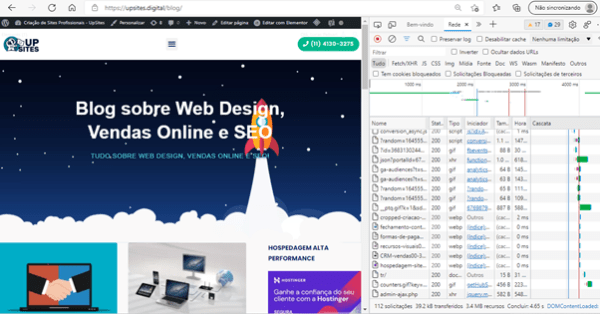
Inspector
You'll usually see a lot of status codes there. That's because a page will load multiple features. For example, the HTML/PHP file from the requested page may be found, but some image features have been written wrong or deleted. In this case, the type of page document will return a response code of 200, while the missing image features will return 404s.
A 404 status code in your browser will be something like this:
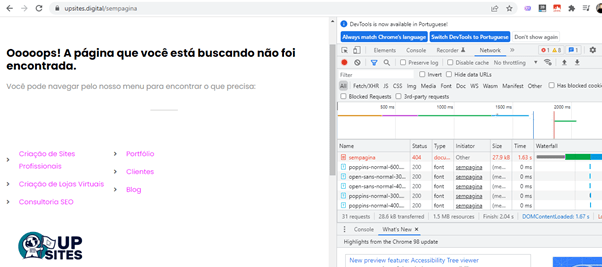
As you can see, we have a document type 404 error code, which means that the page does not exist or was not found at this address, followed by two status 200 codes representing a couple of images that were found.
Another option would be to use a tool like https://httpstatus.io/. . You can enter multiple URLs and it will return your HTTP status codes. This removes the main status code from the document, excluding any other resources. However, you can add the resource URL.
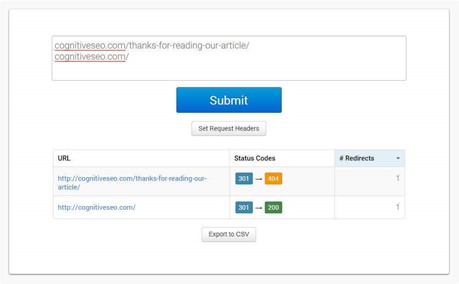
Response code tool
There are other answer codes there that you must have heard of. 500, 501 and 503, for example, usually indicate a server error while 301 (we have an article that talks about this specific code) and 302 defend redirections. These, along with 200 and 404, make up the most common status codes on the web.
The 301s codes you see above in the tool and browser inspector are there because HTTP version was typed instead of HTTPS, so a 301 is performed by the server to redirect users to the version site secure.
However, to combat this problem generated by code 404, Google created a “Soft 404” seal. Basically, if the page states that content is not found, but HTTP status code is 200, we have a smooth 404. You can find these types of errors in Google Search Console, in the Tracking Errors section. If you are already in the new version of Search Console, the easiest way is to temporarily switch to the old one.
The 404 “soft” are not real error codes. They are just a label added by Google to signal this problem or a missing page returning a code of 200.
How to add/personalize a 404 page
Normally, your web server should already handle 404s correctly. This means that if you try to access a URL that does not exist, the server will already pull a 404.
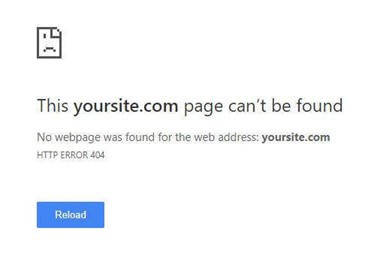
However, sometimes the platform may not return a 404, but a blank page of code 200. The problem in this case of showing the blank page is the issue of UX, which is extremely impaired for its users, reflecting on search engines.
It's a good idea to have a custom web design for your 404 page. The reason is because you can create a better experience for your users. I mean, the experience of not finding what you're looking for is bad enough, but you can add a little humor to it at least. A webdesign company can be an excellent partner to create a custom and professional 404 page.
The most important part on your page 404 is to include a CTA (call to action).
Without a CTA, users will probably leave when they see a regular 404. By inserting some links from some relevant pages, you can collect a little more traffic for your main pages.
Take a look at the image below, which shows a page 404. Big difference, isn't it? You can convince the user not to be upset with your website. Also, there is a very clear CTA that tells you to click on it, and that connects to the home page.
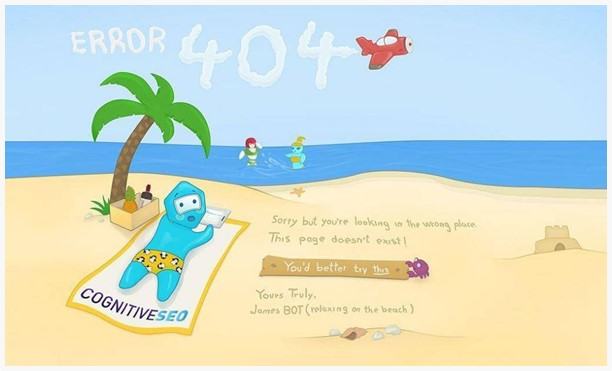
However, you don't have to limit yourself to that. You can add links to pages of relevant categories or other sections of your website. A search bar would also be a great idea.
Be creative with the layout for 404 errors. If you put a smile on users' faces, it might even be better than if they accessed the right page. You can take a look at some examples in this article, to get some ideas.
The most popular CMS (Content Management Systems) such as WordPress or JoomlaThey already have some kind of implemented design. You can easily add a custom design using a plugin. Here's one. plugin for WordPress.
If you have a custom site, then you will have to create a 404 model. Log in to the Apache web server and create a 404 .php file. If you already have one, just edit it. Sometimes it can have the .html extension. If it does not return a status code 404, change it to .php, because we will need to force the HTTP request header with the appropriate 404 error code using some PHP.
<?php
Header (“HTTP/1.04 Not Found”);
?>
Then find your .htaccess file and add the following line to it:
ErrorDocument 404/404.php
This will tell the server which page should be shown when a 404 error code is detected. If the line's already there, just modify it. Make sure to check everything again with your browser inspector or with the tool mentioned above. If he returns a code 404, it's because it worked.
How to find 404 errors.
An easy way to find the 404 errors is the Google Search Console page indexing report, which lists the URLs “Not found (404)” and “Soft 404”.
If you see Soft 404 errors as mentioned above in our article, you have to make sure that page 404 actually returns a 404 error code. If not, it's a good idea to fix this.
There are other ways to find mistakes 404. If you are looking for broken pages on your site, which other people have linked, you can use the CognitiveSEO Site Explorer and check the Broken Pages section.
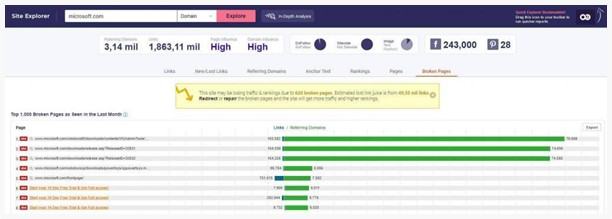
Screenshot of CognitiveSEO tool. More details about him below, in the article.
If you are looking for broken links within your own website, or links to other sites on your site, you can use Screaming Frog. . A free alternative would be Xenu Link Sleuth.
Pages with 404 error harm SEO?
There are many experts out there claiming that 404s can ruin your position and that you should fix this problem as soon as possible. But the truth is that 404s are a normal part of the web and are really useful error codes.
Think about it. If a specific place didn't exist, wouldn't you rather know than be constantly directed to other random places? It's the same thing on the Internet. Although it is a good idea to redirect an old page that has been deleted to a new and relevant page, it is not a good idea to redirect every 404 to your homepage, for example. However, I saw some websites redirect their users after a countdown timer, which might be a good idea.
In theory, 404 have an impact on ranking, but it does not interfere with the ratings of an entire site. If a page returns an error code 404, it means that it does not exist, then Google and other search engines will not index the page. Very simple, right?
So, what's the hype about 404s? Well, obviously, having thousands and thousands of these pages can impact your website in general. However, it is not so much pages 404 that harm SEO, but links containing URLs pointing to the 404s.
That's because these links create a bad experience. They're called broken links. If there were no broken links, there would be no 404 error. Actually, you could say there's a infinity of 404, right? Just add a bar after your domain, type something random and press the enter key. There'll be a 404 error.
We'll explain everything in more detail soon, so keep reading.
What does Google say about 404s?
Google always pointed out that 404s are normal. They also seem to be very indulgent with them. I mean, that's natural, considering they have 404s of their own:
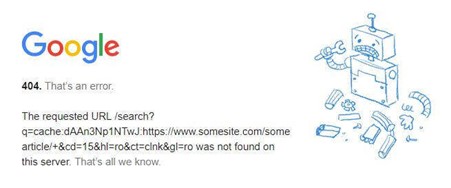
There is also this source that addresses the question:
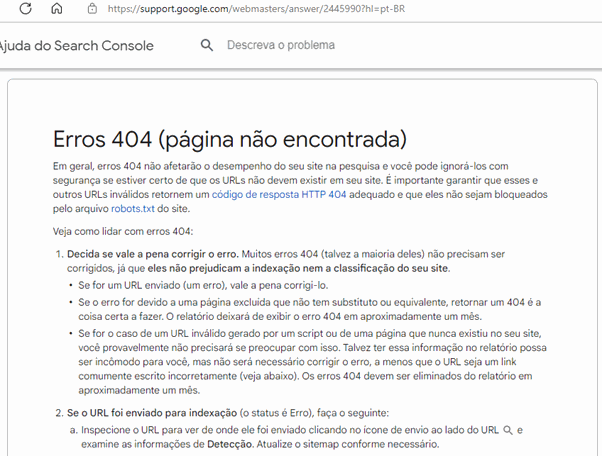
To read the official orientation, see Google documentation on HTTP and Soft 404 errors.
However, let's explain everything here in more detail. People often forget that there are two types of pages 404. Your website and other people's websites. Both may affect your website, but the ones that most affect you are other people's websites.
“What? Can 404s from other sites impact my website?”
Yes, but indirectly. A link from your website to a page from another site that gives 404 does not generate punishment, but leads the visitor to a dead end and shows outdated content. Therefore, it is worth reviewing external links from time to time.
Input 404s
The 404 received are URLs from other sites that point to your site, but return a 404. The 404s of entry aren't always easy to fix. This is because you cannot change URLs on other sites if you do not have them. However, there are alternative solutions such as the 301 redirection, which WebSyd has already written on the subject here in the blog. This should be kept as the last option if you cannot fix the URL.
It doesn't affect you negatively. I mean, why should you be punished? Maybe someone wrote it wrong, or maybe you deleted the page because it's no longer useful. Should you be punished for this? Common sense says you shouldn't and Google agrees.
If you deleted a page with backlinks pointing to it (although it is not a good idea to delete such page) you should be sure that you have a 301 redirect configured. If not, the entire link of backlinks participation will be lost.
A 301 is mandatory, because often you won't be able to change all the backlinks. Let's take social media, for example. On a social media platform like Facebook, a post with a broken link could be shared thousands of times.
The broken internal link is common on large sites with thousands of pages or stores with dynamic URLs and filters. Maybe you had a static menu somewhere with some dynamic filters that don't exist anymore. The possibilities are several.
How to fix 404s received
Fixing 404 input URLs is not always very easy. That's because you're not in complete control. If someone misses a link pointing to your site, you will have to convince them to fix it. A good alternative to this is redirecting this broken link to the right feature. However, 301 is mandatory, just to be sure.
To find incoming broken links, you can use the CognitiveSEO Site Explorer. . Enter your website, click enter and go to the Broken Pages tab.
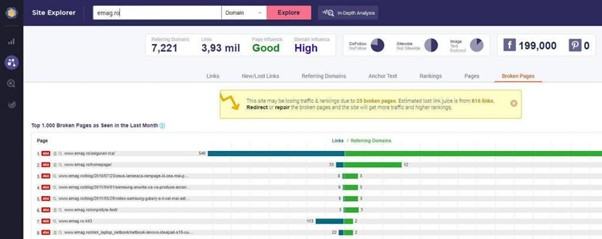
If you click on the blue line, you can see which links are pointing to your URL 404. The green line represents the number of total domains pointing to it. Some domains may link to your broken page several times. For example, the second line shows 33 links coming from 12 domains.
So to fix the links, the best method is to contact domain owners and politely point out that there was an error. Show them the correct/new link and let partners know that they are pointing to a broken page. Most of them will want to fix the link, because that's good for them too.
Remember, 404s should usually stay 404. We only redirect them when they take traffic or have backlinks pointing at them. If you change a URL or delete a page and no one associates with it or it does not receive any traffic at all (check with Google Analytics), it is perfectly good for it to return a 404.
Output 404s (Inner 404s)
The 404s of output are much easier to fix because you have total control over them. That's because they're found on their own website. You're the one linking them. Of course, someone may have harmed you by deleting a page or changing your URL, but you're still responsible for monitoring it.
The type of link 404 that usually harms your site are those in it. When you add a link to your website (such as on a blogpost) that points to another site, you have to make sure that the URL actually exists or that you didn't write it wrong.
Broken links create bad user experience and we all know that Google (and probably other search engines too) cares about the user experience.
Google does not apply penalty for broken links, but the robot wastes time tracking addresses that do not exist and the visitor leaves the site. On large websites, this also wastes the tracking budget.
That's why, from time to time, it's a good idea to check if you are not linking your website or blog to pages with error 404. You never know when a link can get inactive or broken, so the best way to know this is to use some software that tracks your site all the time.
How to fix 404s outputs
Fixing the 404s output errors is easier because you have total control over them. They're on your site, so you can change them.
To find them, you can use the Screaming Frog or Xenu Link Sleuth. . The latter is safe, works and is free.
If you have a screening frog signature, go ahead and track your site. The free version supports 500 URLs, but a new site with less than 500 URLs rarely has broken links. Once the tracking is complete (it may take hours or even days to large sites), go check out the Answer Code tab and then filter it looking for 404. At the bottom, go to the Inlinks section to find the location of the broken URL on your site.
Conclusion
So if you were wondering if 404 errors harm your site SEO, now you know the answer. Anyway, let me summarize:
Error 404 is bad for those who come to the page, but it doesn't affect the site's SEO unless they have links pointing to this broken page. That is, it's always bad for UX, but it's only bad for SEO if you have links, otherwise it's normal and harmless. Also remembering that everything in excess is harmful, so if you have thousands of pages 404 it will certainly be much worse than just a few dozen.
With all this in view, now it's time for you to put your hand on the dough and fix all 404 errors of your site. We appreciate you having enjoyed our article to the end, and if you liked it, share it with your colleagues as well.
Needing create a professional website, with page 404 customised and redirects configured? Get a quote.

FREQUENTLY ASKED QUESTIONS
What is a 404 error and why does it occur?
A 404 error occurs when the server can connect, but does not find the requested page or resource, indicating that the accessed URL does not exist or has been removed.
Pages with 404 error harm the SEO of my site?
Pages 404 do not directly affect SEO unless they have links pointing to them. These broken links can harm the user experience and, in excess, may negatively impact the site's rating.
How can I customize a 404 page to improve the user experience?
Customizing your 404 page with an attractive design, humor and a CTA (call to action) can improve the user experience by directing it to other relevant pages on your site.
What tools can I use to identify and fix 404 errors on my website?
Tools like Google Search Console, Screaming Frog, and Xenu Link Sleuth can help identify and fix 404 errors, ensuring that your site works correctly and without broken links.

Caio Nogueira is a SEO, GEO, link building and Digital PR expert and co-founder of WebSyd, website creation agency and SEO consulting founded in 2016. It acts with organic search strategies, digital authority construction and brand optimisation for search engines and artificial intelligence platforms. Throughout his trajectory, he participated in more than 1000 projects involving SEO, website development, content marketing and authority acquisition through backlinks and Digital PR. At WebSyd, it participates in the planning of strategies to increase organic visibility, lead generation and presence of companies on Google and AI-based search engines. As an author, it publishes content on SEO, GEO, website creation, link building and digital authority, sharing analyses, strategies and practical experiences related to organic growth of companies. Its contents and contributions have also been published in companies and vehicles of technology and marketing such as Wix, HostGator, Duda, Neil Patel, Locaweb and E-Commerce Brasil.
View all posts


 Estimate the cost

