
Order Status in WooCommerce
Summary (TL;DR)
In this post, we will address how order management works in WooCommerce, one of the most popular plugins for virtual WordPress stores.
Understanding the different order status is essential for an efficient operation, avoiding confusion and ensuring that both the administrator and the consumer are aware of each step of the process.
From “Pending Payment” to “Completed”, each status represents a specific moment in the cycle of an online purchase. Follow to learn more about these statuses and how to manage them correctly in your online store.
Quick answer: WooCommerce has 7 main order status: Pending, Failed payment, Waiting, Processing, Completed, Cancelled and Refunded. In practice, “Processing” means that the payment has entered and the order needs to be sent; “Waiting” means that the stock has already been booked, but the payment still needs to be confirmed.
If you have a virtual WordPress store with WooCommerce, you must have already wondered what each order status means.
After all, the management of applications is one of the most important points for e-commerce owners.
Be in the virtual or in the store physics, every purchase has a payment process. In online purchases the order goes through some status until it is delivered to the buyer.
Briefly, the path to a successful online purchase is as follows:
- The user chooses the product and payment form and makes the purchase
- The request is received and is registered in the panel. administration the website;
- Payment is approved;
- The product is invoiced and processed (i.e. taken from the stock, packaged and shipped);
- Request is complete.
The status nomenclature can lead to some confusion. Therefore, full attention is needed for each of them. As much as they may be alike, each status represents specific situations that you as the owner of an e-commerce need to know how to distinguish.
But, of all the online store platforms... how specifically does sOrdering armadillos at Woocommerce?
Status of request on WooCommerce
By default o WooCommerce offers a total of 7 order status.
There are 7 Request Status on WooCommerce:
- Pending payment: order is registered, but payment was not received.
- Failed (failure): payment was refused or not passed.
- Waiting: stock is reduced, but you need to confirm payment.
- Processing: the payment has been received and the request awaits separation and dispatch.
- Finished: the request has been completely processed, there is nothing else to do.
- Canceled: you or the client cancelled the order.
- Reimbursed: you reimburse the customer.
Visual diagram to illustrate order status
This visual representation illustrates the processing of an order through its “pending payment” status to “Completed”, “Cancelado” or “Refunded.”
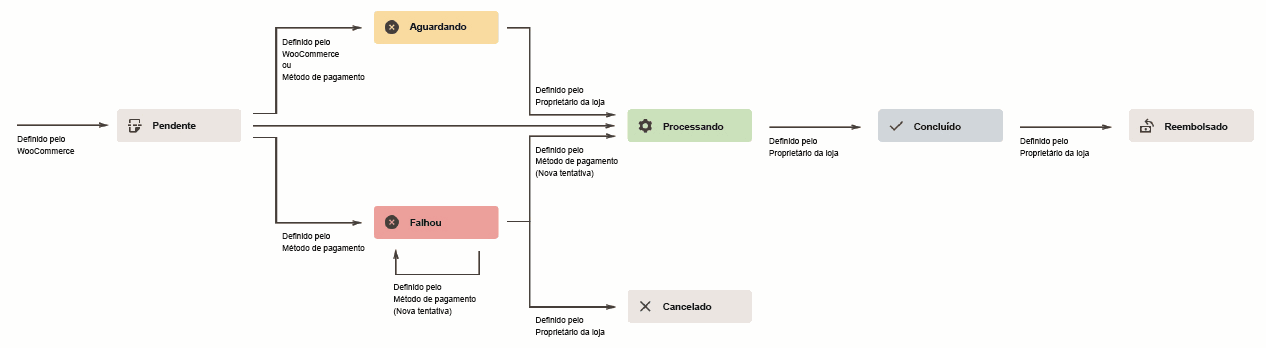
Below, we will detail a little better each of the Request Status on WooCommerce:
1. Payment pending
The order shows the status of “Pending” while awaiting payment completion.
If a request remains “Pending” for long time, usually the client has given up or not completed payment (e.g. a billet or unpaid Pix). It can be cancelled after a deadline.
Pending requests are no cause for concern and that does not mean that the person will be charged twice. But when the user completes payment of an order, the status will soon change to “in processing” before going to “Completed”.
2. Payment refused
One of the frequent reasons for payment refused is the lack of money in the account. In fact, if the balance of the current account has zeroed, and the payment means are debits, it will be refused on the Internet.
Another reason for the refused payment is when credit card data is incorrect.
Another cause for refusal of payment is that some electronic traders do not accept certain types of bank card.
If you own one of these bank cards, your payment will be refused on the website.
3. Waiting
When this status appears it means that the payment is being awaited. That is: the request has been received, but payment is on hold, it has not yet been made. An interesting aspect is that when this happens the product is already reserved in stock for the customer until payment is made.
4. Processing
Processing status appears when payment has been received and stock has already been downloaded; order awaits separation and shipment. All requests for products Physicists pass him. Requests with virtual products only and for download go straight to Done.
If the payment has been successful and the order does not contain digital products or for download, the order will be defined as “Processing”.
5. Done
This is when the request was completed and does not require any further action.
6. Cancelled
The order was cancelled either by the client or by the store administrator. When this happens the stock is increased and no additional action is required.
7. Refunded
This Status is when the client is reimbursed by the administrator. So no further action is needed.
How to Change a Order Status in WooCommerce?
The order data panel allows you to manually modify the order status, display (or change) the customer request note and change which user the order is assigned.
Order status is coded by color and descriptive:
- Cancelled: grey
- Finished: blue
- Failed: red
- Waiting: orange
- Pending payment: grey
- Processing: green
- Reimbursed: grey
If you are using the Post Office and want to automate the status change according to delivery, there are suitable solutions for this like plugin WC Post Status Updater. . With this plugin you keep your customers always informed about each delivery update. Order sent by the Post Office? Automatic email to the customer. Object went out for delivery? Automatically notify the client.
Another interesting plugin to help in this order management is the WooCommerce Order Status Manager which allows you to create, edit and delete custom order status and integrate them perfectly into your WooCommerce order management flow. You can also edit the status of the main order and trigger new order emails based on changes in status.
What's the difference between Processing and Waiting?
The WooCommerce is a plugin developed to manage online stores in a practical and intuitive way.
Its features have been developed to facilitate user navigation. Because it has a similar nomenclature, the status of requests is often confused, causing a problem both for the e-commerce administrator and also for the consumer.
One of the most frequent errors is to confuse the status “processing” and “waiting”. It is never enough to reiterate: when the request is as processing, the payment has already been made and lacks to separate and send the product.
If you're like Waiting That means your request has been received, but the payment is still on hold. In this case, the product is already reserved for customer and will be released as soon as payment is confirmed.
In addition to these 7, recent versions of WooCommerce show the status Draft for orders created in block checkout that have not yet been completed. They don't appear as real orders until the customer completes the purchase.
You want one Virtual store in WooCommerce with this well-configured flow? Ask for a budget.

FREQUENTLY ASKED QUESTIONS
What are the main order statuses in WooCommerce?
WooCommerce has seven main statuses: Pending, Failed Payment, Waiting, Processing, Completed, Cancelled and Refunded. There is also Draft status, used for block checkout requests that have not yet been completed.
What does "Waiting" status mean on WooCommerce?
The status “Waiting” means that the order was received and the stock has already been booked, but the payment still needs to be confirmed, usually by the shopkeeper.
How can I automate the change in order status on WooCommerce?
It is possible to automate the status change using plugins such as WC Post Status Updater, which automatically updates the order status according to delivery steps, or WooCommerce Order Status Manager, which allows you to create and manage custom status.
What is the difference between the status "Processing" and "Completed" in WooCommerce?
The status “Processing” indicates that the payment has been received and the order is being prepared, while the status “Completed” means that the order has been fully processed and requires no further action.

Caio Nogueira is a SEO, GEO, link building and Digital PR expert and co-founder of WebSyd, website creation agency and SEO consulting founded in 2016. It acts with organic search strategies, digital authority construction and brand optimisation for search engines and artificial intelligence platforms. Throughout his trajectory, he participated in more than 1000 projects involving SEO, website development, content marketing and authority acquisition through backlinks and Digital PR. At WebSyd, it participates in the planning of strategies to increase organic visibility, lead generation and presence of companies on Google and AI-based search engines. As an author, it publishes content on SEO, GEO, website creation, link building and digital authority, sharing analyses, strategies and practical experiences related to organic growth of companies. Its contents and contributions have also been published in companies and vehicles of technology and marketing such as Wix, HostGator, Duda, Neil Patel, Locaweb and E-Commerce Brasil.
View all posts


 Estimate the cost

