
SEO Sitelinks: What are they and how to appear in Google search?
Summary (TL;DR)
In our text we explain the importance of Google's websitelinks, which are additional sublinks shown below the main link of a site in the search results.
These links help increase visibility and clicks as they offer direct shortcuts to specific sections of the site, improving user experience.
The presence of sitelinks also signals Google's trust in the site, which can strengthen brand perception and significantly increase click rates.
The text also addresses how to optimise a website to increase the likelihood of Google displaying siteslinks, including having clear browsing and well organized content.
Quick answer: sitelinks are the extra links that Google shows below the main result of a website. You can't activate them manually: Google generates them by itself. What helps is to have a clear structure, descriptive internal menus and links, unique page titles and a brand searched by the name.
The first positions on Google are not as colorful as they seem. It turns out that even if your site is in the first place, it doesn't guarantee that everyone will click on your link! Only about 1/3 of those looking click on it. But when your main link also shows additional links, for example, to product categories, you increase the chances of being clicked. These are Google's weblinks!
Google Websitelinks
At first glance, you can see that Google's websites are simply sub-additional links that appear under the main link of your website. They usually appear when you look for a specific tag or keyword primarily associated with your brand.
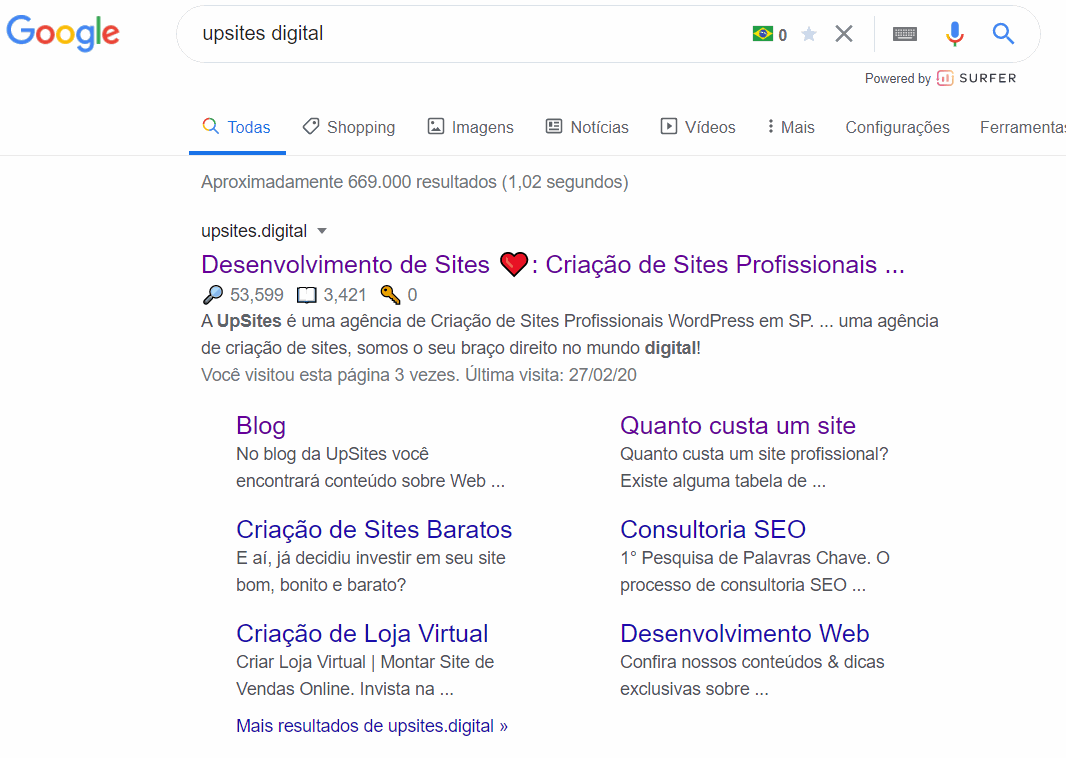
As you can see on the screen above, WebSyd generated six of these weblinks.
The sitelinks complement the title and description shown next to the main link. The client doesn't have to go to the site to see them. It can click directly and go to the subpage on which you are interested.
Not everyone wants to see the home page, many people want to see details, this way you shorten the path for the customer. You save time, search and subsequent clicks.
Not every site has weblinks and this is due to various reasons. But at the same time, it means that the appropriate optimisation, about which you will learn here, allows you to run this option on your website.
But remember: even if you have an optimised website for this, they may not display these links. This happens when Google decides that your links will not be useful to the user.
Why is Google's sitelinks worth using?
I've already mentioned some reasons for using sitelinks. Customers find what they seek most quickly and this is probably the most important reason. However, there are a few more.
1. Higher customer confidence
Just look at the screen below. Google displays sitelinks on the pages you most trust. When a site is less reliable, there are no websites.
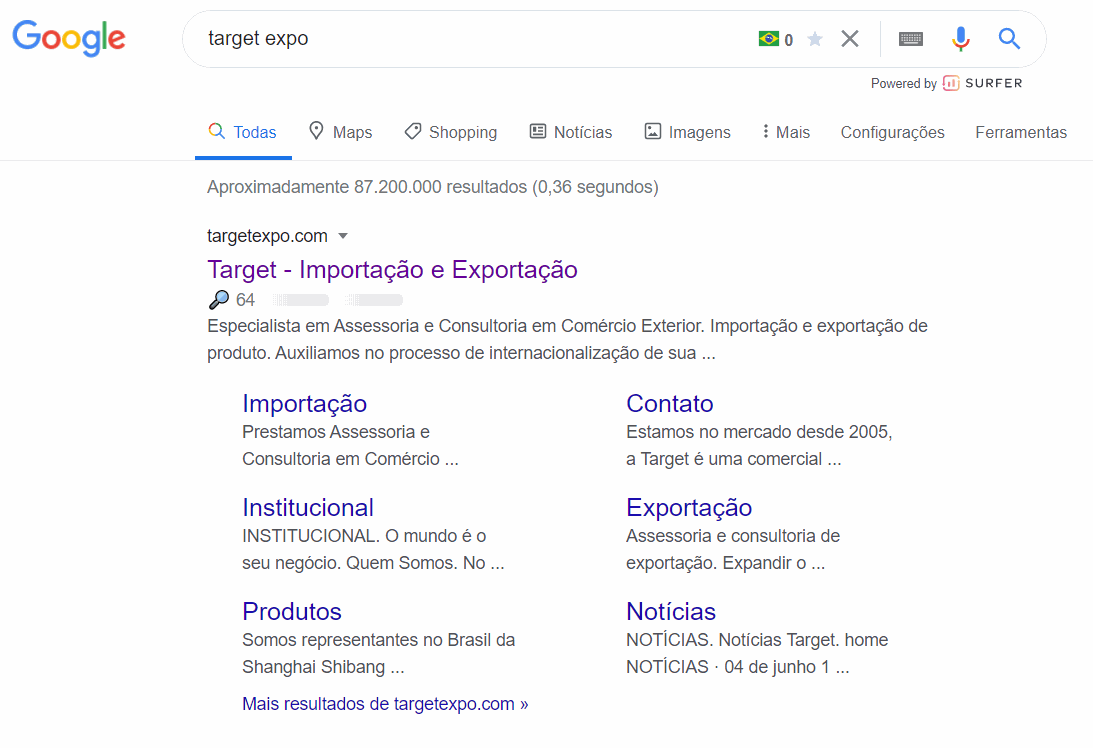
The screen above shows that there is Google's trust in the company of export, because Google offers an entire “screen” for the company. The user must roll the screen to view third party links. And this trust translates into the next topic: the increase in clicks.
2. Click Increase
When the customer does not see an alternative (links to other companies), he focuses more on what Google shows him. And you can see that even more clearly when searching the phone.
Depending on the client's device (phone or computer), approximately 30-35% of people click on the first link. The second position is already 17%, and the third is around 10%. But when you add up a total of 7 links (main link + 6 sitelinks), you get 70-80% clicks! That's twice as much as the first standard place.
And this can directly translate into 2 times more customers, 2 times more sales and 2 times more revenue. The skeptics will probably say it won't be so colorful. But think how much will increase in your case by at least 20 or 30%?
3. You reinforce the message of your brand
Look again at the screen below. See how other website links strengthen the company's message.
The third link in the second column talks about Web development again. The second link in the left column speaks web design Again. Not to mention the gray descriptions that follow each sitelink. 4 out of 6 talk about creating site/Web development.
In one word: choose the subpages for your Sitelinks that will strengthen the message of your brand. . If it's a store, select product groups, but if it's, for example, a blog, it's worth having a guide on the blog or its author on Sitelinks.
How to create Google's website links for your site?
First of all, there is no button that starts the sitelinks for your website or store. Google decides for itself whether to display it or not. You can only prepare your website for the fact that when Google finally wants to display these links, it will be ready for this.
There is also no exact recipe that tells you to click here and there and everything will be ready.
Exclusive page name
You remember the screen that appeared several times above. It's a screen with weblinks to the WebSyd website.
When you insert “creation of websites” into the search engine, WebSyd siteslinks no longer appear. The result appears as follows:
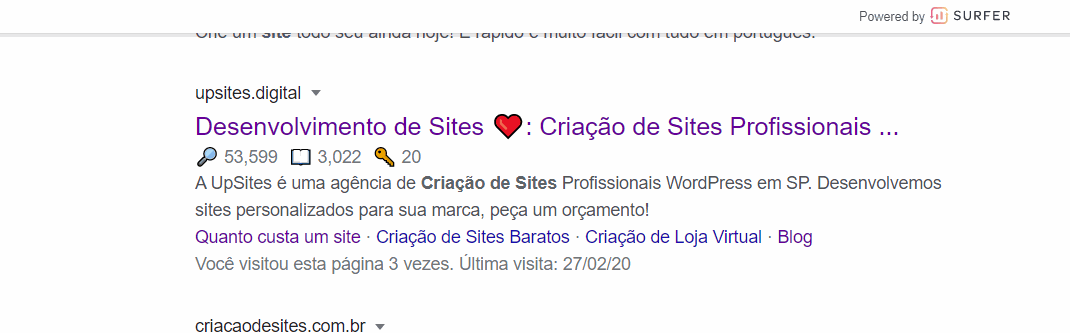
This is called a one-line sitelink. They work very similar to Google's sitelinks placed in two columns. They simply take up less space in the search results list, which obviously makes them less effective.
If Google decides not to show two-column websites next to their score, they will probably show those in a row below. As long as you do all the optimisation I'm talking about right now.
Clear page navigation
This point may seem strange. On the other hand, it is true that some sites have a lot of difficulty for users to navigate through them. How should simple and clear navigation be?
It's better to build it in the form of a tree:
- Whose root will obviously be the home page
- On the home page, there are new branches: about the company, offer, projects, contact, etc.
- These branches grow in smaller branches, for example, from the supply.
The easiest way to present this navigation is by using the call drop-down menu. . Then you pass the cursor over the position “offer” and other items are developed.
It's just... Organize it to be intuitive. Not just for Google, but mostly for the customer. Because it's his positive experiences that can greatly affect his position on Google.
In addition, it is usually the main navigation guides that later lead to Google's displayed sitelinks.
Work well on the blog
Websitelinks take first place on Google. There are some cases of bloggers who first created a YouTube channel and only then create a website. At that point, the Google considers the YouTube channel more “trustworthy”.
Consequently, in the search results, the YouTube channel is the first and the blog is the second. Effect? They don't show off. The blog needs to be further developed so you can get over your trust on YouTube.
The site is worth optimizing!
It is true that you have no guarantee that Google will choose to display sitelinks on your website. But you can do a lot to leave your site ready for that, as soon as Google takes that step!
Thinking about hiring a company to optimise your website? WebSyd is the right choice! Click on the button below and ask for a quote from SEO consulting quickly and practically.
FREQUENTLY ASKED QUESTIONS
What are Google siteslinks?
Sitelinks are sublinks that appear under the main link of a site in Google search results. They offer shortcuts to important pages within the site, such as product categories, and can improve visibility and clicks.
Why are sitelinks important to a website?
Sitelinks increase the chances of clicks on search results, facilitating direct access to site-specific pages. They also indicate that Google trusts this site, which can increase customer confidence and strengthen brand message.
How can I optimise my website to display sitelinks?
To optimise your site for weblinks, it is important to have clear and intuitive browsing, organize content well and ensure that the main pages have unique titles. These elements help Google understand the structure of the site and select the sitelinks.
Do all sites receive Google's websites?
No, not all sites receive websites. Google automatically chooses to display sitelinks based on various criteria, such as the clarity of website browsing and the relevance of pages for users. Adequate optimisation may increase the chances of having sitelinks, but there is no warranty.

Caio Nogueira is a SEO, GEO, link building and Digital PR expert and co-founder of WebSyd, website creation agency and SEO consulting founded in 2016. It acts with organic search strategies, digital authority construction and brand optimisation for search engines and artificial intelligence platforms. Throughout his trajectory, he participated in more than 1000 projects involving SEO, website development, content marketing and authority acquisition through backlinks and Digital PR. At WebSyd, it participates in the planning of strategies to increase organic visibility, lead generation and presence of companies on Google and AI-based search engines. As an author, it publishes content on SEO, GEO, website creation, link building and digital authority, sharing analyses, strategies and practical experiences related to organic growth of companies. Its contents and contributions have also been published in companies and vehicles of technology and marketing such as Wix, HostGator, Duda, Neil Patel, Locaweb and E-Commerce Brasil.
View all posts


 Estimate the cost

