
Landbot Review: Best Chatbot Review of 2026
Summary (TL;DR)
In this article you will learn about chatbots, with special focus on Landbot. The text begins with an introduction to chatbots, highlighting their evolution from ELIZA to current advances in artificial intelligence.
Then the article explains what a Landbot is, a specific chatbot for landing pages, and details its advantages such as 24/7 availability, customer management, cost savings and customer satisfaction.
The article provides a step-by-step guide to creating and configuring a Landbot, emphasizing its ease of use and customisation.
Finally, Landbot's main features are addressed and the importance of integrating it into Google Analytics to monitor its performance.

Quick answer: Landbot is a codeless tool to create chatbots for website and WhatsApp with a visual block editor. It's for picking up leads, qualifying contacts and answering frequently asked questions. It has limited free plan and paid plans; check the current values on the official website before hiring.
Chatbots or chat robots are computer programs that simulate human conversations. They interact with users through instant messaging, artificially imitating human communication patterns. But do you know what Landbot is?
Chatbots have been around since 1960. O First chatbot was ELIZA, developed by MIT professor Joseph Weizenbaum. Today, chatbots play important roles in many sectors.
Thus, as more and more services are digitized, especially in customer service, chatbots are at the forefront.
This was possible due to several advances in artificial intelligence and computational linguistics. But then what would be a Landbot?
This article covers everything you need to know about landbots and how to start your project immediately.
What is a landing page chatbot?
To simplify, bots are mechanisms that can process text communication and combine it with an appropriate element of the available database. Its use is becoming increasingly universal.
In addition, they can offer products directly or advise talking about them. They can automate customer service, answer the most frequently asked questions and help in sales support.
What are the advantages of using a Landbot?
Surely there are many others, but here are the main reasons why you should consider using Landbot!
Sales
1. Landbot Available 24/7
How many of you have been put on hold by a call centre operator? How many couldn't even communicate with the operator?
With the chatbots this does not happen, they can replace not only phone calls but also live chats.
The chatbots They don't get tired. They also respond during vacations, weekends and at dawn.
2. Customer management
We humans are able to do three or four things at the same time. Chatbots can automate the management of thousands of customers at the same time and with 0% chance to miss.
3. Save money on landbot
Reports say that every year there are 265 billion customer requests. Companies have spent nearly $1.3 trillion to meet these requests. Chatbots can help you save up to 30% .
Implementing chatbots is an investment that helps companies optimise customer service costs.
Investing in chatbots saves extra costs of adding more agents.
The hiring of more support agents means additional costs and time.
The costs may be in terms of:
- Wages
- Training
- The infrastructure
You could automate repetitive responses with a chatbot, which will deal with about 97% of requests.
Consequently, you will need a much smaller service team and only to answer more qualified questions.
4. Offer 100% customer satisfaction
How much does the mood of the customer affect?
A bot will always respond with a good attitude and good mood, and with the chat module you can add humor or details to the conversation.
6. Open a new communication and feedback channel
Your customers will have a personal assistant who will guide you during shopping while customers can ask questions about the products. In case of problems, the bot can help them immediately, so there will be less chance for the user to abandon conversion.
This situation can also be explored to open a new communication channel where you can send promotions, coupon codes and ads directed to your “buyer personas”.
7. Analysis
Professional chatbots always have analytics to make real data-based decisions. This way, you will always know how to improve on sales.
Example: KPIs, reports, chat transcripts between client and operator, Chatbot performance analysis, dropout rate etc. ...
8. Training
Training costs can be drastically reduced because artificial intelligence will be connected to your business, via API, and will update with the latest marketing initiatives.
Thus, if a newly hired attendant does not know the answer to a customer's question, he can get a suggestion directly from the bot.
Immediate support
You can create a specific chatbot to address customer support and service issues.
The main advantage offered by chatbots from the point of view of customer service is automation. You can optimise human resources and manage conversations with users in a highly efficient way.
For example, if a potential customer sends a message to the company's Facebook page and no one is connected to serve it, the artificial intelligence chatbot system can offer useful information about the business, such as prices or time, working hours, etc.
You can quickly direct users to appropriate help documents or FAQs depending on what questions they have, increasing agility and saving your client's search time.
Why choose Landbot over a conventional chatbot?
Chatbot is interactive software on a website that supports the customer communication area. He performs the most repetitive and tedious tasks.
Chatbot works well in case of complaint and also increases engagement by building a brand image (entertainment or notification bots).
The Landbot supports the customer until the end of the sales process. The solution significantly simplifies communication between the customer and the store.
This tool contributes to the optimisation of the service process and improvement of purchases. Automating the communication process is not only a cheaper solution, but definitely more convenient for employees and customers.
The Landbot, by collecting information about consumers and knowing the preferences of specific users, can help in purchasing decision making, which in turn translates into customer satisfaction and loyalty.
There are many reasons for using the LandbotBut here are the main ones:
Landbot is easy to use
First, Landbot is easy to install and can be customised for your site quickly.
- Just choose an avatar (which will be the virtual wizard);
- Choose a chat window style
- Set a color.
It's as simple as that. Right below you can check the step by step on how to proceed to set it up effectively.
Personalised conversation experiences
Thanks to the form of conversation that mimics dialogue, you approach personalised and intimate communication with users. In addition, Landbot provides the option to transfer the conversation to a human in real time.
But if for some reason Landbot cannot help the user, he already has the potential customer email address and a team member can contact him later.
Landbot's main resources
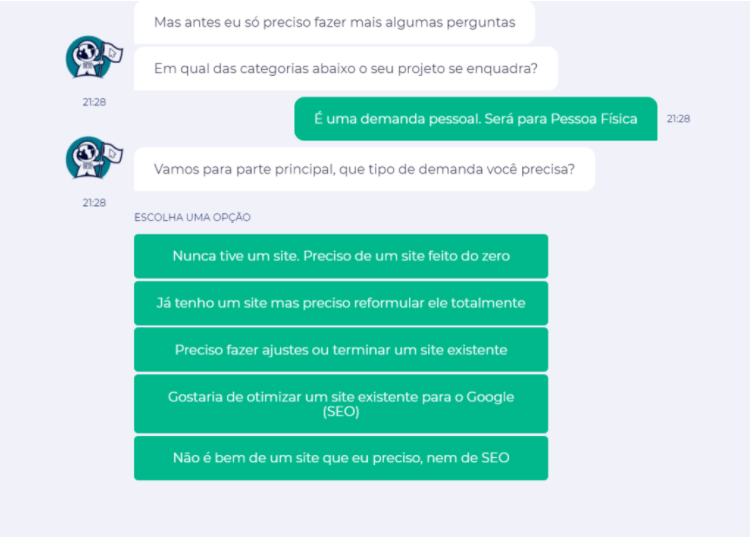
Here at WebSyd we have developed a chatbot to capture leads and to facilitate the sending of budgets.
- Available 24 hours a day, 7 days a week for site visitors
- Immediate help in real time
- Writing is immediately visible
- Developer without code
- Customization through conditional logic
- Calculate and control user responses with formulas
- The bot has connection to any database.
- Multi Languages
- Pre-built models
Now that you know what Landbot is and have an idea of what he can do, it's time to consider how to use it properly.
Create a landing page using a chatbot builder: step-by-step guide
Chatbots can be very valuable to your company, but many owners think it's too expensive and complicated to build one.
Fortunately, this is not the case.
Landbot.io provides a platform to create chatbots without the need for technical knowledge.
Landbot is very easy to use, friendly and intuitive. Very good for new brands and companies with needs of online service.
The platform also has many models to help you get started faster. And the best of all is that you can create professional-looking results. You can experience the service registering on the platform for free.
1. Create your Landbot account
First of all, you need to get register on platform to get an account and access all the data.
You will receive an email confirming the creation of your account. Then you can enter your account and start setting up the bot.
2. Determine the goal of your chatbot and create your workflow
First you have to define which function and central goal the bot should have.
A chatbot can provide support by answering the main customer questions, it can perform a pre-sales job asking important questions and can even increase sales by offering customers the right product.
- Generation of leads and sales
- Loyalty and customer service
- Market research
3. Give your landbot some personality
A bot can take on different personas.
Communication through chatbots is more personal than via email.
Therefore, it is advisable to adapt the language to the environment and target group in which the bot will be integrated.
For example, the bot can speak as a first person digital assistant or third person to represent the company.
It is also worth remembering that language is very important. As Landbot is intended to be a conversational bot, try to use a natural language that also fits your audience and business.
4. Embed your chatbot into your website
The penultimate stage of the process is to incorporate your chatbot into the landing page. Ready! Your chatbot is ready to start converting leads to your business!
5. Integrate your bot with Google Analytics
Finally, it is important that you integrate your Landbot with Google Analytics so you can measure its performance. With this, you will be able to know the number of visits, duration of visits, target audience and more.
Final considerations on Landbot
In short, Landbot offers a unique and affordable way to offer help 24 hours a day, 7 days a week to visitors to your website.
The Landbot.io is a quick and affordable support solution.
This is very useful for growing companies that don't have a budget for a full support team and it's a great complement to websites that receive a large number of visitors who need guidance.
Finally, Landbot’s resources and popularity will continue to grow in the coming years, significantly improving online shopping and customer service.
Thus, companies that anticipate will step forward and be able to offer a differentiated experience for their visitors and customers.
Also read on our blog: Webnode x WordPress – Which is the best?
Would you like to have an optimised and personalised Chatbot on your website? Ask for a quick quote by clicking on the button below!
FREQUENTLY ASKED QUESTIONS
What is a Landbot and how does it differ from a conventional chatbot?
Landbot is a specific type of chatbot designed for landing pages. It differs from conventional chatbots by offering a more personalised and interactive conversational experience, imitating a real human dialogue. In addition, Landbot can collect detailed user information, support up to the end of the sales process and be easily integrated into existing systems.
What are the main advantages of using a Landbot?
The main advantages of using a Landbot include 24/7 availability, allowing it to respond to queries and support at any time of the day. It can also manage multiple customers simultaneously, saving money by reducing the need to hire more support agents. In addition, Landbot can increase customer satisfaction by providing quick and accurate answers and opening new communication channels for promotions and feedback.
How do I set up a Landbot for my company?
Setting up a Landbot is simple and can be done in a few steps. First, create an account on the Landbot.io platform. Then determine the purpose of your chatbot and configure the workflow. Customize the bot with a persona and language that fits your audience. Then incorporate Landbot into your landing page. Finally, integrate the bot with Google Analytics to monitor your performance and adjust as needed.
Is Landbot suitable for companies of all sizes?
Yes, Landbot is suitable for companies of all sizes. For small businesses, it offers an affordable solution to provide customer support without the need for a large service team. For large companies, Landbot can manage a large volume of queries simultaneously, improve customer service efficiency and increase conversions by offering personalised and immediate support.

Caio Nogueira is a SEO, GEO, link building and Digital PR expert and co-founder of WebSyd, website creation agency and SEO consulting founded in 2016. It acts with organic search strategies, digital authority construction and brand optimisation for search engines and artificial intelligence platforms. Throughout his trajectory, he participated in more than 1000 projects involving SEO, website development, content marketing and authority acquisition through backlinks and Digital PR. At WebSyd, it participates in the planning of strategies to increase organic visibility, lead generation and presence of companies on Google and AI-based search engines. As an author, it publishes content on SEO, GEO, website creation, link building and digital authority, sharing analyses, strategies and practical experiences related to organic growth of companies. Its contents and contributions have also been published in companies and vehicles of technology and marketing such as Wix, HostGator, Duda, Neil Patel, Locaweb and E-Commerce Brasil.
View all posts


 Estimate the cost

